I Taught Opus 5.5 to Pick the Right Sub-Agent for Every Job
Last week I put Opus 5.5 in charge of five Haiku 5.5 workers, and together they built a game I’m genuinely proud to share.
That was round two. In round one, Haiku ran the whole show on its own and handed me something… meh.
The full story is in Can Haiku 5.5 Beat Opus 5.5? I Made It Build the Same Game Twice. The short version: Haiku 5.5 makes a poor boss and a very good worker.
And the recipe? One line in the prompt:
Use ONLY haiku 5.5 for the sub agent.
It worked beautifully. On a game.
(Hold on to those last three words. They’re about to cause trouble.)
.
.
.
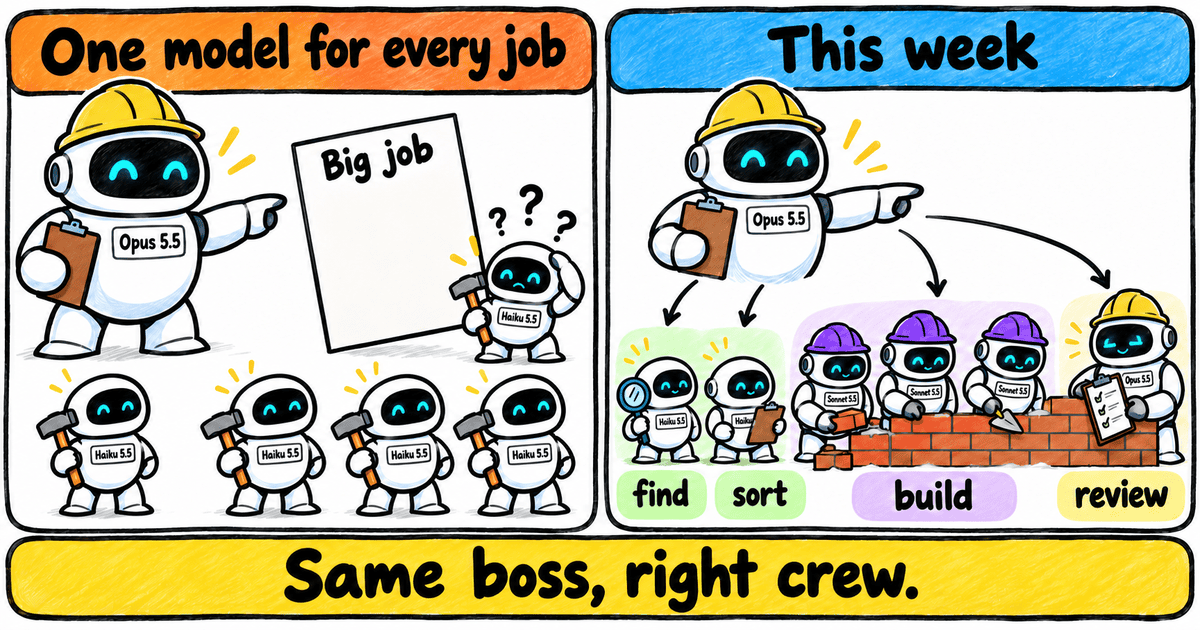
Last Week’s Boss Gave Every Job to the Same Worker
A game splits neatly into five slices, one per worker, with Opus reviewing everything until it’s good. As real work goes, that’s about as tidy as it gets.
My real projects are messier. (Much messier. Ask my git history.)
In a single hour I might need a quick code search, a feature build, a security review and a written report. Four very different jobs.
Opus is overkill for the quick search. Put Haiku on the security review and it’s out of its depth. And most of the everyday building in between? That’s Sonnet’s sweet spot.
Run everything on one model and either the expensive one chews through your weekly usage on errands, or the cheap one lowers the bar where it matters.
(Hello again, meh.)
Then there’s the sneaky part.
When you spawn Claude Code’s built-in sub-agents without naming a model, they quietly use the main session’s model. The skill I’m about to show you spells out what that means under an Opus boss: “every task silently runs on Opus”.
I found out the hard way.
My weekly bar was climbing faster than the work justified, and when I finally looked, Opus was the one running my little file searches. (Picture hiring a master carpenter and sending them out for nails. All day. At master-carpenter rates.)
So who should decide which model does which job?
The boss. Once you teach it how.
This post shows how I turn my main session into a Claude Code orchestrator that picks the right model and effort for every task, then checks the work before it lands. It’s free, and you can run it today — but first, let’s meet the crew.
.
.
.
Every Job Has a Right-Sized Model
Remember the building site from last week’s post?
A good site runs on a foreman who plans the job and inspects the work, with skilled builders doing most of the building and a fast apprentice running the errands. Nobody hands the apprentice the blueprints, and nobody asks the foreman to sweep up.
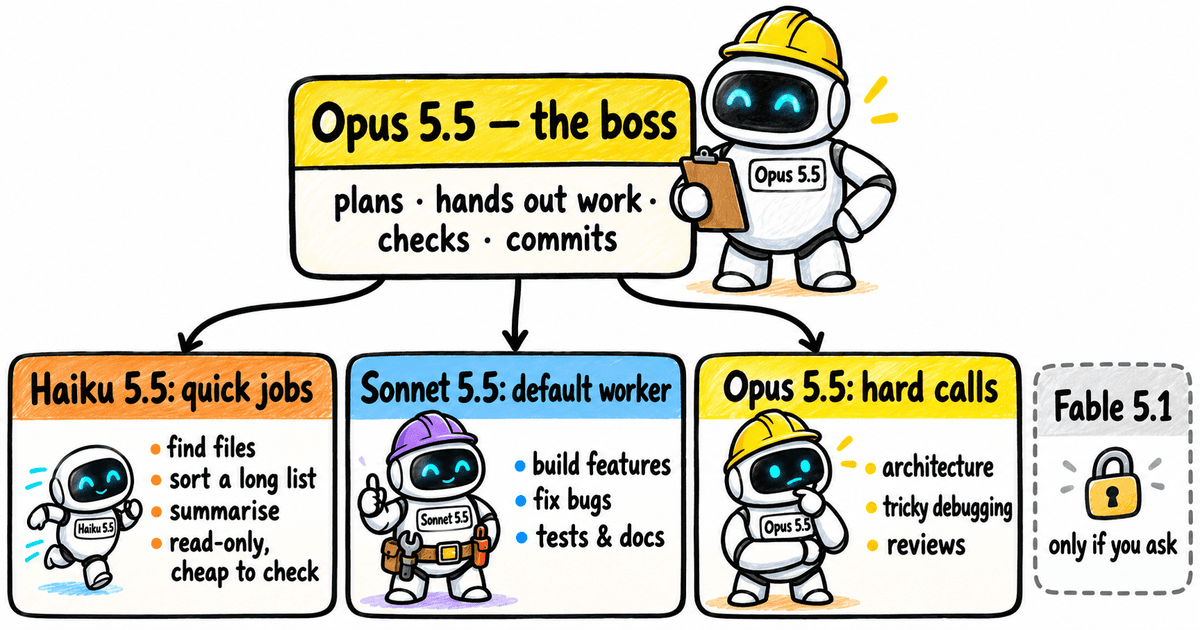
Your Claude Code crew works the same way. Here’s how I rank the models:
| Model | Cost (higher = cheaper) | Intelligence | Taste | Speed | Use for |
|---|---|---|---|---|---|
| Haiku 5.5 | 9 | 4 | 4 | 10 | narrow read-only or mechanical jobs, triage (through the gate) |
| Sonnet 5.5 | 6 | 7 | 7 | 8 | default worker: scoped building, bug fixes, docs, tests |
| Opus 5.5 | 4 | 8 | 8 | 6 | the boss; architecture, hard debugging, reviews, user-facing quality |
| Fable 5.1 | — | — | — | — | opt-in only |
Scores are my own judgement, used to rank the models for routing. Higher is better; for cost, higher means cheaper.
Now, the Haiku question. I know last week’s readers are already asking it. (I can practically hear the keyboards from here.)
Last week’s table gave Haiku the building too, and that worked on a game.
On a real codebase, the skill hands building to Sonnet and keeps Haiku on jobs like finding where a feature lives in the code, or cutting a long list of issues down to a shortlist.
Why so careful with the little one? Haiku is the weakest of the three at long, multi-step coding. So the skill only hands it work whose output is cheap to check — say, a list of file locations you can verify in a minute — and even then the boss spot-checks it.
Think of it as the apprentice’s first week on site. Plenty of fetching and measuring, and somebody always glances at the tape measure afterwards.
The skill calls this the Haiku gate. Every one of these has to hold:
- Read-only or mechanical work
- One clear objective
- Output that’s cheap to check
- Nothing that involves writing code, design work or reviews
- A fixed budget and a short job
And the line that sums up the gate: “Haiku never edits repo files.” (Blunt. I love it.)
On top of the gate sits a pattern the skill calls triage-then-verify: Haiku sorts a big pile into a shortlist, and Sonnet or Opus confirms what’s on it. It works like a mailroom: someone quick sorts the post, and someone senior reads whatever actually matters.
What about Fable 5.1?
It sits behind a locked door, and runs only when you ask for it by name, or when Opus misses the same task twice and you say yes. In the skill’s words: “Opus is close to Fable on most work at a much lower price.”
(Which is a polite way of saying: keep your wallet in your pocket.)
.
.
.
Meet the Orchestrate Skill
I built this skill weeks ago for my own private repos, and it’s been the boss on my projects ever since. Now it lives in CloudPlay, so anyone can use it.
The skill opens with its job description:
“You are the orchestrator. You plan, route, brief, monitor, integrate and commit. Sub-agents do the work.”
That’s the whole idea of a Claude Code orchestrator in three short sentences. (Most job ads take a full page to say less.)
With CloudPlay‘s setup, the boss loads the skill for every request except tiny ones, like a quick lookup or a one-line edit. It’s tuned for an Opus 5.5 boss and works in Claude Code only, in cloud and local sessions alike.
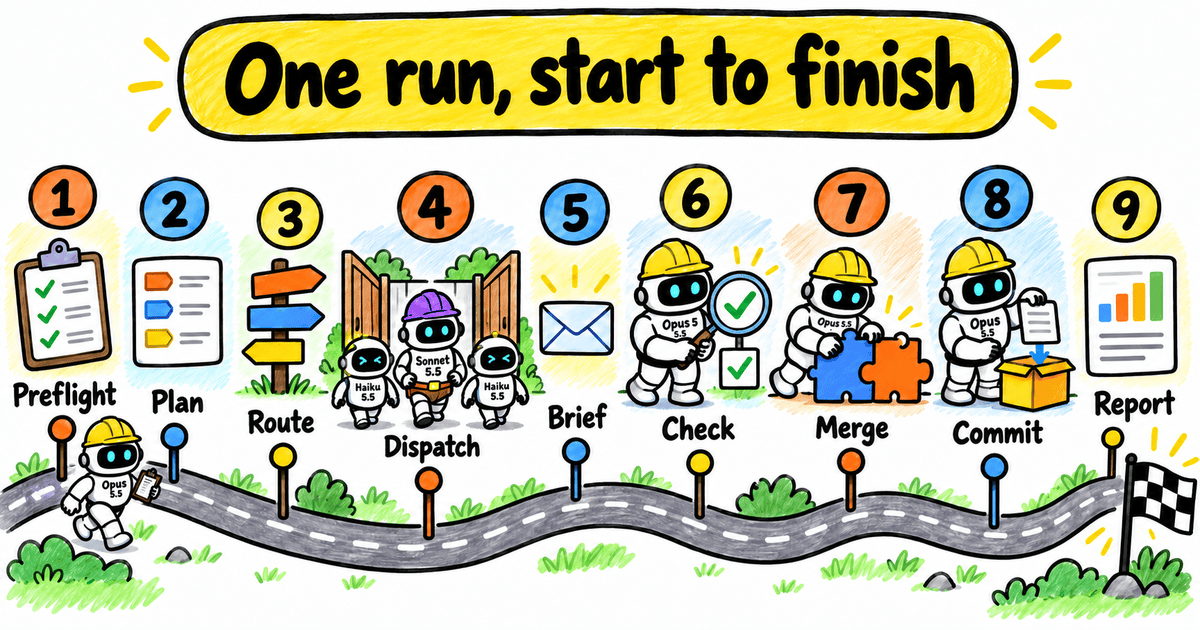
Here’s one run, start to finish:
- Preflight: checks the branch and settings
- Plan: writes the task list, each task labelled
- Route: picks model and effort per task
- Dispatch: sends work out in waves, five at most
- Brief: gives every worker a full written brief
- Check: verifies each result itself
- Merge: copies changes back, one at a time
- Commit: writes a handoff, pushes only the feature branch
- Report: shows what actually ran, and how it was checked
Two habits jump out the first time you watch it work.
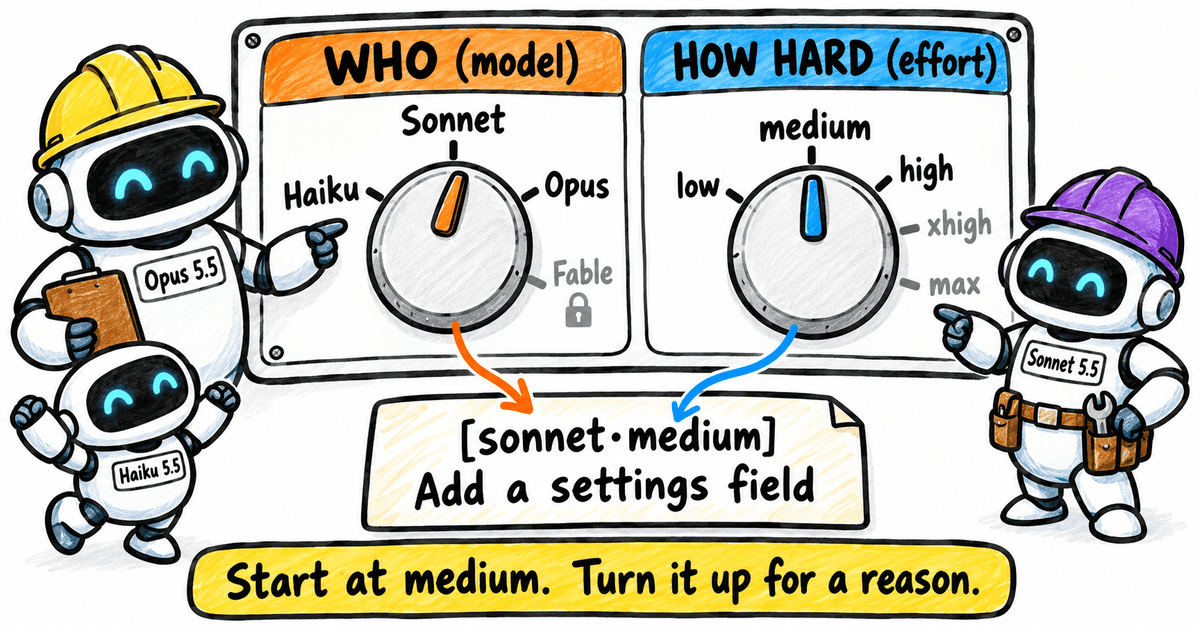
The first is the labels. Every task in the plan carries its route right at the front, like [sonnet·medium] or [opus·high], so one glance tells you who’s doing the job and how hard they’re thinking. (Like name tags at a conference, if the name tags also listed how much coffee everyone had.)
The second is the briefs. I learned this one by sending a worker a single sentence once. It came back with a tidy, confident answer to a question I never asked.
The skill is firm about why every brief gets written out in full:
“Never send a one-liner: the worker has none of your context.”
Honestly, that’s advice I should follow with humans too.
Enough theory. Let me show you a real run.
.
.
.
A Real Run, Caught Mid-Way
This task list comes from one of my own projects, captured in the middle of the implementation.
(Mid-run screenshots are the honest ones. Nobody has tidied up for the camera yet.)
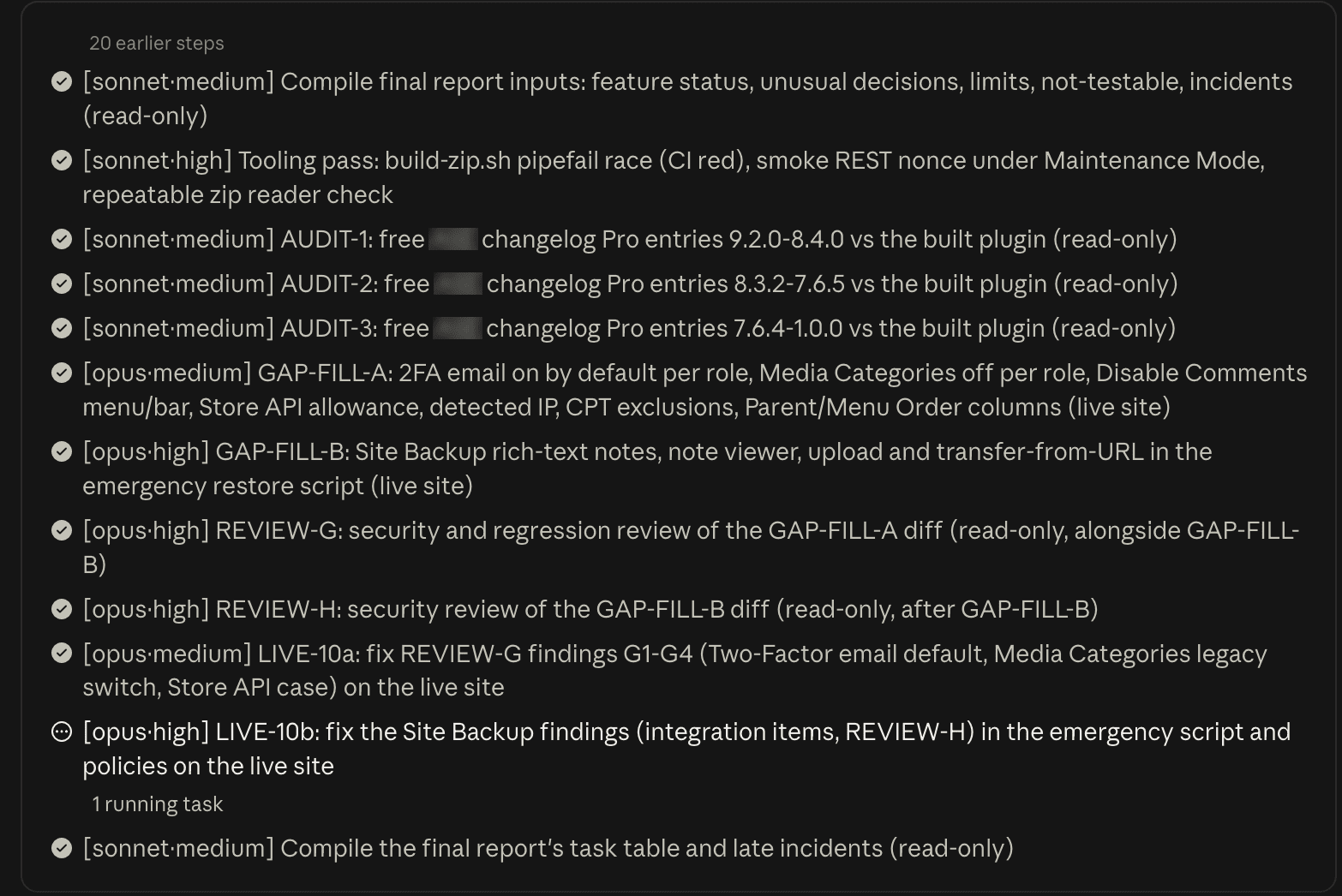
The 20 steps collapsed at the top were the main build. What you see is the later stretch, where the boss checks the build against what it promised and fills the gaps.
Look at the quiet jobs first. Compiling the report inputs and three audits all ran on Sonnet at medium effort, each one marked read-only. A tricky tooling fix went to Sonnet too, at high effort.
The audits turned up missing features, so the boss added two gap-filling builds to the list and sent both to Opus, one at medium effort and the harder one at high.
Wait. Isn’t Sonnet the default builder?
It is, for scoped work.
My read is that these builds were a different animal: they touched a live test site and many features at once. The skill sends that kind of sprawling, edge-case-heavy job to Opus. (Sonnet is a fine builder. For a renovation with the family still living in the house, though, you call in your most senior hands.)
Now look at what happened after each build.
Each one got its own Opus security review at high effort. The first review ran alongside the next build, since a review only reads. When the reviews came back with findings, the boss added a fix task for each, and those went to Opus too.
Here’s the thing that makes me trust the result: the task list keeps growing as the checks come back. (A to-do list that grows by itself would normally fill me with dread. Here, it’s the best sign in the room.)
One more thing caught my eye: those three audits were read-only, so why not Haiku? My read is that comparing a changelog against a built plugin takes judgement, and a judgement call takes real effort to check, which fails the Haiku gate.
Which brings us to the second dial on every task: effort.
The model decides who does the job. Effort decides how long that worker thinks before it acts. The skill’s rules:
- Start at medium, for all three models
- Quick, single-lookup Haiku jobs drop to low
- Raise to high for reviews, architecture and tricky debugging
- The two levels above high “are not defaults anywhere”
The boss turns effort up only for a reason. That tooling fix was a timing bug in a build script (two steps racing each other to the finish), which is exactly the kind of tricky bug that earns Sonnet a step up to high.
.
.
.
Five Workers, One Clean Branch
So far we’ve got the right worker and the right effort for each job.
Now for the rails. Five workers changing one project at once sounds like a recipe for shenanigans. (If you’ve ever shared a spreadsheet with four colleagues on deadline day, you know exactly how that ends.)
The skill’s answer is separate desks.
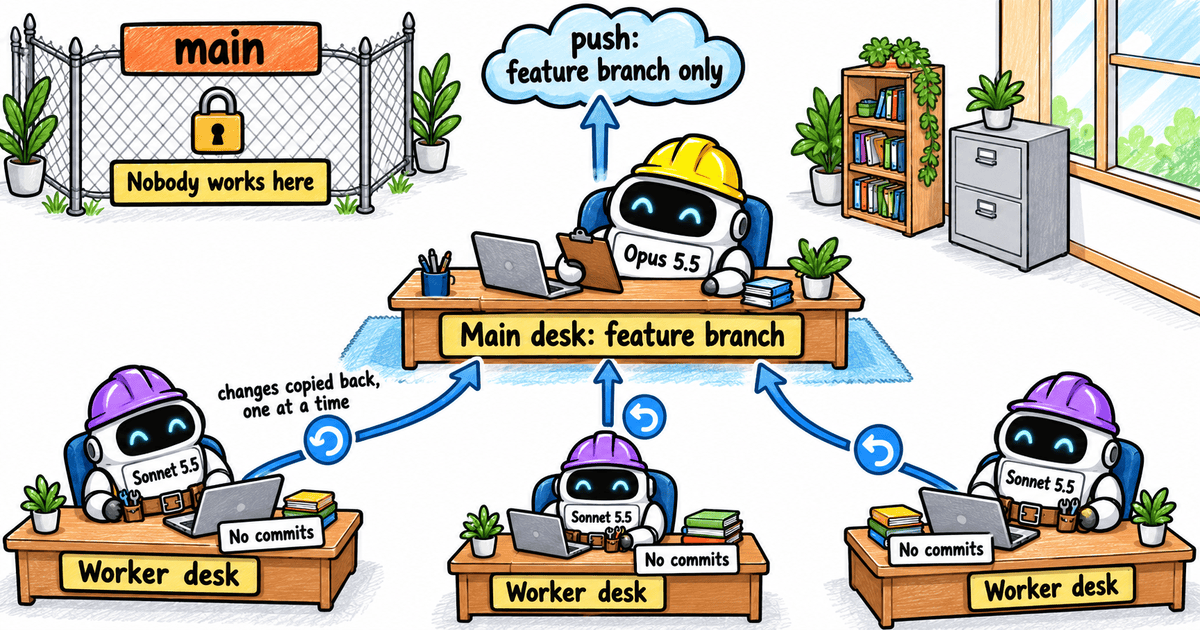
Up to five workers run at once, and the ones that write at the same time each get their own desk: a separate copy of the project, called a git worktree. (If worktrees are new to you, I walked through them in How I Vibe Code With 3 AI Agents Using Git Worktrees (Without Breaking Anything).)
When a worker finishes, the boss copies its changes back to the main desk, one worker at a time, and checks each one there. It keeps an undo for every copy, so a bad batch can be rolled straight back.
If two workers touched the same lines, the boss settles it itself.
It’s the one holding the decisions, after all.
Then come the branch rules, and they’re strict. (Good. Strict is exactly what I want here.)
A run never touches your main branch. It works on a feature branch and pushes only that branch. Workers never commit either.
Only the boss commits, and every commit carries a handoff doc: a save point that lets the next session pick up exactly where this one stopped. The boss writes it with the skill from Stop Losing Work When You Compact Claude Code (The Handoff-Doc Skill), and the hooks that enforce it come up again in the CloudPlay section.
.
.
.
When a Worker Misses the Bar
Here’s my favourite line in the whole skill. If I could frame one sentence and hang it over my desk, it would be this one:
A worker’s “done” is a claim. Verify it yourself before marking a task completed.
I’ve had a worker tell me everything passed when the checks had never actually run. Since then, I trust the boss’s check more than the worker’s word.
So the boss runs the check itself before it ticks a task off. On top of that, every Haiku result gets a spot-check.
And when the work comes back wrong?
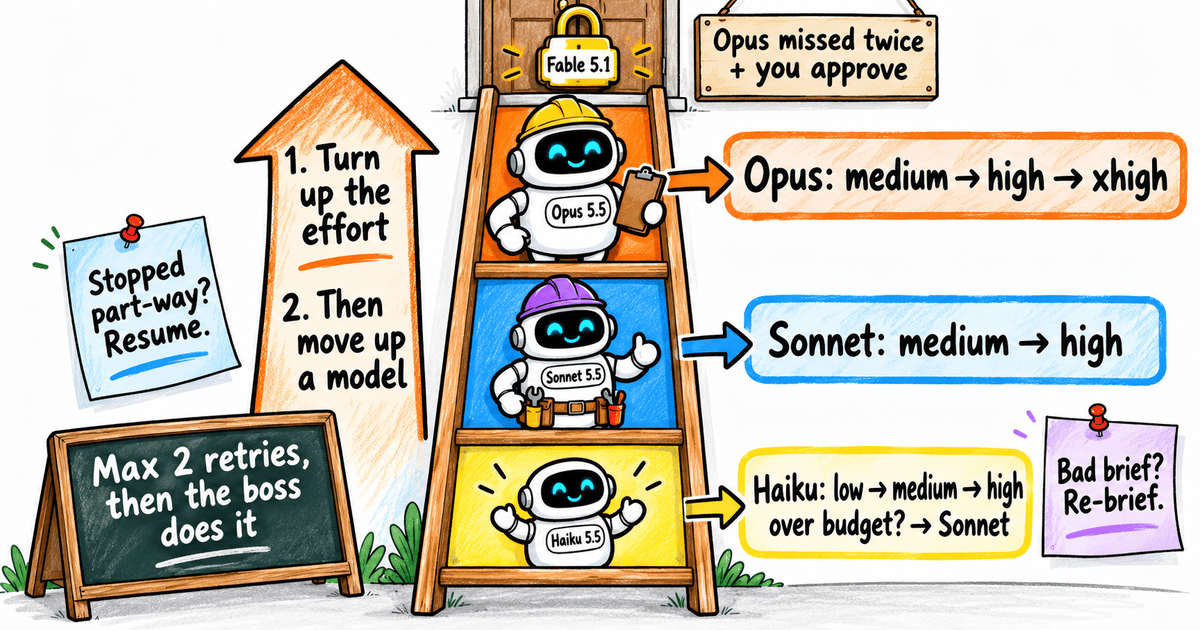
The skill has a ladder, and the right rung depends on what went wrong:
- Stopped part-way: resume the same worker where it left off
- Wrong or off-scope (the brief was the problem): re-brief a fresh worker
- The model fell short: turn the effort up one step, else move up one model
- Haiku over budget or erroring: straight to Sonnet
- Two delegated retries used up: the boss does the job itself
- Opus missed twice: the boss asks you about Fable
Fable only shows up at the very top, behind a door you have to open yourself.
When the run ends, the report shows exactly what ran, including any climb up the ladder. Anything that failed or stayed unverified goes in it too, stated up front. In the skill’s words: “say so plainly, never bury it.” (Bad news delivered early is a gift. The skill seems to know that.)
And for fans of my hands-off prompts (“build the game without asking me any questions at all”), there’s a no-ask mode: the boss makes the calls itself and lists every one in the report, with Fable kept out and the hard rules still on.
(Guilty. I’m the biggest fan.)
.
.
.
Get It Running With CloudPlay
Ready to try it yourself? Good, because this is the easy bit.
CloudPlay is built for Claude Code on the web, the cloud version of Claude Code at claude.ai/code. I introduced it in Can Sonnet 5.5 Really Build a Full Game From One Prompt? I Tested It., where one prompt before bed turned into a playable game by morning.
A cloud session normally starts empty, like a rented flat with nothing but the light bulbs.
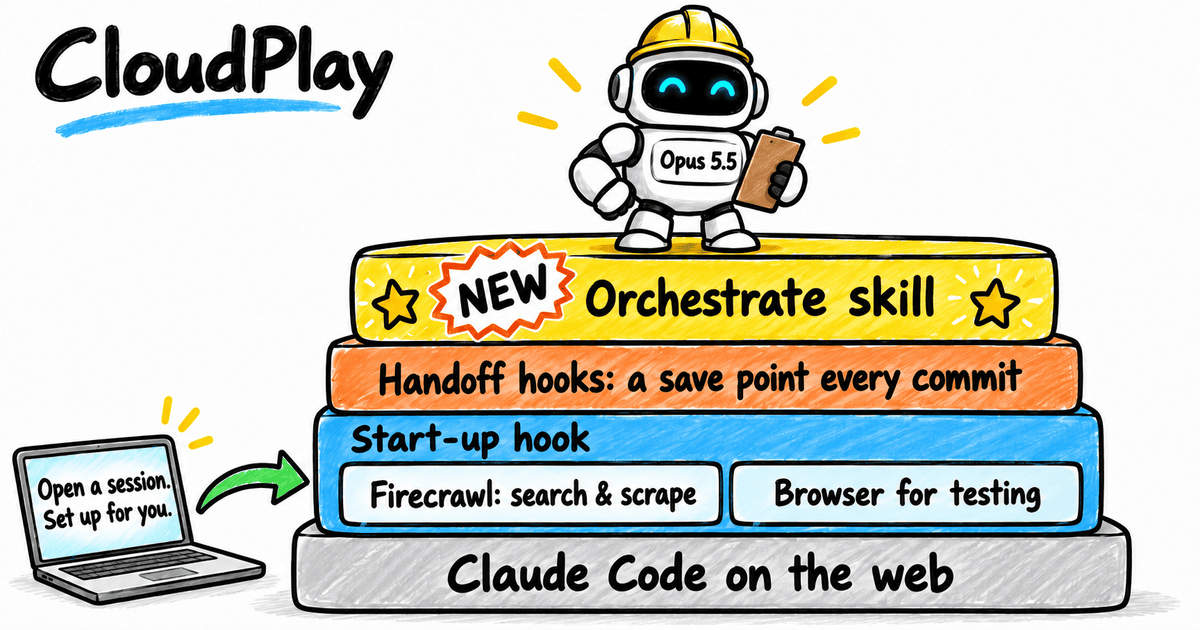
Pick CloudPlay as the repo and every session opens with my tools already in place: a self-hosted Firecrawl for web search and scraping (no API keys needed), a browser so Claude can check its own work, and the handoff hooks from I Burned 40% of My Max 20x Week Overnight. Here’s How I Fixed My Claude Code Cloud Setup. The orchestrate skill is the newest addition, so every cloud session now comes with a boss that knows how to route its crew.
Here’s how to get going:
- Fork or clone CloudPlay and build your project on it. The skill and its settings are already in place.
- Open the repo in Claude Code on the web and pick a cloud environment with network access. Mine runs on Full Access, since the first start pulls in Firecrawl and the browser.
- Give the first session a minute or two to set itself up.
- Hand the boss a big job and close the laptop.
Step 4 is the best part. (It’s also the hardest, if you’re the type who keeps peeking at the progress.)
If you want a Claude Code orchestrator in your own cloud projects this week, that’s the quickest way to get one.
Already have a project? The README’s Orchestration (optional) section shows how to add the pieces to your own repo. One tip from it is worth knowing: commit the worktree setting. Cloud sessions only read settings you’ve committed, and without this one your writers take turns, one at a time. (Five workers in a single-file queue. Exactly as slow as it sounds.)
Like the rest of CloudPlay, it’s MIT-licensed.
.
.
.
Your Turn: Give Your Boss a Proper Crew
Last week, Haiku found its job: working under a strong boss.
This week, the boss learned to give every worker a job that fits. The whole building site, finally staffed properly.
I run this setup on my own projects, but I have no usage numbers to show for it yet. (Very scientific, I know.) So try it on your own work and keep one eye on your weekly bar.
Here’s your challenge: give a CloudPlay cloud session a real multi-step request, then look at the labels in the task list.
Would you have routed any of those tasks differently? That’s the part I most want to hear about. (Arguing with the boss is half the fun.)
👉 Start your next project from CloudPlay (or copy the skill in) and reply with the first plan your boss writes.
Haiku finally has a job. Now so does everyone else on the crew.

Leave a Comment