The Orchestrate Skill: Teach Opus or Fable to Run a Team of Agents in Any Repo
“Wait… didn’t you write about this before?”
Yes. Three weeks ago, in I Taught Opus 5.5 to Pick the Right Sub-Agent for Every Job.
That post introduced the orchestrate skill: a boss model that plans the work, hands each task to the right sub-agent and checks the result before it lands.
There was one catch. That version needed CloudPlay’s setup.
On a fresh cloud checkout, that setup fits like a glove. In a repo on your laptop, it’s a tuxedo at a plumbing job. Your half-finished edits are lying around, you’re on whatever branch you left open, and you’d rather nothing got pushed yet.
(My laptop repos are rarely tidy. I suspect yours are the same.)
So here’s the news.
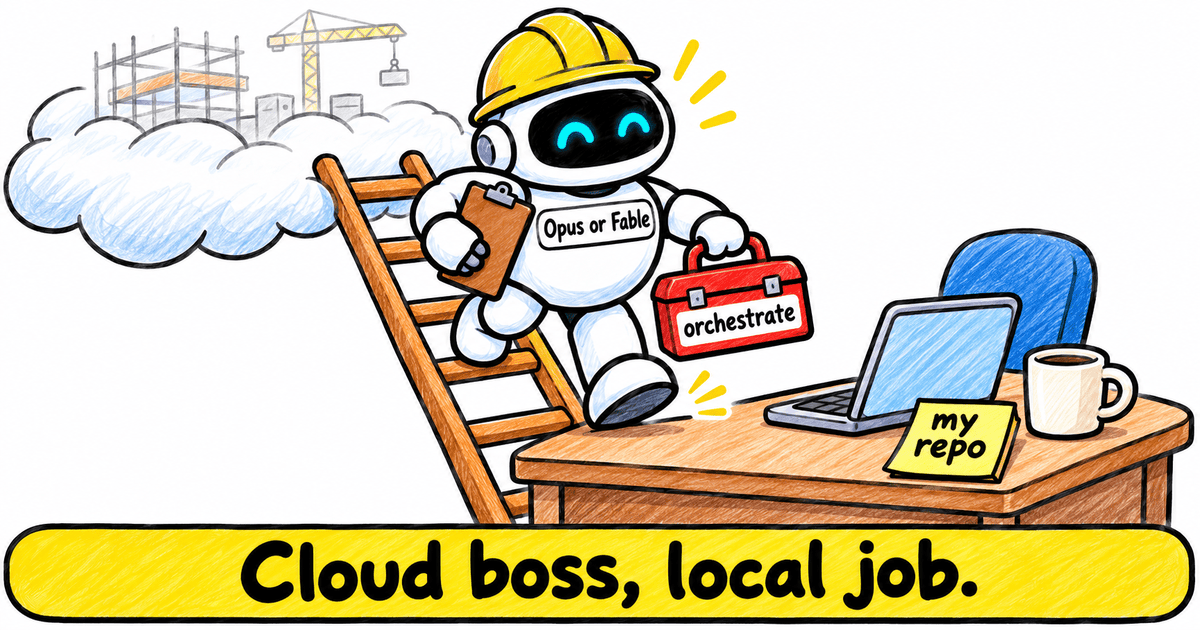
There’s now a standalone version: a local Claude Code orchestrator for any repo on your own machine. The skill has also picked up a few new habits since October, and one of them is my new favourite. (More on that later.)
By the end of this post, you’ll know what changes on your machine, how each member of the crew is dialled, and how to install it in two commands.
.
.
.
A Quick Recap: The Boss and the Crew
Missed October? Here’s the short version.
The skill runs your Claude Code session like a building site. The boss plans the job, hands out the work and inspects every result, and it’s whichever model your session runs, Opus or Fable. Sonnet is the skilled builder. Haiku is the fast apprentice who runs the errands.
Every task in the plan carries its route right at the front, like [sonnet·medium]. One glance tells you who’s on the job and how hard they’re thinking.
And the line that holds it all together:
“A worker’s ‘done’ is a claim.”
So the boss checks the work itself before it ticks anything off. For the full story (model rankings, escalation ladder and all), head back to the October post.
.
.
.
What Changes When the Boss Works on Your Machine
So what changes when you run a local Claude Code orchestrator instead of the CloudPlay one?
Here’s the side-by-side:
| CloudPlay version (Oct 23) | Local version (new) | |
|---|---|---|
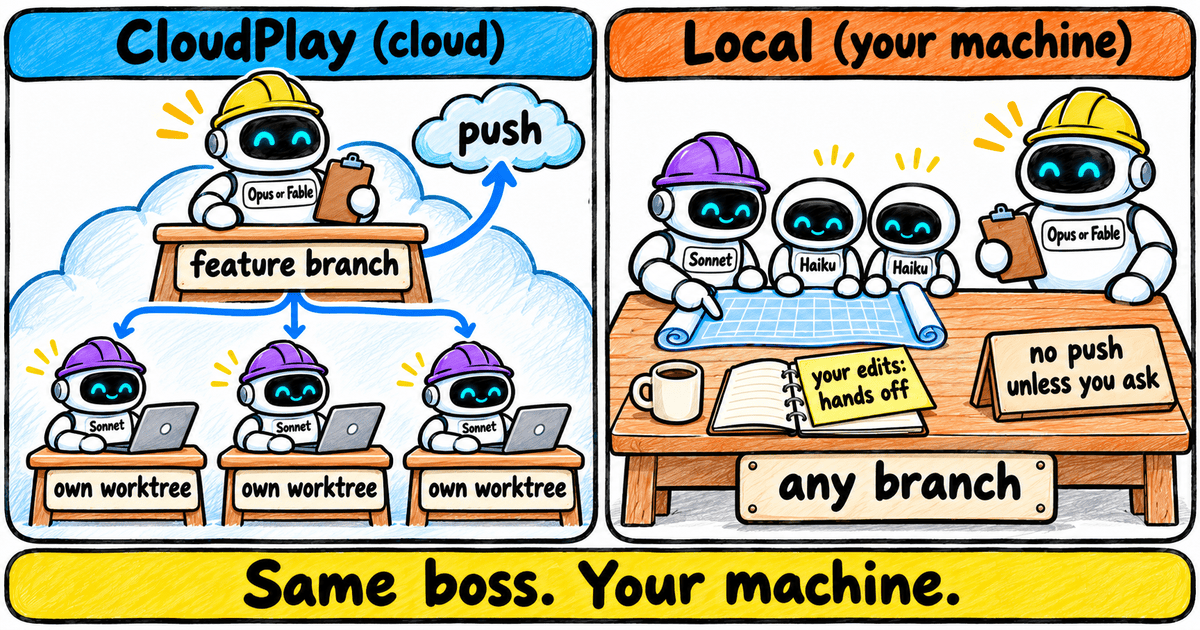
| Branch | Moves to a feature branch first | Works on whatever branch you’re on |
| Your own uncommitted edits | Not a concern (fresh cloud checkout) | Left out of every commit, listed at the end |
| Push | Pushes at the end | Never pushes unless you ask |
| When it loads | For almost every request | When you ask for it (“orchestrate this”, “use sub-agents”) |
Here’s what that means in practice:
- Your half-finished edits stay yours. On a laptop, this is the change that matters most. (I once found my scratch notes file sitting in an agent’s commit, right next to the feature it built.) Before the crew starts, the boss spots files you’d already changed, asks whether to include them in its commits and recommends leaving them out. Its final report lists them as left alone. Picture the foreman sticking a “hands off” note on your coffee mug and notebook.
- One builder at a time. Scouts can read the blueprints alongside, but anyone who changes files takes a turn at the main workbench, so nothing collides or needs merging back. It’s a little slower, since builders queue. Want parallel builders? Ask for worktrees, which I walked through in How I Vibe Code With 3 AI Agents Using Git Worktrees (Without Breaking Anything).
- Nothing gets pushed unless you say so. The boss commits its own work on your current branch, and the push stays your call. Ask for one, and it pushes the branch you’re on.
- It waits to be asked. The local version wakes up when you say “orchestrate this” or “use sub-agents”, so a quick question still gets a quick answer.
CloudPlay stays right where it was. It’s still the way in for Claude Code on the web, where a fresh checkout and a feature branch make perfect sense.
Everything else carries over from October: the routing, the labels and the escalation ladder.
.
.
.
Every Role Gets Its Own Dial
You met the two dials in October. The model decides who does the job, and effort decides how long that worker thinks before it acts.
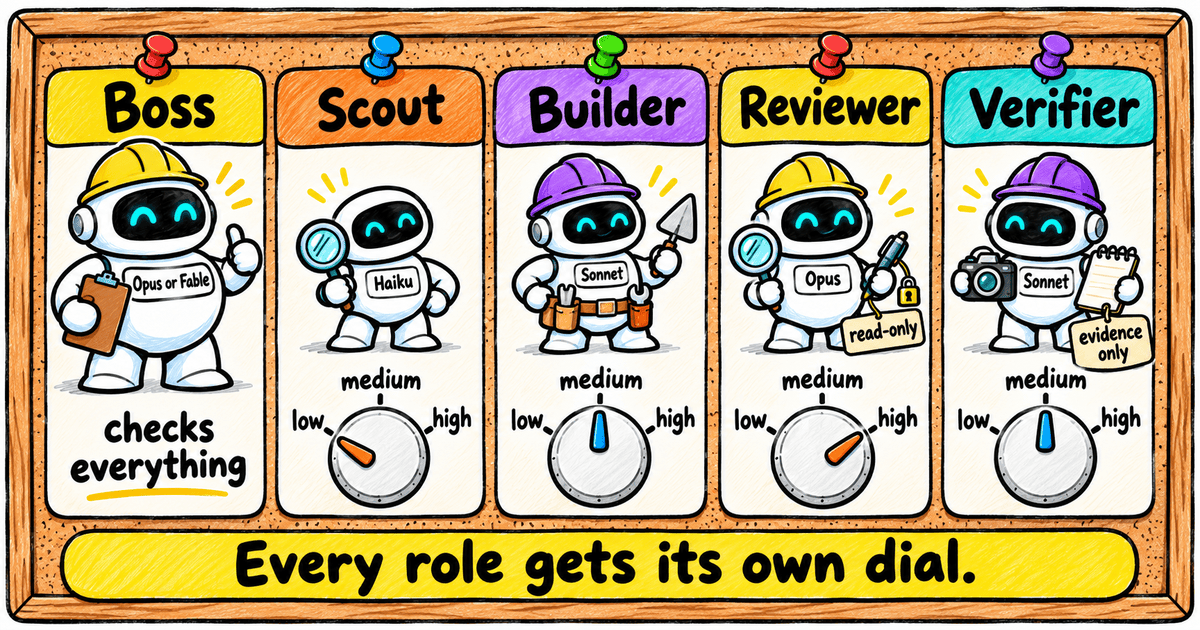
Since then, the crew has picked up named roles. Each role starts with sensible settings on both dials, like where the dials sit when a worker clocks in. The boss can still pick something different for any task.
| Role | What it does | Starts at |
|---|---|---|
| Boss | Plans, hands out work, checks every result | Your session’s model: Opus or Fable |
| Scout | Quick lookups and searches | haiku·low (or haiku·medium when it mustn’t miss) |
| Builder | Features, fixes, tests, docs | sonnet·medium (higher, or Opus, for the hard jobs) |
| Reviewer | Reads the finished change with fresh eyes; read-only | opus·high |
| Verifier | Tries the app and writes down what it saw; gives no verdict | sonnet·medium |
(Boss, Scout and Builder are my own nicknames. Reviewer and Verifier come straight from the skill.)
A few of those starting points are worth a closer look:
- The boss’s chair. Opus is the tuned default. Run Fable as the boss and the skill mentions once that it was tuned on Opus 5.5, then gets on with the job. Fable as a sub-agent stays opt-in.
- Why the reviewer starts highest. Reviews are where deep thinking pays off. The reviewer also arrives with a clean slate, so it judges the finished change on its own merits.
- Why the verifier sits at medium. Its job is to try the app and write down what happened. Judging belongs to the boss, and the skill’s instruction to the verifier is blunt: “Give no pass/fail verdict.” (I do love a worker who knows its lane.)
- Why Haiku stays on errands. I dug into that in Can Haiku 5.5 Beat Opus 5.5? I Made It Build the Same Game Twice.
Now for the habit I promised, my favourite of the lot: knowing which dial to turn.
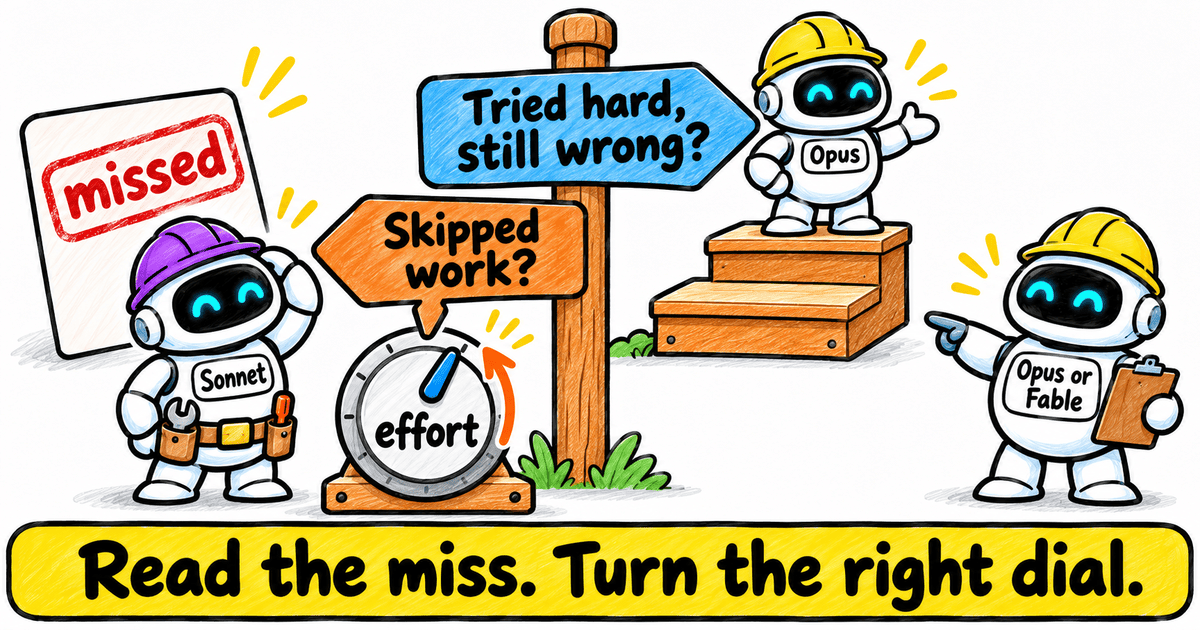
When a worker misses, the boss reads its report and asks one question. What kind of miss was this?
- Did it skip work? Maybe it never opened a file it needed, or never ran the check. Turn effort up a step, so the same worker slows down and does the job properly.
- Did it try hard and still get it wrong? That calls for a more senior hand, so move up a model.
A builder who skipped the spirit level needs to slow down. One who used it and still built a crooked wall needs the foreman’s best bricklayer.
.
.
.
Tighter Checks Before Anything Lands
The boss has also got stricter about what counts as finished.
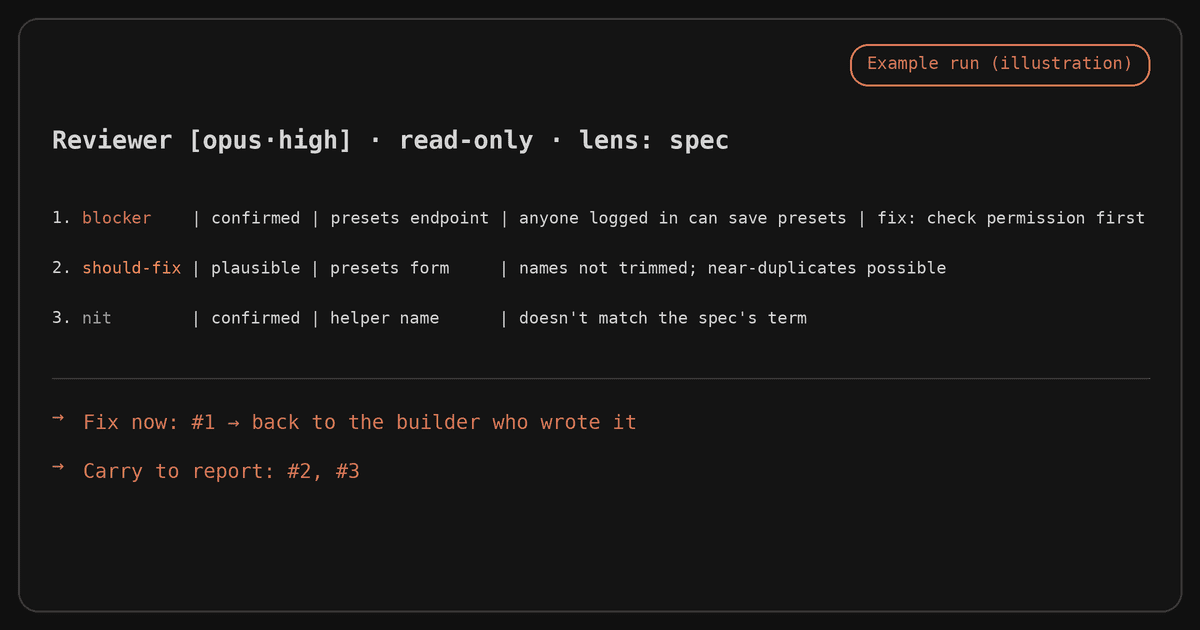
- Every review finding gets graded. The reviewer marks how bad each problem is and how sure it is. The boss fixes the serious, confirmed ones and lists the rest in the report.
- Defects go back to whoever wrote the code. That worker still has the context. Think of the inspector’s snag list going straight to the builder who laid that wall.
- “Could not run” gets said out loud. When a check can’t run, the boss reports the task as unverified. It never quietly swaps in a weaker check and hopes you won’t notice.
That last one is personal. I’ve had a sub-agent tell me the tests passed when they never ran at all. The test command had failed to start.
Credit where it’s due: the reviewer and verifier split, and the finding grades, are adapted from Ray Amjad’s task-lifecycle skill (MIT).
.
.
.
What a Run Looks Like on Your Machine
Time to watch the whole crew on one job. This run uses a made-up presets feature, so you can see every role at work.
The request. You’re in a repo with two of your own files still uncommitted, and you type:
/orchestrate:orchestrate Add a "presets" feature per docs/spec.md. Use sub-agents.
Preflight. First, the boss checks the repo, spots your two files and asks what to do with them.
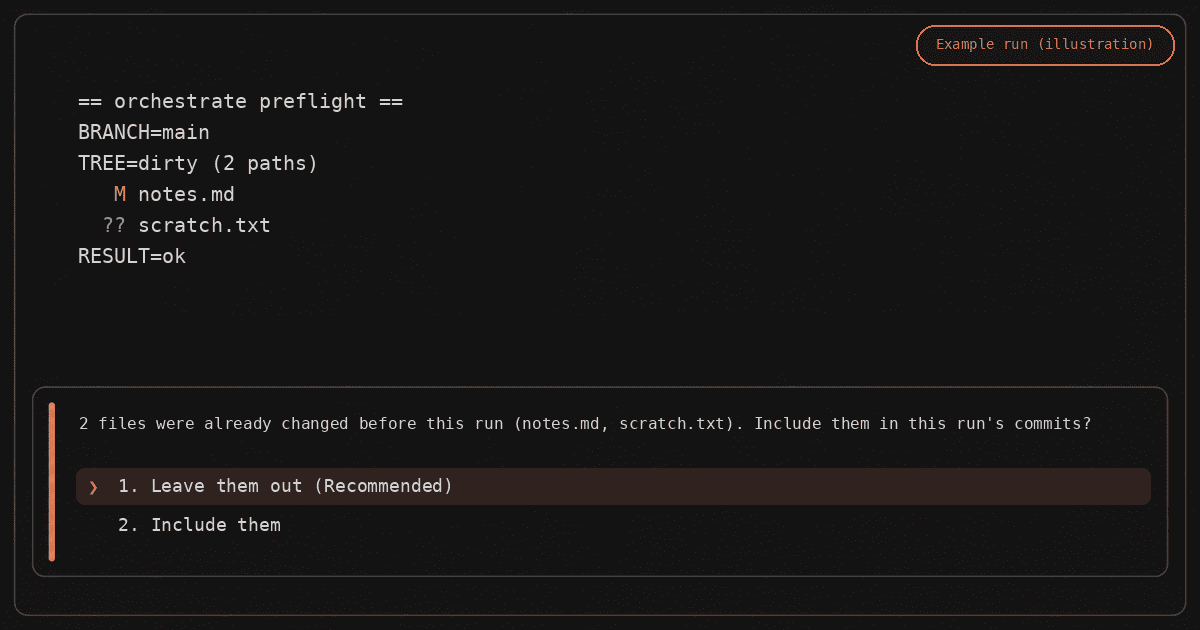
Leave them out is the recommended answer, and the one I’d pick. (Ask me how I know.)
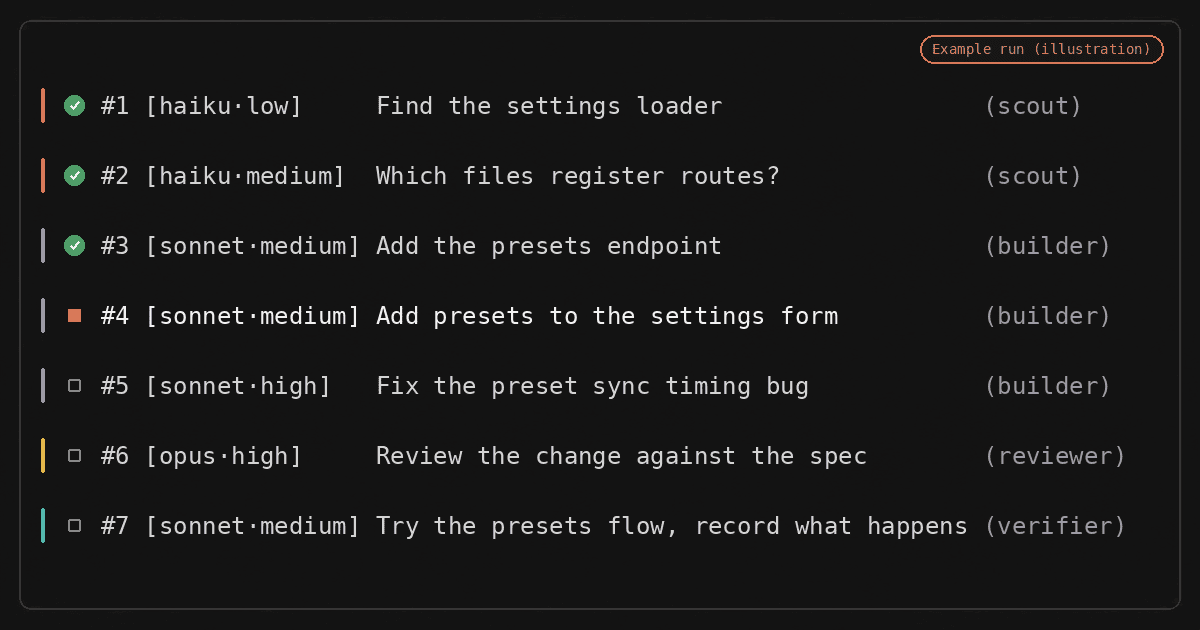
The plan. Next comes the task list: seven labelled tasks covering every role. Scouts go first, then the builders take turns at the bench. The tricky timing bug gets Sonnet at high effort, the review runs on Opus at high, and the verifier goes last.
The report. When the dust settles, the boss commits only the run’s own files on your current branch and pushes nothing. The report shows which model ran each task, how each one was checked, and your two files, left exactly where you put them.
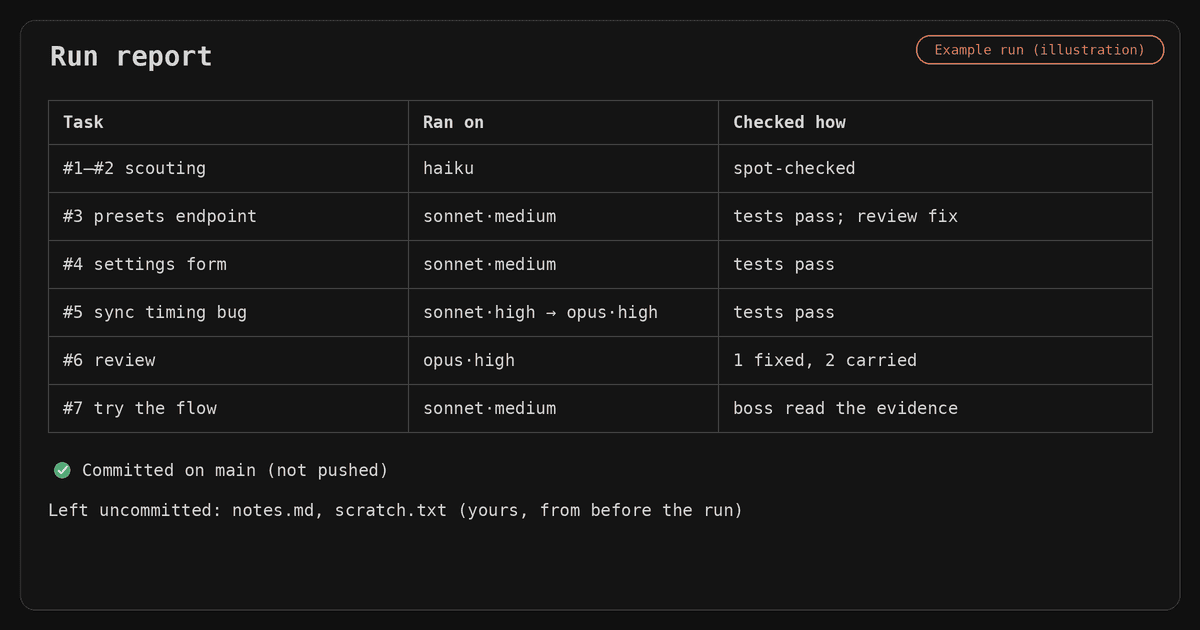
Spot task five? In this example, Sonnet gave it everything at high effort and still missed, so the boss called in Opus. Read the miss, turn the right dial.
.
.
.
Install It in Two Commands
Ready to hire a boss of your own? Here’s how to set up the local Claude Code orchestrator. Inside Claude Code, add the marketplace and install the plugin:
/plugin marketplace add nathanonn/agent-skills
/plugin install orchestrate@nathanonn-agent-skills
Then, in a fresh session, hand the boss a job:
/orchestrate:orchestrate Build the feature described in docs/spec.md with sub-agents
Prefer the skills installer? This one line works instead:
npx skills add nathanonn/agent-skills --skill orchestrate
Pick one route only. Two copies of the skill would both answer the call, each with its own rules.
Two quick notes:
- One copy only. If you copied the CloudPlay version into a repo earlier, remove it first.
- Start a fresh session after installing, with Opus or Fable as your boss. New skills load when a session starts.
Optional settings live in the repo’s README. The plugin is at version 1.1.0, it’s MIT-licensed, and you’ll find it at github.com/nathanonn/agent-skills.
Working in Claude Code on the web instead? CloudPlay is still the place to start.
.
.
.
Your Turn: Give Your Own Repo a Boss
If you take one thing from this post, make it this.
With the orchestrate skill, choosing a model and an effort level for every task stops being your job. You hand the boss the playbook, and it works out who does each task and how hard they think.
The usual advice is to switch the model or the effort yourself, task by task. For me, that’s too much work on the human side.
I tried switching models and effort by hand for a while. More than once I forgot to switch back and had Opus on high effort fixing a typo. (Fiddling with dials all day is a strange way to run a building site.)
In the age of AI, your attention is worth more than ever. Spend it on what needs building and why. Hand the how — and the whole process of building it — to the AI, and save yourself for the high-level calls that really matter.
In October, the boss ran a building site up in the cloud. Now it has climbed down to the job that’s already open on your laptop, half-finished edits and all.
Here’s your challenge: pick a real multi-step change in your own repo and run it. Then pause and read the first plan before anything gets built. It’ll tell you a lot about your new boss.
Wondering where this sits in the bigger picture? I mapped it out in The 4 Levels of Agentic Coding (And How to Climb to the Next One).
👉 Install the plugin and reply with the first plan your boss writes.
The boss has come down from the cloud. Your laptop is the building site now, so grab a hard hat.

Leave a Comment