Never Let Claude Code Auto-Compact Again
Auto-compact fires when the context is full — not when your task is at a clean boundary. Here’s how to stay in control with a status line, manual compact instructions, and a HANDOFF.md habit.
Here’s the moment that made me religious about manual compaction.
I was deep in a Claude Code session with one hard rule: no parallel sub-agents. One at a time. Always. I’d stated it clearly at the start of the session — burn one agent at a time, not five.
Auto-compact fired mid-session. And with it, that rule vanished. Gone from context.
I kept going. Claude kept going.
Then I glanced at the status line.
Ten sub-agents. Running simultaneously. My five-hour budget torched in about four minutes. The constraint wasn’t in CLAUDE.md, so the compact summary had nothing to reload it from. Just… gone.
That was my last auto-compact.
Claude Code auto compact functions like a seatbelt — there to catch you at the hard limit, but with no awareness of where you are in your task. It fires when the system decides the window is too full. No knowledge of whether you’re mid-hypothesis or mid-debugging loop. No idea whether the work has reached a clean handoff point.
The system protects itself.
You lose state.
Nate Herk raised a useful heuristic in his video How to Never Hit Your Claude Session Limit Again: the 1M context window is insurance. His argument is that resetting around 120k tokens — rather than filling the full window — keeps the model operating at full quality across a long session.
I’ve adopted a version of this as my working rule. The context window is a budget you actively manage. Stop treating it like a lap pool you’re trying to fill.
Never let the session reach the “dumb zone.”
That’s the upper range where compaction is imminent, signal-to-noise is poor, and the model is sorting through stale logs and abandoned attempts on every turn.
By then, you’ve already paid the tax.
.
.
.
What Actually Lives in the Context Window
Here’s what most people don’t realize about the context window.
Everything costs.
Before you type a single message, the session is already carrying: the root CLAUDE.md and any auto-memory blocks, MCP tool names and schema, skill descriptions, output style instructions, system prompts, and any path-scoped rules triggered on load.
That’s a meaningful slice of the context window before any work begins.
As the session runs, more piles in.
Every file read. Every command result. Every hook output. Every tool call and response. The full assistant turn history. You think “I only sent 20 messages” — but the session is carrying all of the above, in full, on every turn.
- Stale exploration logs from an hour ago? In there.
- Error output you resolved three steps back? In there.
- Assistant messages full of planning that’s now completely moot? Also in there.
On every single turn, the model processes the entire window.
Every bit of it.
So yes — that 20-message conversation might be carrying the weight of forty.
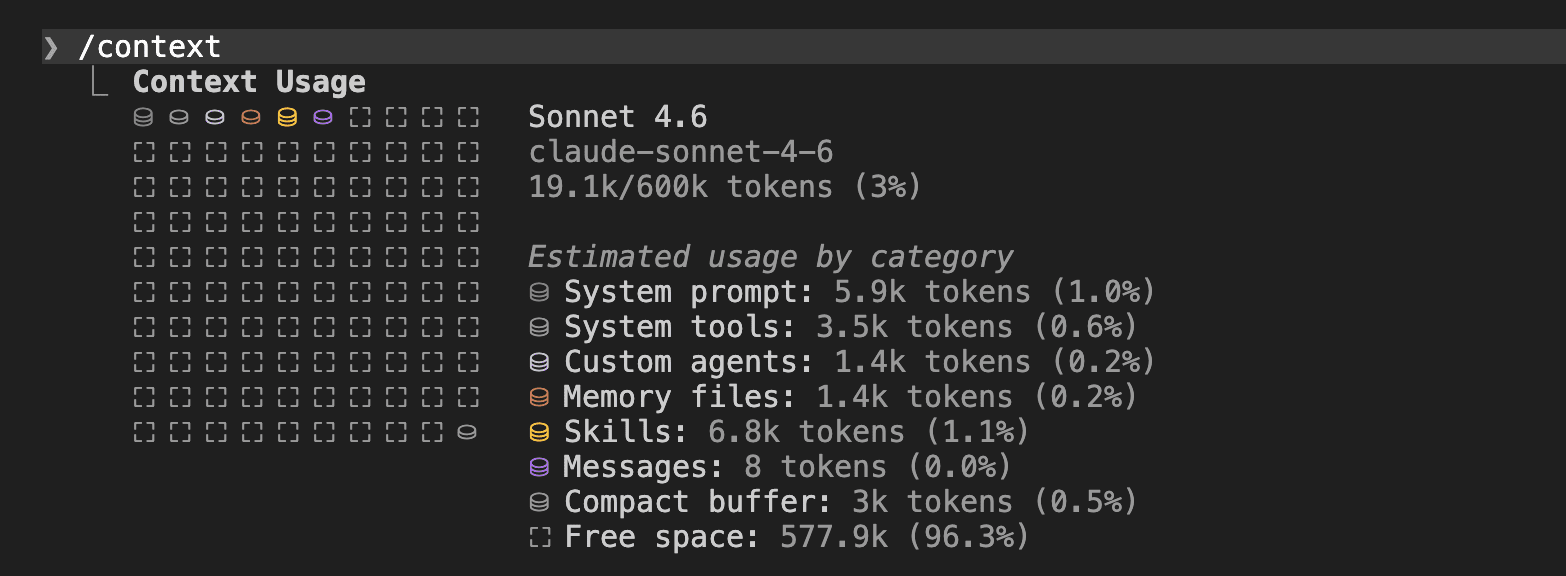
/context gives you a live breakdown: how much is used, by which category, with optimization suggestions. Run it at least once per session to get a feel for where the weight is. (It’s the closest thing to a profiler the session gives you.)
.
.
.
Why Auto-Compact Is Lossy by Design
Here’s the thing: compaction isn’t broken.
The tradeoff is real and explicit.
Compaction takes a long running session and converts it into a structured summary, then continues from that summary. The official docs are clear about it: requests and key code snippets are preserved; detailed instructions from earlier in the conversation may be lost.
The problem with Claude Code auto compact is timing.
When the system fires it, the session has no clean boundary. The compaction summarizes whatever is in the window at the moment of overflow — including partial plans, mid-hypothesis reasoning, and error threads still in flight.
That’s where my rule vanished.
That’s where your constraints vanish, too.
Stay with me, because understanding what survives is what makes the mechanism workable.
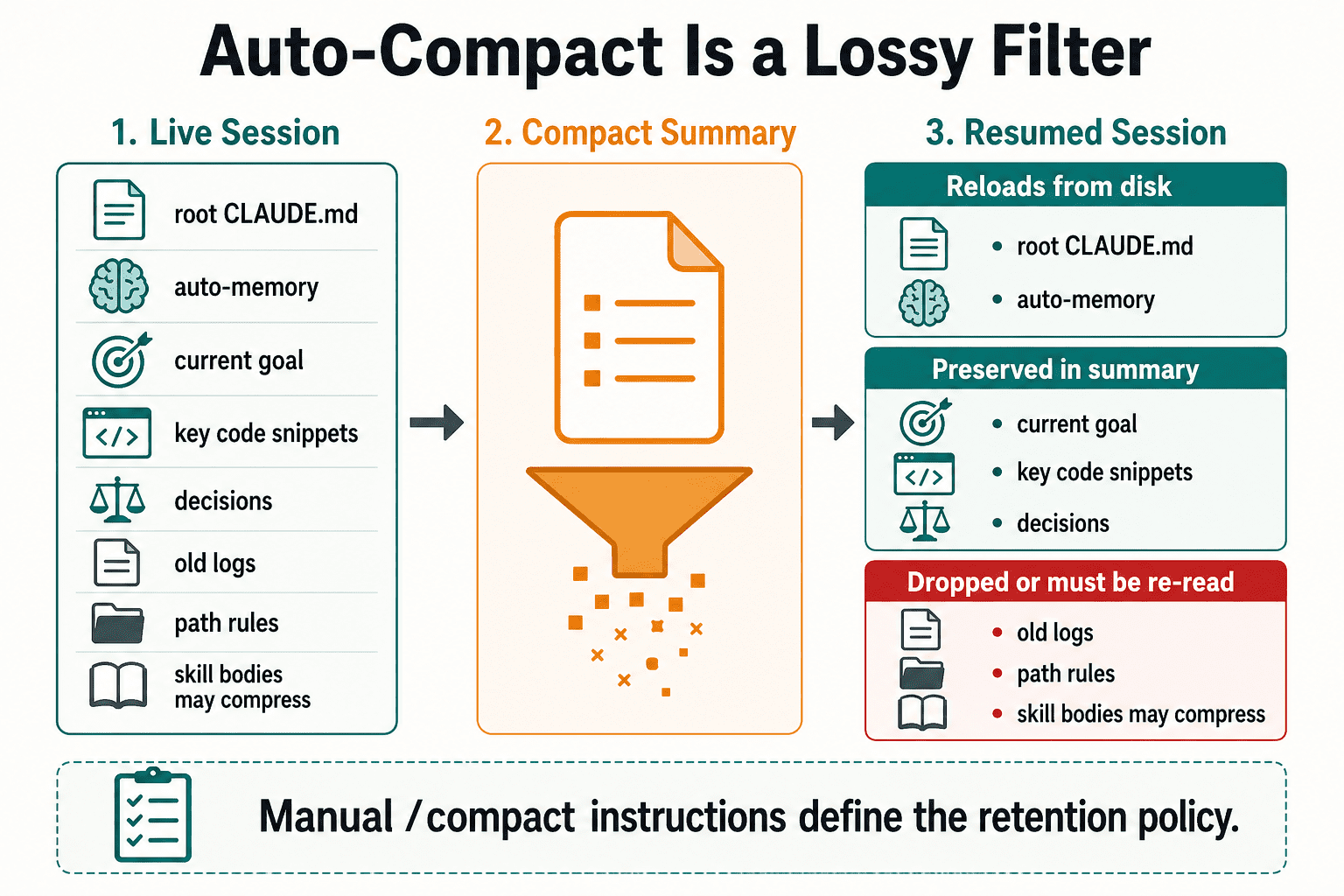
After compaction, these reload reliably: the root CLAUDE.md and auto-memory blocks. They come back because they’re read from disk — the filesystem is their source, not the summary.
These do not survive automatically:
- Path-scoped rules and nested CLAUDE.md files. They existed in the session because matching files were read. After compaction, they’re gone — until those files are read again. If your project has a
src/api/CLAUDE.mdwith API-specific rules, those rules are out of context post-compaction until Claude re-reads that file. - Invoked skill bodies are a middle case. They may reload with token caps applied — the full skill text might come back, or a compressed version, depending on what the token budget allows.
(The Decode Claude team has a thorough breakdown of how compaction actually works under the hood — worth reading if you want the full mechanism.)
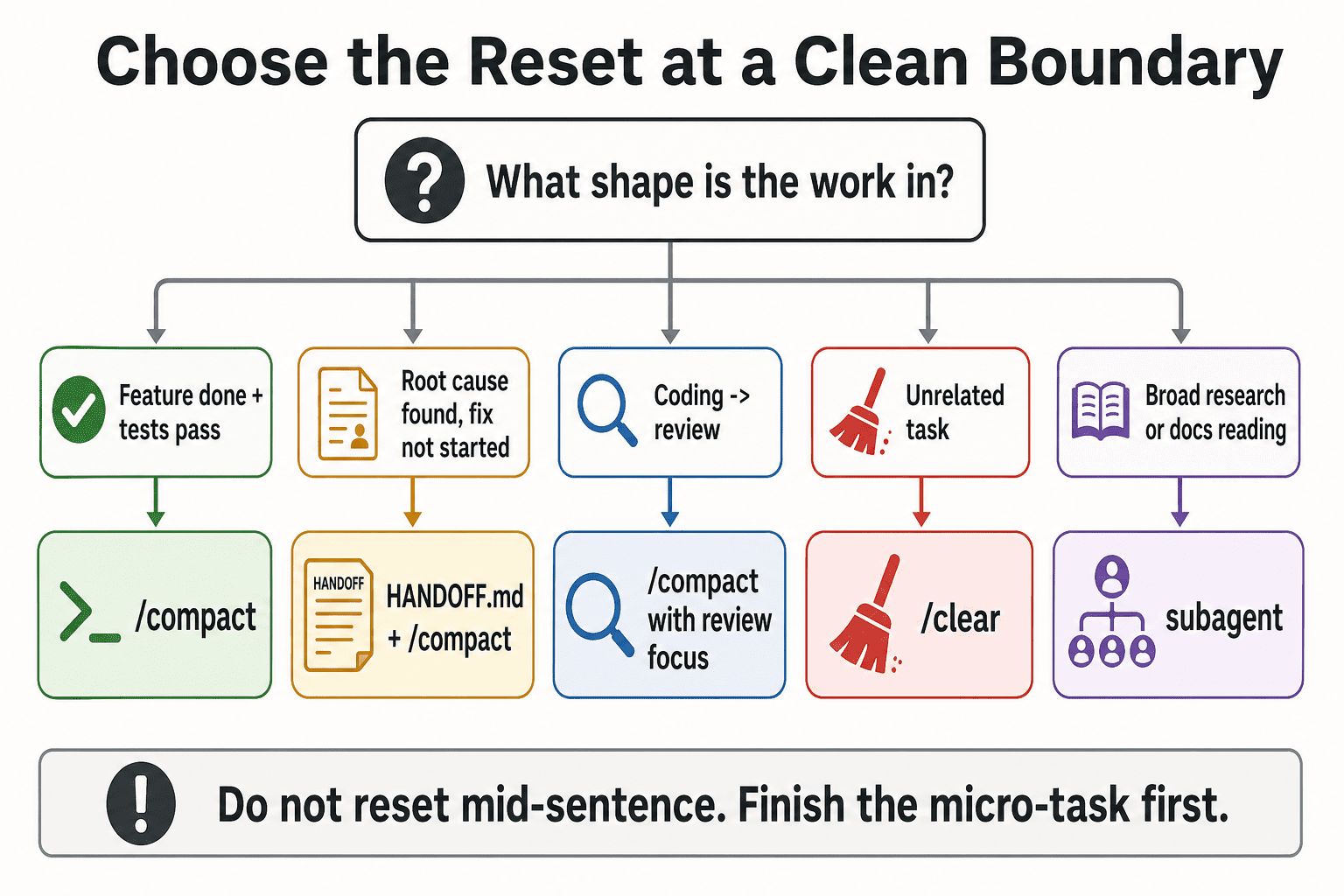
The practical caution: compact when the work has natural shape.
- After a feature lands and tests pass.
- After a root cause is identified but before the fix starts.
- Before switching from implementation to review.
Never compact mid-plan without first writing down the state you need preserved.
The mechanism works when you give it a retention policy. When auto-compact fires without one, you get whatever the summarizer decided mattered. /compact [instructions] gives you that control.
Use it.
.
.
.
Install a Context Meter in Your Status Line
The goal: always-visible context usage in the terminal status line.

Without it, you find out the window is at 78% when you run /context — which means you checked too late.
Here’s the script. Save it as ~/.claude/statusline.sh:
#!/bin/bashinput=$(cat)MODEL=$(echo "$input" | jq -r '.model.display_name // "Claude"')EFFORT=$(echo "$input" | jq -r '.effort.level // "n/a"')PCT=$(echo "$input" | jq -r '.context_window.used_percentage // 0' | cut -d. -f1)FIVE_H=$(echo "$input" | jq -r '.rate_limits.five_hour.used_percentage // empty')WEEK=$(echo "$input" | jq -r '.rate_limits.seven_day.used_percentage // empty')LIMITS=""[ -n "$FIVE_H" ] && LIMITS=" | 5h:$(printf '%.0f' "$FIVE_H")%"[ -n "$WEEK" ] && LIMITS="$LIMITS | 7d:$(printf '%.0f' "$WEEK")%"echo "[$MODEL] effort:$EFFORT | ctx:${PCT}%$LIMITS"Make it executable:
chmod +x ~/.claude/statusline.shAdd this block to ~/.claude/settings.json:
{ "statusLine": { "type": "command", "command": "~/.claude/statusline.sh", "padding": 2 }}Here’s why that matters.
ctx:47% is the core signal.
Once it’s in your status line, context management becomes part of your session loop — you glance at it the same way you glance at a battery indicator. You stop waiting for it to reach critical before acting.
5h:71% prevents starting a heavy refactor when rate limits are already burning.
If you’re at 71% of your five-hour budget, a full session of parallel tool calls might hit the ceiling before the task finishes.
Better to know before you start.
.
.
.
The Operating Rule — Compact at Boundaries, Not at Panic
These are the zones I use as working heuristics.
Hard-won across real sessions — not universal thresholds from published research. If they feel arbitrary, calibrate them against your own work.
But start here:
- Green (0–30%): Keep working. Avoid dumping unrelated files or running broad research in the main session — keep the window clean while you have room. The session is young. Let it breathe.
- Yellow (30–50%): Start watching for task boundaries. Note where the natural stopping points are in your current work. You have runway. Use it intentionally.
- Orange (50–60%): Finish the current micro-task, then compact or hand off. Do not start a new major branch. The window is narrowing faster than it feels.
- Red (above 60%): The threshold I use before a major context reset. Do not start a new feature, refactor, or research thread without resetting context first. This is the zone where sessions start producing work you’ll have to redo.
1M Opus exception: If token budget matters, treat 15–20% as the practical reset band. Twenty percent of 1M tokens is already a large session with substantial context weight. The math changes when the window is enormous.
One important pushback worth stating clearly: do not interrupt a working implementation mid-flight just because the number crossed a threshold. If you’re in the middle of a function, a migration, or a debugging loop that’s producing real signal — finish the micro-task first.
Compact at a boundary.
Never mid-sentence.
The threshold is a trigger to watch for the next natural stopping point. The task shapes where compaction makes sense:
.
.
.
Write /compact Like a Handoff Prompt
The biggest leverage point in this workflow is how you write the compact instruction.
Bad:
/compact summarize everything so farThat hands the retention decision back to the model. You get whatever the summarizer determined was important.
Ferpetesake.
Better:
/compact Preserve only what a fresh coding agent needs to continue safely: current goal, files changed, decisions, errors, tests, pending tasks, and exact next step. Drop stale exploration and repeated logs.Even that is improvable.
The reusable KEEP/SUMMARIZE/DROP template:
/compactKEEP:- Current goal and acceptance criteria- Exact files changed and why- Important code decisions and rejected alternatives- Open bugs, failing tests, console errors, and commands already tried- The last 5 user/assistant turns in detailSUMMARIZE:- Earlier exploration- Completed debugging paths- General discussionDROP:- Repeated test output- Long logs that no longer matter- Dead-end ideas already ruled outThis format works because it makes compaction a retention policy.
You’re telling the model exactly what to keep verbatim, what to compress, and what to discard. The output is shaped by your instructions — not the summarizer’s defaults.
Three task-specific variants ready to copy:
Feature implementation:
/compact Preserve feature implementation state: goal, acceptance criteria, files changed, functions/components touched, business rules, test results, unresolved bugs, and exact next step. Summarize old exploration and drop repeated logs.Debugging:
/compact Preserve debugging state: original bug, reproduction steps, exact error messages, hypotheses tested, files inspected, fixes attempted, current most likely root cause, and next verification command. Drop dead-end logs unless they explain a rejected approach.Refactor:
/compact Preserve refactor state: target architecture, files already refactored, files not yet touched, compatibility constraints, naming conventions, migration risks, test status, and next file to inspect..
.
.
Add Compact Instructions to CLAUDE.md
One-off compact prompts work.
But if you’re running long sessions regularly, encoding the retention policy in CLAUDE.md means you stop writing it from scratch every time. The official docs support this directly: add a “Compact Instructions” section to CLAUDE.md, and Claude Code uses it during compaction.
Here’s the copy-paste version:
## Compact InstructionsWhen compacting, preserve working state for continuation, not chat history.Always keep:- Current goal and acceptance criteria- Exact files changed, created, deleted, or inspected and why- Important hooks, functions, classes, routes, settings, commands, and config keys- Business rules and architectural decisions- Rejected approaches and why they were rejected- Errors, failed tests, commands run, and fixes attempted- Pending tasks and the exact next stepSummarize:- Completed exploration- Older discussion- Repeated command outputDrop:- Verbose logs unless they contain unresolved errors- Duplicate explanations- Abandoned ideas that are no longer relevantAfter compaction, re-read PLAN.md or HANDOFF.md if present before continuing.One caution: if CLAUDE.md grows too large, it becomes its own context tax — loaded on every session, occupying window space before any work begins. The Compact Instructions block is worth including if it replaces ad-hoc reminders you’d otherwise type in long sessions.
Keep the file disciplined.
If you haven’t read The Single File That Makes or Breaks Your Claude Code Workflow, that’s the foundation. The Compact Instructions block sits inside it.
.
.
.
Write a Handoff File Before Compaction or Clear
The compact instruction controls the summary.
The handoff file makes that summary durable — written to disk so it survives the reset.
A Hacker News commenter put it well, and I’m passing this on the way a mentor would: get better results by asking Claude to write the important parts into a Markdown file, reviewing it, clearing context, and continuing from that file. The session state becomes explicit and inspectable. You can read it. You can verify it. You can hand it to a fresh session and have it pick up exactly where you left off.
That’s worth framing as a habit.
The moment before compaction is the moment to make your state visible.
The prompt to generate HANDOFF.md:
Create HANDOFF.md. Include:- Goal- Current branch/state- Files changed- Decisions made- Commands run- What failed- What remains- Exact next stepMake it complete enough that a fresh Claude Code session can continue without reading this chat.Then compact with a focused instruction:
/compact Focus on HANDOFF.md, current git diff, unresolved errors, and next step. Drop old exploration.Or for a truly fresh start:
/clearRead HANDOFF.md, then continue from the exact next step.The distinction between the three reset mechanisms:
/compact— same session continues. Old context is summarized, not erased. The compressed history is still present./clear+ HANDOFF.md — clean slate. The continuation document is the only thread back to prior work./rewind— last branch was wrong. Use this to remove polluted attempts rather than summarizing them into the session memory.
HANDOFF.md works with all three.
Write it before the reset. Verify it’s complete. Then pick the right reset for the situation.
.
.
.
Rehydrate After Compaction
Compaction has a subtle failure mode: after the summary is generated, Claude may know a plan exists — but not have the plan’s actual content in context.
Let that land for a second.
The root CLAUDE.md and auto-memory reload — they’re read from disk. PLAN.md, HANDOFF.md, and path-scoped rules loaded from specific subdirectories are not automatically restored. The compacted summary might reference them. The content is not there.
The fix is explicit.
Tell Claude to re-read them.
After-compaction checklist:
After any compaction:1. Re-read PLAN.md if it exists.2. Re-read HANDOFF.md if it exists.3. Re-check git diff --stat.4. Confirm the current goal, unresolved risks, and exact next step.5. Continue from the latest pending task, not from memory alone.This checklist can live in CLAUDE.md under “Compact Instructions” — the last line of the block from the previous section already includes it. But it’s worth stating explicitly so the habit is clear: after compaction, re-read the durable files before continuing.
Do not assume the summary captured everything they contained.
The official docs confirm it: root CLAUDE.md reloads after compaction; path-scoped and nested instructions may need trigger files re-read. An explicit rehydrate checklist is more reliable than hoping the summary preserved those details.
.
.
.
The Decision Table — Continue, Compact, Clear, Rewind, or Subagent
Here’s where it all comes together.
When the context meter signals it’s time to act, this is the call:
| Situation | Use | Why |
|---|---|---|
| Same task, clean milestone reached | /compact [instructions] | Preserve state, drop noise |
| New unrelated task | /clear | Avoid dragging old context into new work |
| Last branch was wrong | /rewind | Remove polluted attempts instead of summarizing them |
| Heavy research or file exploration | Subagent | Keep raw reading out of main context |
| Long implementation needs continuity | HANDOFF.md + /compact | Make continuation state durable |
| Session feels confused far below the limit | HANDOFF.md + /clear | Reset quality before wasting more turns |
The new habit is five steps:
- Watch ctx%.
- Finish the current micro-task.
- Write down state if needed.
- Compact with a retention policy.
- Re-read the durable plan.
- Continue.
Never letting Claude Code auto compact means staying in charge of what survives.
The best sessions — the ones that actually ship — are the ones where context stays intentional. Build the status line. Write the compact instruction. Keep HANDOFF.md in the habit. Re-read the durable files every time.
That’s the playbook.
Own it.
If you want the full framework this sits inside, start with Context Engineering with Claude Code, Explained.

Leave a Comment