Stop Losing Work When You Compact Claude Code (The Handoff-Doc Skill)
You know the moment.
You’ve been working for over an hour.
The status line says ctx:22% (that’s about 220k tokens in Opus). You know you should compact. You also know you should write something down first — a handoff doc, a note, anything that captures where you are so the next session can pick up cleanly.
But writing a handoff prompt from scratch, right now, mid-session? That means composing the prompt. Reviewing the output. Making sure it caught the decisions you made forty minutes ago, the file you changed twenty minutes ago, the test that’s still failing.
So you skip it.
I did.
Last month, I was two hours deep in a refactor, ctx sitting at 24%. I compacted without writing anything down. The next session spent its first fifteen minutes re-reading files I’d already inspected — and then made a decision I’d already made. In a different direction.
Fifteen minutes of rework. Because I didn’t want to spend thirty seconds.
That’s the gap.
The gap between “I should capture my state” and “I actually do it” is where session continuity goes to die.
There’s a skill that closes it.
One command. The skill reads back through the session, distills what happened, writes it to a file on disk, and reports what it captured. Thirty seconds of your time, about three minutes of processing. Then you compact with the handoff doc already durable — written to disk, safe from the reset.
The next session reads it back. Picks up cold. Knows exactly where you left off.
This post walks through the whole thing: the threshold that triggers it, five steps from “context is getting high” to “fresh session, state preserved,” and why the skill captures more than you’d write manually.
.
.
.
The System This Builds On
In Never Let Claude Code Auto-Compact Again, I built a full context management system: a status line that shows ctx% on every turn, operating zones from green to red, structured /compact instructions using a KEEP/SUMMARIZE/DROP template, and a rehydration checklist for after compaction.
At the center of that system was the HANDOFF.md habit — write a structured document to disk before compacting so the session state survives the reset.
It was also the step most people skip.
And honestly? I get it. Generating a good handoff required an eight-line prompt. You had to remember to run it. You had to review the output. When you’re already deep in a session and context is climbing, that friction adds up fast.
The handoff-doc skill replaces the entire manual step with one command.
If you haven’t read the prior post, that’s fine — this one is self-contained.
But the full context management playbook is there for anyone who wants the complete system.
.
.
.
Install the Skill
The handoff-doc skill is open source and available from the agent-skills repo.
Claude Code (plugin marketplace):
/plugin marketplace add nathanonn/agent-skills/plugin install handoff-doc@nathanonn-agent-skillsOther agents (Codex, Cursor, GitHub Copilot):
npx skills add nathanonn/agent-skills --skill handoff-docFor manual installation or the full list of available skills, see the repo README.
Once installed, /handoff-doc is available as a slash command in Claude Code. In other agents, describe the task and the skill triggers automatically.
.
.
.
The 20% Rule
For 1M Opus sessions, 20% is already 200,000 tokens of context.
That’s easily an hour or more of active development — file reads, tool calls, test output, back-and-forth.
The rule is simple: when ctx crosses ~20%, finish the current micro-task, invoke the handoff-doc skill, then compact.
Why 20% and not higher?
Quality degrades gradually. By 25-30%, the model is processing a growing pile of stale content on every turn — old exploration logs, resolved error output, abandoned approaches. The signal-to-noise ratio drops before you feel it in the responses.
The skill itself needs room.
It reads back through the session to distill what happened. Invoking it at 20% gives it space to work. At 30%, the distillation is competing with the content it’s trying to capture.
Early resets force a healthy rhythm. Working in 15-20% chunks means each new session starts fresh, with full model quality. The Claude Code handoff doc bridges the gap between sessions — capturing enough state that the fresh session can continue without re-reading the transcript. The work stays continuous even though each chunk gets a clean window.
Think of it as version control for your session state. Git captures code state between commits. The handoff doc captures working state between context resets. Both let you move forward with confidence that what you’ve done is preserved.
The threshold is a heuristic — a zone to start watching for a clean boundary. Some sessions run lean and don’t cross 20% for two hours. Others — heavy file reading, broad research, lots of tool calls — blow past it in thirty minutes.
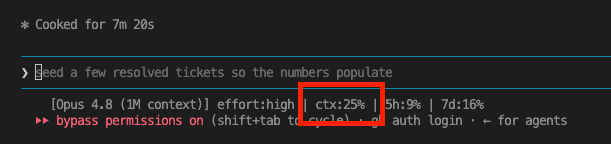
The status line makes it visible. You glance at ctx:21% the way you glance at a battery indicator.
When you see it, that’s the cue.
.
.
.
Five Steps From Threshold to Reset
Here’s the full workflow. Five steps, start to finish.
Step 1: Notice the threshold
You’re mid-session.
The status line shows ctx:25%. Past the 20% zone. Time to capture state before compacting.
This is a glance — completely passive. If you set up the status line from the prior post, you see ctx% on every turn without running any command. The moment it crosses your threshold, you know.
Step 2: Invoke the skill
Type /handoff-doc followed by the destination path.
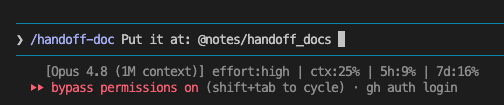
The @ reference lets you point at any folder in your project. The skill checks whether the destination already has files and follows their naming convention. If the folder uses a YYYYMMDD_NN_slug pattern, the skill continues the numbering automatically. If the folder is empty, it starts the series.
(The first time I ran this in a folder that already had three handoff docs, it picked up the naming pattern and slotted in as number four. A small thing — but it meant I never had to think about filenames. The skill just knew.)
One line.
That’s the entire invocation.
Step 3: Review the handoff doc
The skill reads back through the session, distills what happened, and writes a structured document to disk. Processing takes about three minutes, depending on session length.
When it finishes, the output reports what it captured:
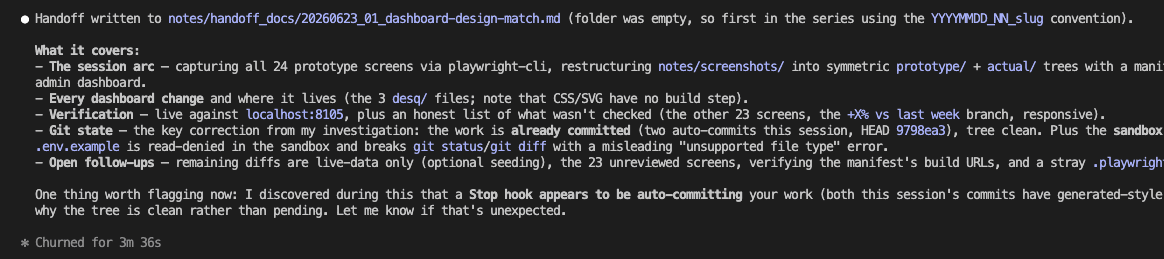
The generated doc follows a consistent skeleton: what happened this session, where things live (files changed, key paths), verification done — and honestly, what was not verified — git state, and open follow-ups with numbered next steps.
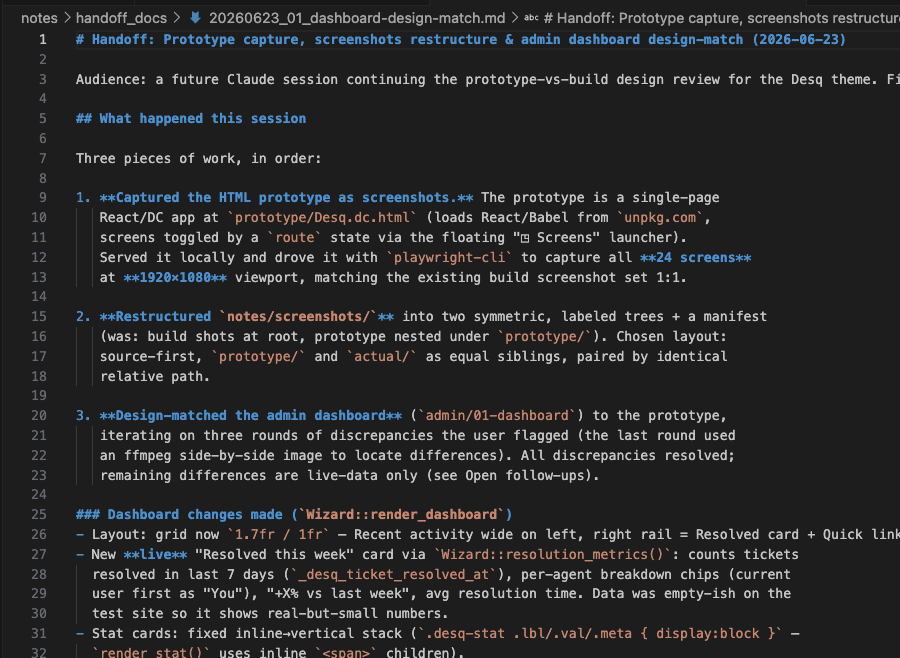
Take thirty seconds to skim the key sections. The structure is deliberate — each section answers a question the next session will have:
- What happened tells the next session what was accomplished and what decisions were made.
- Where things live gives it the file paths and locations it needs to navigate the work.
- Verification done is the honesty check — what was tested, what passed, and critically, what was not tested. This prevents the next session from assuming something works when it hasn’t been verified.
- Git state anchors the handoff to a specific commit, branch, and push status.
- Open follow-ups are the actual continuation point — numbered, specific, ready to pick up.
That verification section deserves a callout. One of the first times I used the skill, the handoff doc flagged — plainly, almost embarrassingly — that a feature I’d been working around hadn’t actually been tested. I would have glossed right over that in a manual handoff. The skill was more honest than I would have been.
If those sections look right, move on.
The skill has full session context to work from — it usually captures more than you’d remember to include manually.
Step 4: Compact
With the handoff doc written to disk, run /compact. You can add custom summarization instructions (the prior post has KEEP/SUMMARIZE/DROP templates for this), or run it bare.
Here’s the important shift: the handoff doc is the durable artifact now. It lives on disk, outside the context window, unaffected by whatever the compaction summarizer decides to keep or drop. The compact summary adds useful compressed context, but the handoff doc on disk is the lifeline.
This is also where the /compact instruction from the prior post pays off. If you point the compact instruction at the handoff doc — “Focus on the handoff doc at [path], current git diff, and next step” — the summary and the handoff doc reinforce each other.
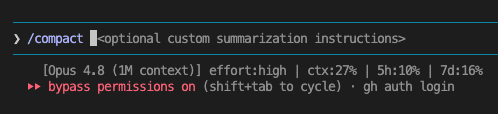
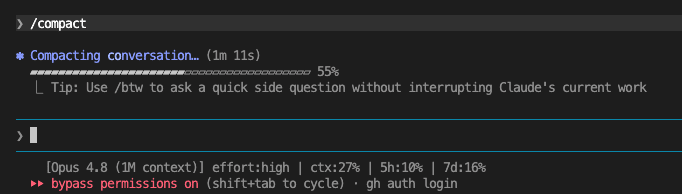
Compaction takes one to two minutes for a session around 25%. The progress indicator shows how far along it is.
Step 5: Fresh context, handoff preserved
After compaction completes, ctx drops to 0%.
And here’s the payoff.
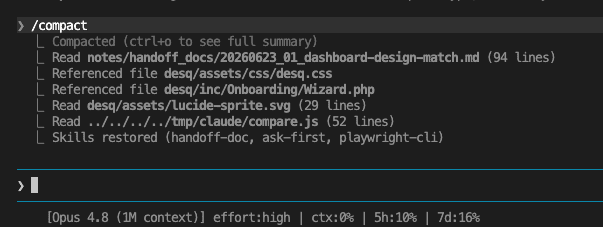
Look at the compaction output. It lists every file it re-read — including the handoff doc you just created. Skills are restored. Referenced files are loaded back into context.
The session is fresh. Your state is preserved. The model knows what was done, what’s pending, and what to do next — all from the handoff doc it just read back.
Continue from exactly where you left off.
.
.
.
Why This Beats Writing It Manually
Manual handoffs fail in three predictable ways.
You skip it entirely.
This is the most common failure mode — and the one I’m most guilty of.
When context is high and the session has been long, writing a handoff prompt feels like overhead you can defer. The compact summary might be good enough. You’ll remember what you were doing. You’ll just re-read the git diff.
Then the next session opens, and you spend fifteen minutes re-establishing context that could have been preserved in thirty seconds. Re-reading files. Re-explaining decisions. Worse — sometimes the session makes different decisions because it doesn’t know what you already decided.
The skill makes the habit frictionless enough that you actually do it.
One command instead of a prompt you compose from scratch every time.
The activation energy drops from “write an eight-line prompt and review the output” to “type one line and skim for thirty seconds.”
You write too little.
A manual prompt like “create a handoff doc” gives the model almost nothing to work with.
The result is a vague summary that misses specifics: which files were changed and why, what was tested and what wasn’t, where the git state stands, which follow-ups are still open.
With the skill, a structured skeleton does the work for you.
Each section — what happened, where things live, verification done, git state, follow-ups — exists because it answers a question the next session will have. The structure acts as the prompt.
You write too much.
A full transcript replay disguised as documentation.
Every step narrated, every error included, every tangent preserved. The next session wades through three pages when it needed three paragraphs.
The skill distills. It extracts what the next session needs to continue — decisions made, current state, open work — and drops the noise. Exploration paths that led nowhere get summarized or omitted. Error output you already resolved is gone. The handoff reads like a briefing, because that’s what it is.
Beyond those failure modes, the skill handles details you’d forget in a manual prompt. It checks the destination folder for existing naming conventions. It auto-increments the sequence number. It converts relative time references to absolute dates so the doc stays useful a week later. Every Claude Code handoff doc has the same structure, the same level of detail, the same honesty about gaps.
.
.
.
Making It a Habit
The workflow is three steps, once it’s in muscle memory:
- Watch ctx%. The status line makes this passive — you see the number on every turn without doing anything.
- At ~20%, invoke the skill. Finish the current micro-task first, then
/handoff-docwith a destination path. - Compact and continue. The handoff doc is on disk. Compact. The fresh session re-reads it automatically.
A few tips for adoption.
Pick a consistent destination. Use notes/handoff_docs/ or docs/handoffs/ — whatever fits your project structure. The skill handles a dedicated folder with sequential files, and it handles a single HANDOFF.md at the project root. Choose one pattern and stick with it so the skill builds a clean series over time.
Don’t review obsessively. Thirty seconds of skimming after the skill runs is enough. If the key sections are present — decisions, files changed, next step — move on. The skill has full session context. It captures more than you’d remember to write.
Pair it with Compact Instructions. If you have a Compact Instructions block in your CLAUDE.md (described in the prior post), the skill and those instructions work together. The skill writes the durable state to disk. The compact instructions shape what gets preserved in the compressed session summary. Two layers of continuity.
Use it before /clear too. The workflow pairs naturally with /compact, but it works equally well before /clear — when you want a genuinely fresh session instead of a compressed one. The handoff doc is the bridge. The reset mechanism is your choice.
Let the series accumulate. If you use a folder with sequential naming, the handoff docs become a session log. Over the course of a multi-day project, you end up with a numbered series that traces how the work evolved: what was done in each session, what decisions changed, what follow-ups carried forward. It’s useful for your own reference, and it’s useful for onboarding someone else into a project mid-stream.
One more thing worth stating: the handoff doc works for human readers too. If you need to hand a project to a colleague — or pick it up yourself after a week away — the handoff doc reads like a structured briefing. You don’t need Claude Code to benefit from what it wrote.
.
.
.
The Habit in One Sentence
When context crosses the threshold, capture your state with one command, then reset.
The handoff-doc skill makes this automatic. Session state goes to disk. Context resets clean. The next session picks up cold from one structured document that tells it everything it needs to continue.
The best sessions — the ones that actually ship — are the ones where context stays intentional from start to finish. The status line is the sensor. The threshold is the trigger. The handoff-doc skill is the mechanism that makes the whole thing effortless.
Build the habit. Watch ctx%. Invoke the skill. Compact. Continue.
For the full context management system — status line, operating zones, compact instructions, rehydration checklist — start with Never Let Claude Code Auto-Compact Again.
For readers new to Claude Code skills, Claude Skills: Your “I Know Kung Fu” Moment Has Arrived (Part 1 of 3) covers how to build and use them.
The handoff-doc skill (and several others) is open source at github.com/nathanonn/agent-skills.

Leave a Comment