Workflow Engineering: Why Your AI Development Process Matters More Than Your Prompts
You open Claude Code.
You’ve got a feature to build — a complex one. Payment integration, subscription handling, admin dashboard, the works.
So you write the most detailed prompt you’ve ever crafted. 1000+ words. Every requirement listed. Edge cases mentioned. You even throw in a few “make sure you handle X” reminders for good measure.
(You’re being thorough. You’re being responsible. You’re practically writing documentation before the code even exists.)
You hit enter.
Claude gets to work.
Files appear. Functions materialize. Code flows like water.
Thirty minutes later, you look at the output.
Half your edge cases? Missing. The subscription lifecycle you described in exquisite detail? Partially implemented. That race condition you specifically warned about? Acknowledged in a code comment — a lovely, well-formatted code comment — but never actually handled.
So you do what every developer does.
You rewrite the prompt.
Make it longer. More specific. Add bold text for emphasis. Paste in code examples. Maybe underline something, just to really drive the point home.
Same result. Different gaps.
.
.
.
The Prompt Optimization Trap
Here’s the cycle most developers are stuck in right now:
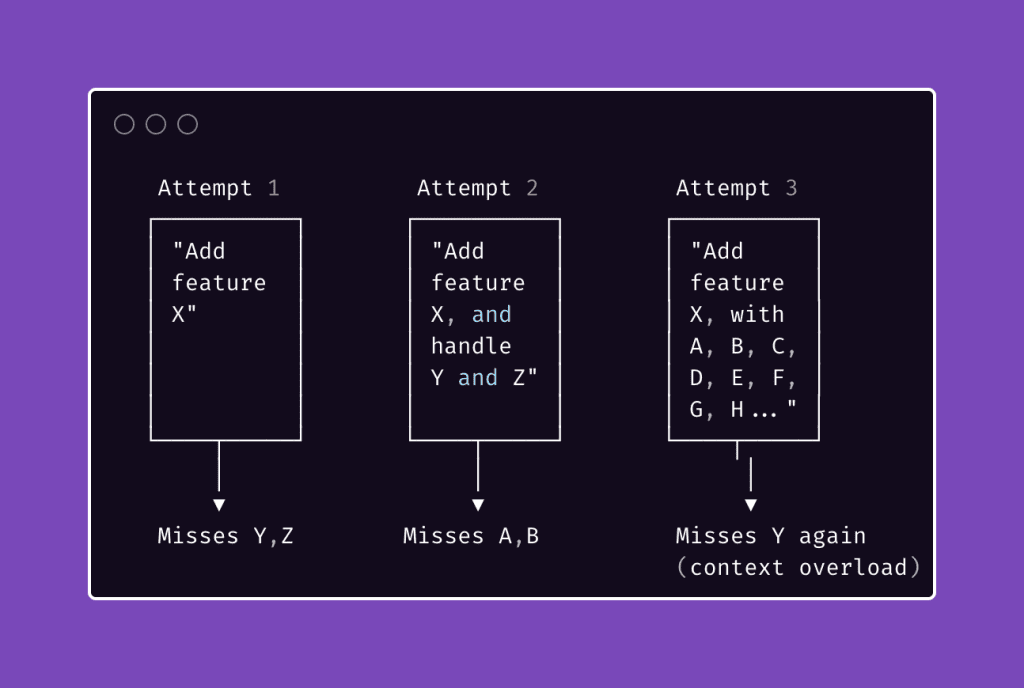
The prompt keeps getting bigger. The results don’t keep getting better.
You’ve probably watched this happen in real-time.
The AI starts strong — the first few hundred lines look great. Then quality dips. Functions get shallower. Edge cases receive “TODO” comments instead of actual handling. By the end, Claude is running on fumes, juggling so much context that it’s forgetting what you said at the beginning of your very thorough, very responsible prompt.
Everyone’s response?
Write a better prompt. A clearer prompt. A more detailed prompt. I did this too. For longer than I’d like to admit.
Here’s what I learned after months of building complex features with Claude Code: the answer has nothing to do with writing better prompts.
The answer is designing better workflows.
.
.
.
From Prompts to Workflows
Stay with me here — because this is the shift that changed everything about how I work with AI.
Think about how you’d approach a complex feature without AI.
You wouldn’t sit down, write everything you know into one document, hand it to a junior developer, and say “build all of this.” That’s a recipe for disaster.
(And possibly a resignation letter.)
Instead, you’d break the work into phases.
Write specs first. Review them. Plan the implementation. Assign tasks. Verify the results. Each phase produces something concrete — a document, a plan, a test report — that feeds into the next phase.
The same principle applies to AI-assisted development. And it has a name.
Workflow Engineering is the practice of designing multi-step, artifact-driven processes where each step produces a concrete output that becomes the input for the next step — and where the process itself is reusable across projects.
Read that again.
Two words matter most:
Artifact-driven. Every step creates something tangible. A spec file. A test plan. An implementation plan. Not vibes. Not “context.” Actual files that exist on disk and can be read by a fresh session.
Reusable. The workflow works regardless of what feature you’re building. Payment integrations, admin dashboards, API endpoints, plugin architecture — the same sequence of steps applies every time.
Here’s the mental model shift:
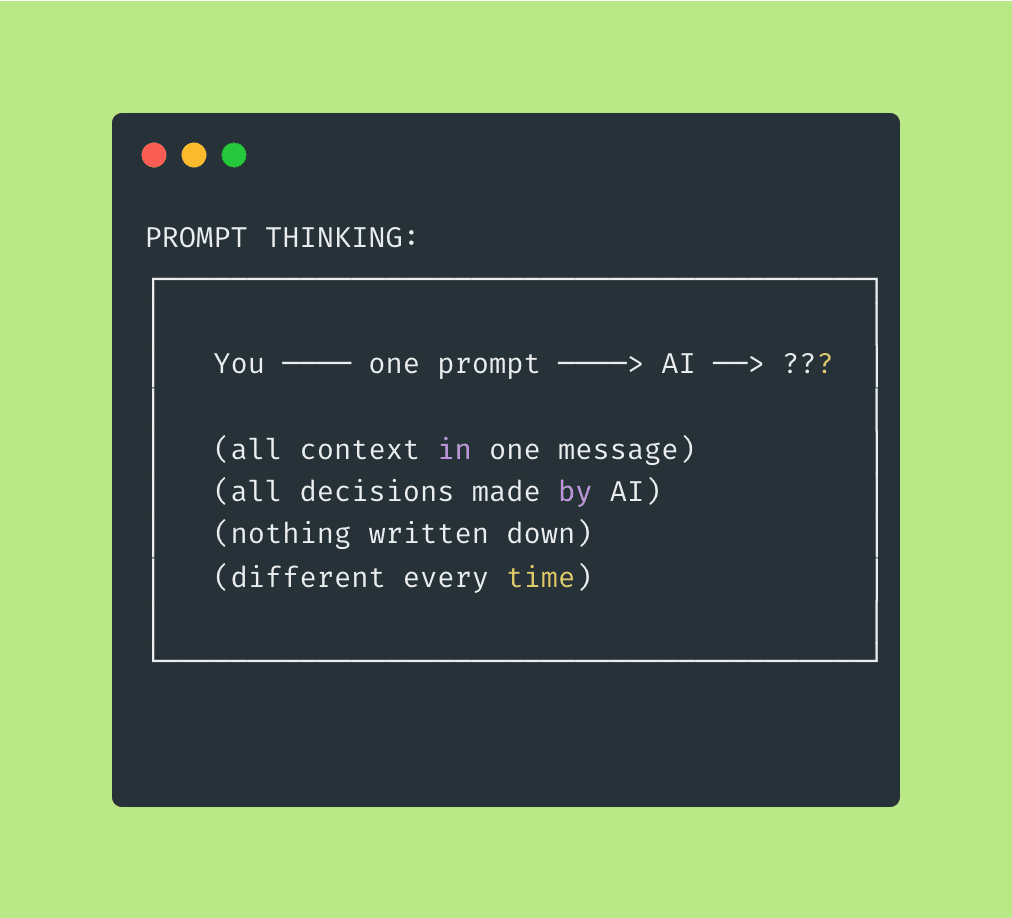
With prompt thinking, you’re optimizing the message.
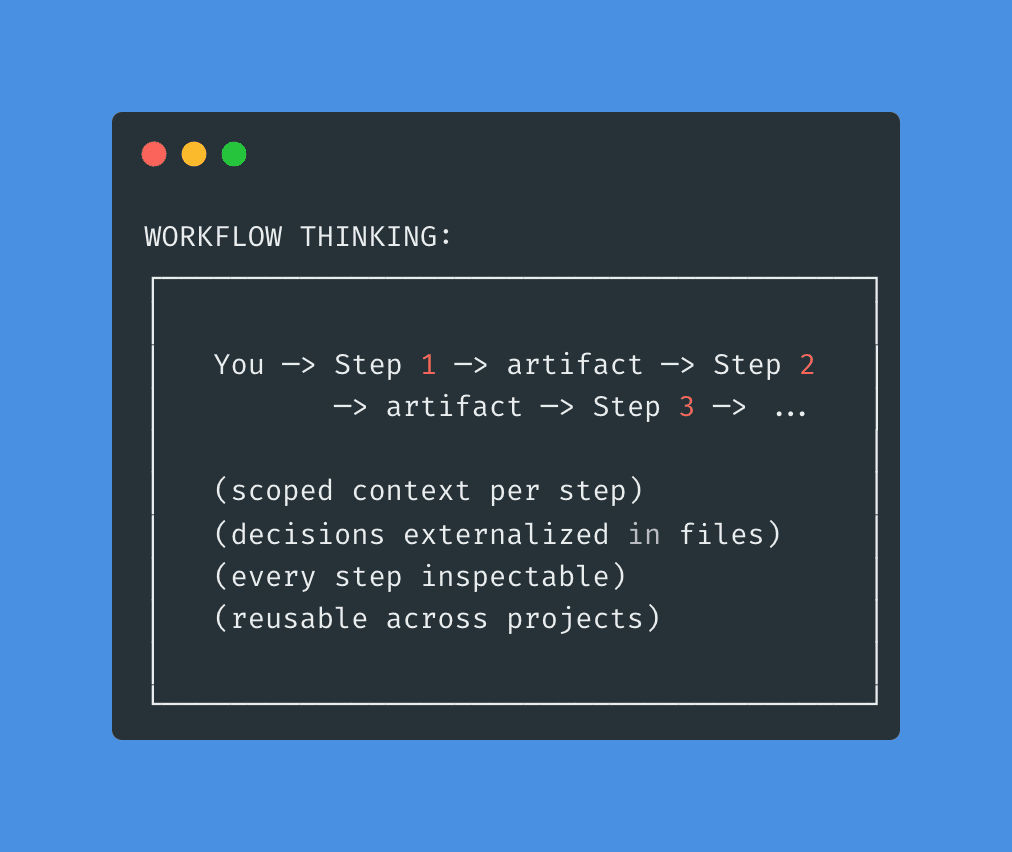
With workflow thinking, you’re optimizing the process.
One is fragile, project-specific, and impossible to debug when things go sideways. The other is robust, reusable, and traceable — meaning when something does go wrong (and it will, because software), you can trace exactly where the chain broke.
The question stops being “how do I write the perfect prompt to implement this feature?” and becomes something far more interesting: “what sequence of focused steps will reliably produce a working feature — regardless of what that feature is?”
That second question? That’s workflow engineering.
.
.
.
The Four Principles of Workflow Engineering
After months of building and refining workflows for Claude Code, I’ve distilled what makes them work down to four principles.
(Four! A reasonable number. I considered making it seven because odd numbers feel more authoritative, but that felt dishonest. Four is what I’ve got. Four is what works.)
These apply to any AI coding tool — Claude Code, Cursor, Copilot, Codex, whatever ships next quarter.
The tools will change.
These principles won’t.
Principle 1: Separate Thinking from Doing
When Claude is brainstorming specs, it shouldn’t be writing code. When it’s implementing, it shouldn’t be redesigning architecture. Mixing planning and execution causes both to suffer.
Here’s why.
Planning gets shallow when the agent is eager to start building.
It rushes through decisions because there’s code to write — ferpetesake, there are functions to create, endpoints to scaffold. Meanwhile, the code gets sloppy because the agent is still making design decisions mid-stream — changing its mind about architecture while simultaneously trying to implement it.
You’ve seen this happen.
Claude starts building a feature, realizes halfway through that the data model needs restructuring, pivots the architecture, and now half the code it already wrote doesn’t match the new approach.
The result? A Frankenstein codebase where the first half follows one pattern and the second half follows another.
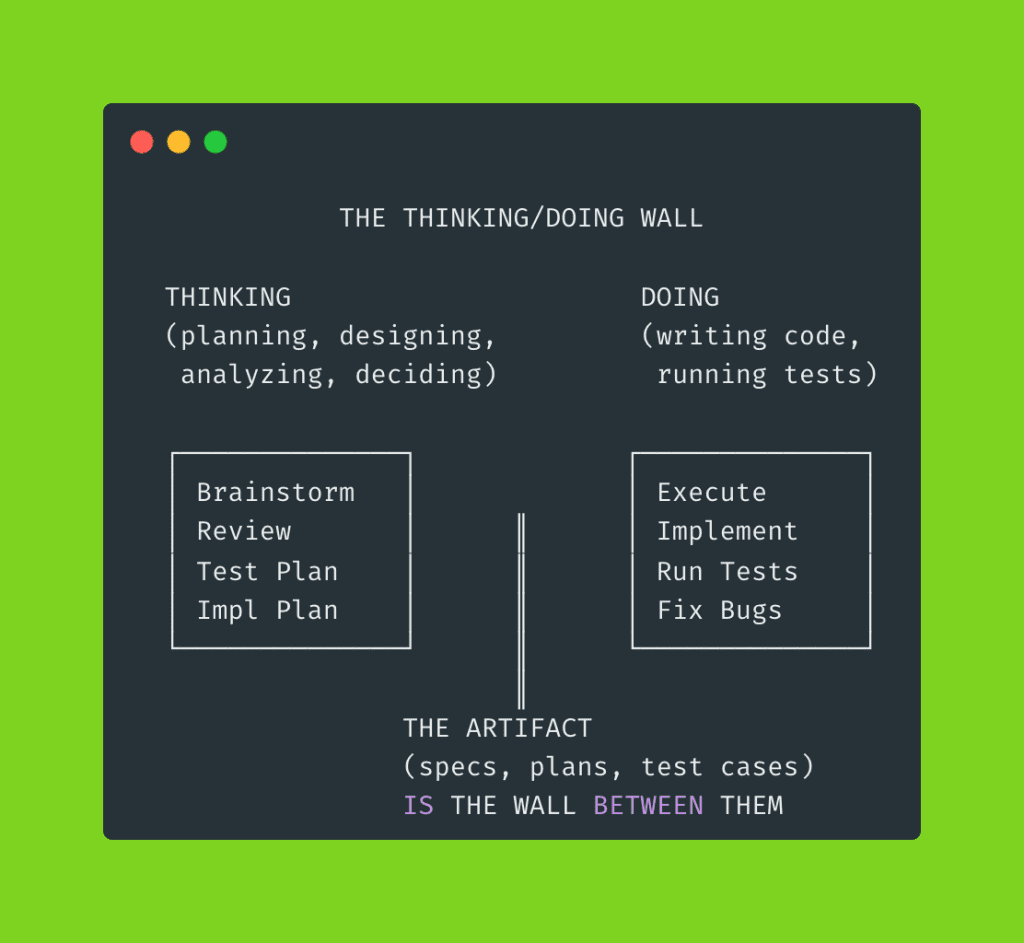
Every step in a well-engineered workflow should be either a thinking step or a doing step.
The artifact that comes out of the thinking phase — the spec, the plan, the test cases — becomes the wall between them. By the time Claude starts coding, every design decision has already been made and documented.
No more mid-implementation architecture pivots. No more shallow plans that crumble at the first edge case.
Principle 2: Fresh Context, Always
Here’s something most developers learn the hard way. (I certainly did.)
AI performance degrades as context accumulates. The longer a session runs, the worse the output gets. Claude starts “forgetting” early instructions. It takes shortcuts. Details slip through the cracks like sand through fingers.
We call this context rot — and it’s the silent killer of ambitious AI projects.
Think of it like a multi-day hiking trip.
Day one, your backpack is light. You’re sharp, focused, covering ground fast. By day five — if you’ve been packing on top of yesterday’s gear without clearing anything out — you’re hauling 40 pounds of stuff you don’t need. Yesterday’s rain jacket (it’s sunny now). Tuesday’s extra water bottles (you passed a stream an hour ago). Your pace drops. Your attention narrows. You start missing trail markers because you’re too busy adjusting your shoulder straps.
That’s what happens to an AI agent running in a single session across a dozen tasks.
Workflow engineering forces natural context boundaries:
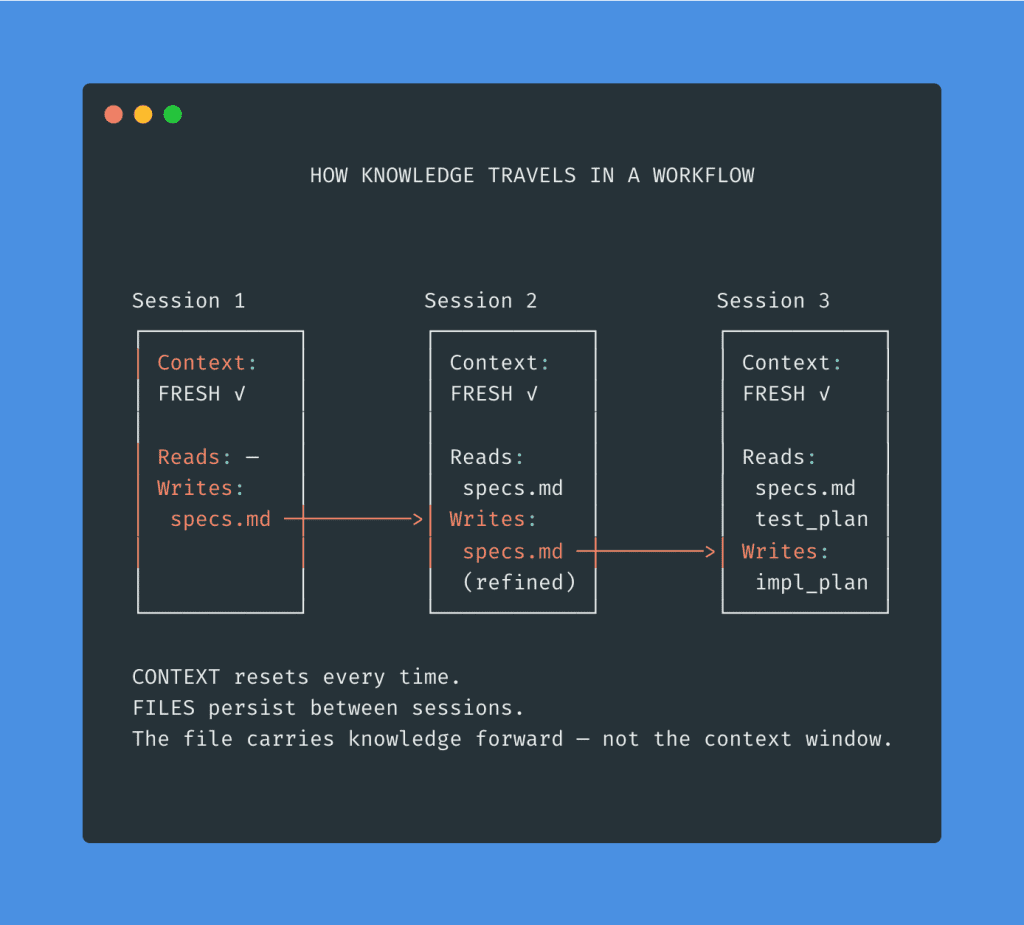
Each step runs in its own session. Each sub-agent gets a clean slate. The file carries knowledge forward. The context resets every time.
Fresh backpack. Every single morning.
Principle 3: Artifacts Over Memory
Don’t trust the AI to “remember” what you decided three steps ago.
(Don’t trust yourself to remember, either. I once forgot a critical API decision I made that same morning. Before coffee, but still.)
Every decision, every requirement, every edge case — externalized into a file.
Why? Three reasons.
- A file can be read by a fresh session. This enables Principle 2. When a new session starts, it reads
specs.mdfrom disk — it doesn’t need to “recall” a conversation that happened two hours ago in a completely different context window. - A file can be reviewed by a different agent — or by you. This is how you catch mistakes before they compound. The spec review step? That’s a fresh agent reading the brainstorm agent’s output and poking holes in it. Adversarial quality control, built right into the workflow.
- A file creates a traceable chain. If something breaks in implementation, you can walk the chain backwards to find exactly where things went wrong:
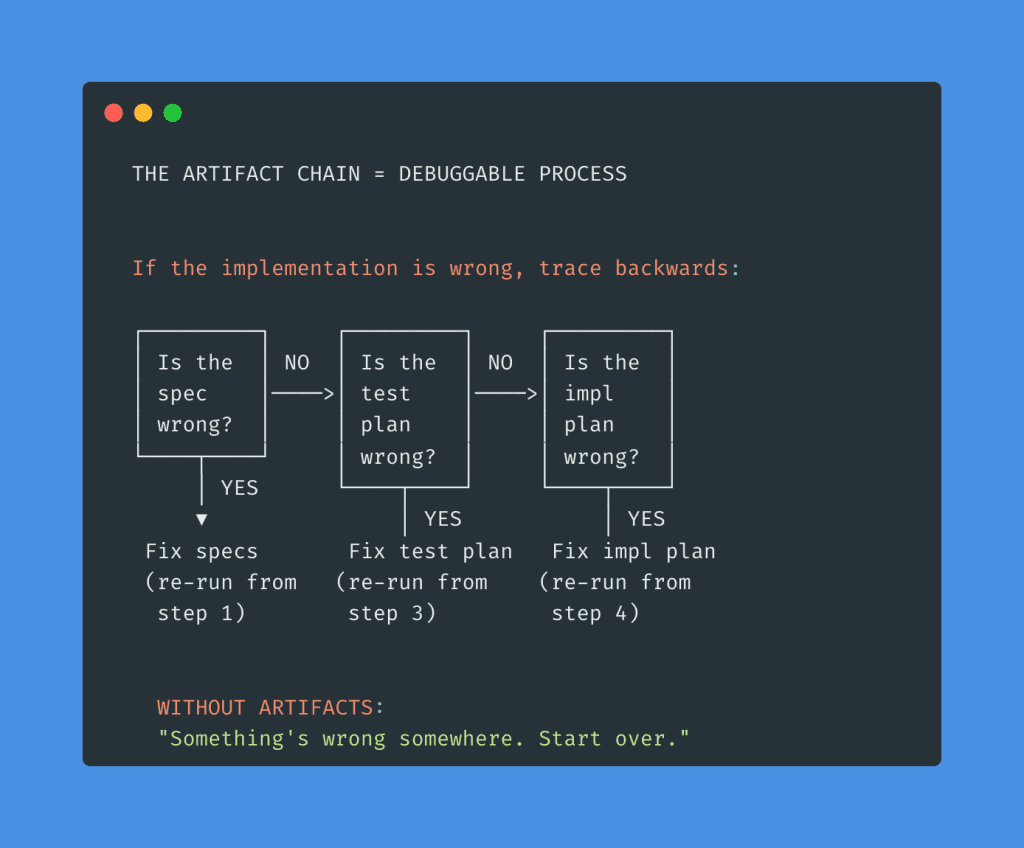
Without artifacts, every failure means starting from scratch.
With artifacts, every failure is traceable to a specific step. You fix that step. You re-run from that point. Everything downstream updates accordingly.
That’s the difference between “something broke” and “I know exactly where it broke.”
Principle 4: Define Success Before Starting Work
Write the test plan before the implementation plan.
(I know. I can feel you resisting this one through the screen.)
Most developers want to start building immediately.
Writing test cases for code that doesn’t exist yet feels like… paperwork. Busywork. The kind of thing a project manager suggests in a meeting you didn’t want to attend.
But for AI-driven development, it changes the entire outcome. Here’s why.
1/ Deep requirement analysis.
When Claude has to turn “handle race conditions during renewal processing” into a specific test case — with preconditions, exact steps, and expected outcomes — it has to deeply understand what that requirement actually means.
Shallow understanding produces shallow tests.
If the test plan looks thorough, the requirements were thoroughly analyzed.
2/ Gap detection before code exists.
A missing test case reveals a missing requirement. And finding a gap in your spec is a hundred times cheaper before implementation than after.
(Ask me how I know.)
3/ Clear implementation targets.
Every task in the implementation plan maps to specific test cases.
The developer — or AI agent — knows exactly what “done” means for each piece of work. No ambiguity. No interpretation. No “I thought you meant…”
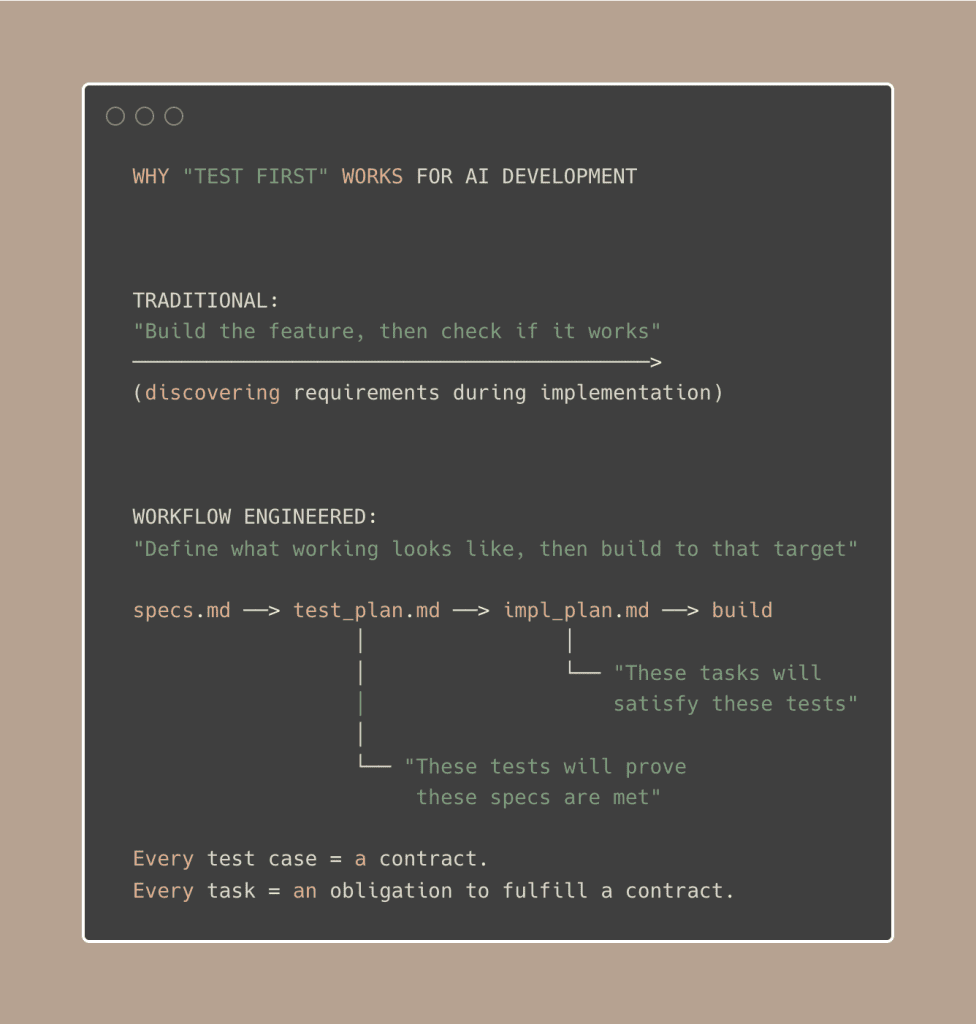
You’re building toward a defined target instead of discovering the target while building.
Which sounds obvious when I write it out like that — but go look at your last three AI-assisted features and tell me you had a test plan before you started coding.
(No judgment. I didn’t either. Until I did.)
.
.
.
The System: Workflow Engineering in Practice
Principles are great.
Principles are necessary.
But at some point, you need to see them actually working — not just sounding wise on a page.
So let me show you the complete workflow engineering pipeline I’ve built and refined over the past several months for Claude Code. Six steps, four phases, every principle encoded into the process.
I’ve written deep-dives on each phase of this system:
- The 3-Phase Method for Bulletproof Specs covers Steps 1–2 in detail
- How to Make Claude Code Actually Build What You Designed walks through Steps 3–5 with real screenshots
- Claude Code Testing: The Task Management Approach That Actually Works shows Step 6 in action with 30 test cases
This article is the why behind those hows.
Here’s the complete system at a glance:
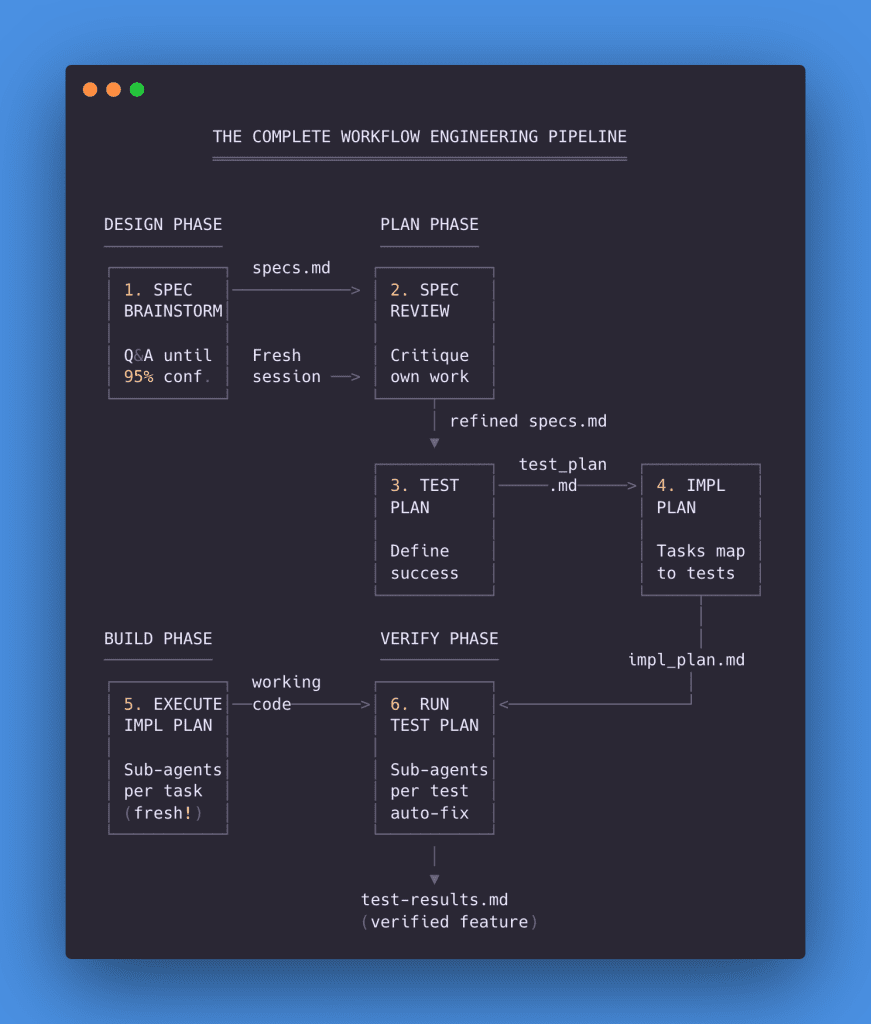
Let me walk you through each step — what it does, why it exists, and what artifact it produces.
Step 1: Spec Brainstorm
Principle served: Artifacts Over Memory
You describe the feature you want.
But instead of Claude immediately starting to code, you trigger a question-asking mode: “Ask me clarifying questions until you are 95% confident you can complete this task successfully.”
That line is the key.
It tells Claude to stop assuming. Stop guessing. Stop filling in blanks with whatever seems reasonable.
Claude explores your codebase first — reading your existing patterns, your database schema, your current architecture. Then it starts asking questions, with options, explanations, and its own recommendation for each.
In my WooCommerce integration project, Claude asked 15 questions covering everything from subscription plugin choice to refund handling to email notifications. Edge cases I hadn’t thought about. Architectural decisions that would have bitten me weeks later.
Every answer gets compiled into a comprehensive specification document.
Artifact produced: notes/specs.md
👉 Deep-dive: The 3-Phase Method for Bulletproof Specs
Step 2: Spec Review
Principle served: Fresh Context
Start a new session. Fresh context. Then ask Claude to critique its own work.
Why a new session?
Because the brainstorming session’s context is bloated with 15 rounds of Q&A. A fresh agent reading the specs with skeptical eyes catches things the original agent — who was busy building the specs — overlooked.
In my project, the review found 14 potential issues, including a race condition that would have caused double charges (ferpetesake, the payments!), a token deletion scenario that would silently break renewals, and a mode-switching conflict that would have confused billing for every active subscriber.
You pick which issues matter. Claude fixes them — with another round of clarifying questions to make sure the fixes are solid.
Artifact produced: refined notes/specs.md
👉 Deep-dive: The 3-Phase Method for Bulletproof Specs
Step 3: Test Plan
Principle served: Define Success Before Starting Work
Before writing any implementation code, Claude reads the specs and generates a structured test plan. Every requirement becomes a test case with preconditions, specific steps, expected outcomes, and priority levels.
For my WooCommerce project: 38 test cases organized into 12 sections. 7 Critical, 20 High, 11 Medium.
This serves a dual purpose.
It verifies Claude deeply understood every requirement — shallow understanding produces shallow test cases, so thorough tests mean thorough comprehension. And it creates the success criteria that will drive everything that follows.
Artifact produced: notes/test_plan.md
👉 Deep-dive: How to Make Claude Code Actually Build What You Designed
Step 4: Implementation Plan
Principle served: Separate Thinking from Doing
Claude reads both the specs and test plan, then generates an implementation plan. Tasks are grouped logically, dependencies are identified, and every task maps to the specific test cases it will satisfy.
For my project: 4 phases, 12 tasks, each explicitly linked to test cases. Phase 1 handles foundation (TC-001 to TC-007). Phase 2 tackles checkout and lifecycle (TC-008 to TC-014). Phase 3 addresses the critical renewal processing (TC-015 to TC-021). Phase 4 covers remaining features (TC-022 to TC-037).
This is the last thinking step.
After this, the wall goes up. Every design decision has been made. Every task has a clear target. Now — and only now — we build.
Artifact produced: notes/impl_plan.md
👉 Deep-dive: How to Make Claude Code Actually Build What You Designed
Step 5: Execute Implementation
Principle served: Fresh Context
Here’s where sub-agents change everything.
Instead of running all 12 tasks in one session (guaranteed context rot), Claude creates each task using the built-in task management system, identifies dependencies, and processes them in waves. Each task runs in its own sub-agent with fresh context.
Fresh backpack. Laser focus.
For my project:
- Wave 1: 2 sub-agents (foundation tasks, no dependencies)
- Wave 2: 2 sub-agents (checkout + lifecycle, depend on Wave 1)
- Wave 3: 3 sub-agents (critical renewal processing)
- Wave 4: 6 sub-agents (remaining features)
Total time: 52 minutes. 13 tasks completed. 38 test cases worth of functionality implemented. Each sub-agent used ~18% context — compared to ~56% if everything had run in a single session.
Artifact produced: working code across all specified files
👉 Deep-dive: How to Make Claude Code Actually Build What You Designed
Step 6: Run Test Plan
Principle served: All four principles working together
The final step.
Claude reads the test plan, creates one task per test case, analyzes dependencies between tests, and executes them sequentially — one sub-agent per test, each with fresh context.
If a test fails, the sub-agent analyzes the root cause, implements a fix, and re-runs the test. Up to 3 attempts. If it still fails after 3 tries, it gets marked as a known issue with reproduction steps and a suggested fix.
For my project: 30 tests. 2 hours 12 minutes. All passed. One bug found and autonomously fixed during TC-002 — a settings save handler that wasn’t persisting color options. Found, diagnosed, fixed, re-verified. All without me touching the keyboard.
Results get logged in two places: test-status.json for machine parsing, test-results.md for human review.
Artifact produced: notes/test-results.md and notes/test-status.json
👉 Deep-dive: Claude Code Testing: The Task Management Approach That Actually Works
The Complete Artifact Chain
Look at how everything connects:
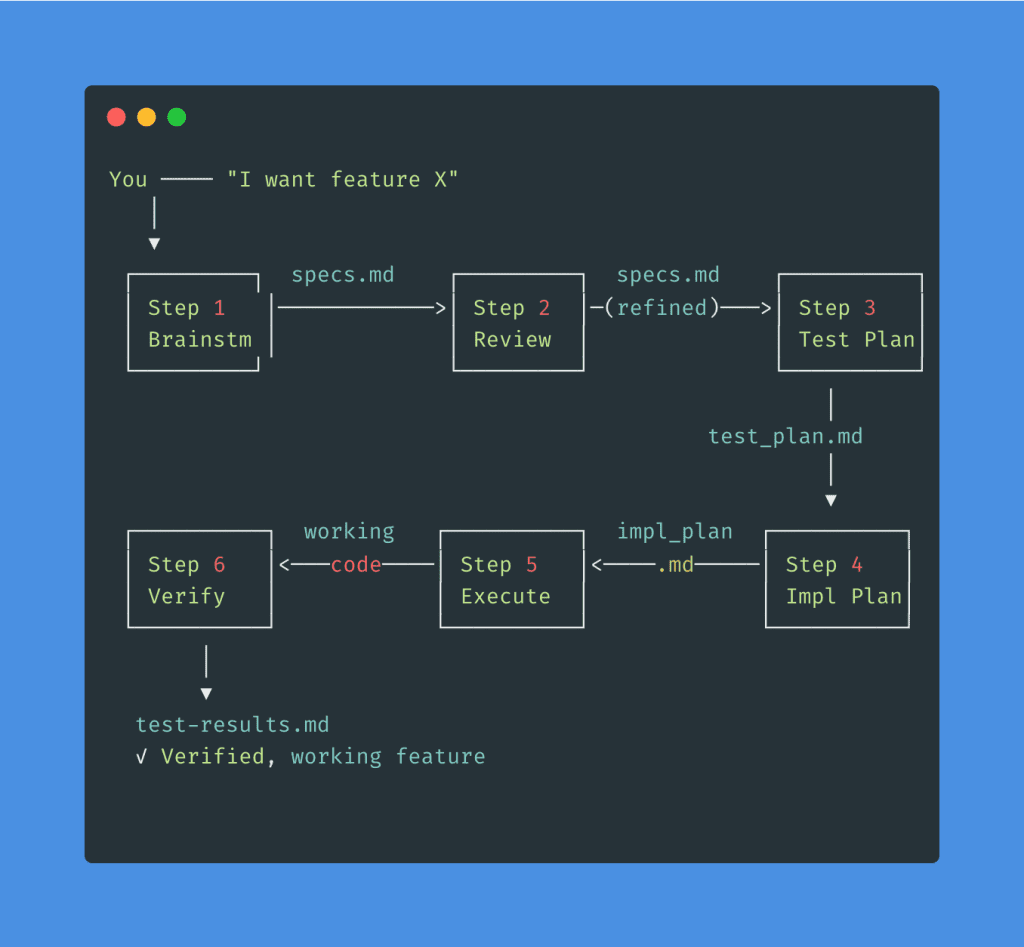
Nothing lives in memory.
Everything lives in files. Every step reads from the previous step’s artifact. If something goes wrong at Step 5, you trace backwards through the chain to find exactly which artifact — which decision — needs fixing.
No more “something broke somewhere, guess we start over.” Just: “the impl plan missed a dependency — let me fix Step 4 and re-run from there.”
I’ve packaged all six prompt files into a Workflow Engineering Starter Kit — drop them into your .claude/commands/ folder and the entire pipeline is ready to go. Download the Starter Kit here →
.
.
.
Design Your Own Workflows
The six-step system above is one example — a specific workflow I’ve built for feature implementation with Claude Code.
But the principles behind it apply to any multi-step AI task.
Writing a technical article, planning a product launch, migrating a database, refactoring a legacy codebase. Same principles. Different steps.
The specific prompts change. The tools change. The principles stay constant.
Here’s a checklist you can run before starting any complex AI task — five questions that reveal whether your process has gaps:
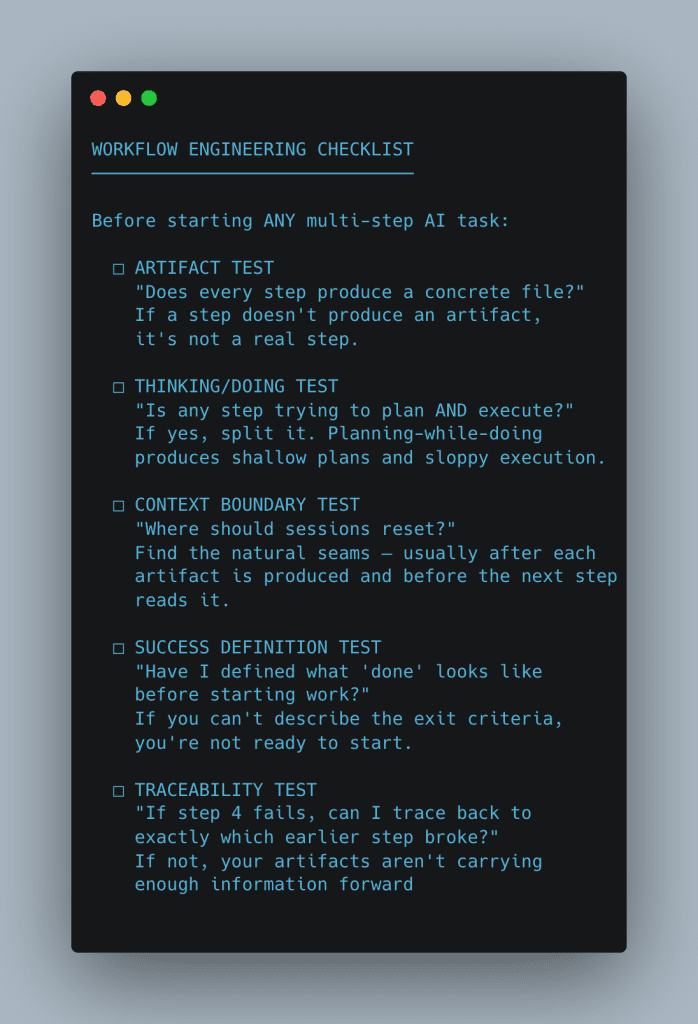
Five questions. If any answer is “no,” your workflow has a gap.
- The artifact test catches phantom steps — work that happens “in context” but produces nothing concrete. Those are the steps where information vanishes between sessions.
- The thinking/doing test catches the most common mistake in AI-assisted development: asking an AI to plan and build in the same breath. Every time you let that happen, both the plan and the build suffer.
- The context boundary test catches rot before it starts. If you can’t point to where sessions should reset, you’ll end up with one massive session that degrades across every task.
- The success definition test catches the “just build it and we’ll see” trap. Without defined success criteria, you have no way to verify the output — and no target for the AI to aim at.
- The traceability test catches broken chains. If you can’t walk backwards from a failure to its root cause, your artifacts aren’t detailed enough to serve as the connective tissue between steps.
.
.
.
The Skill That Compounds
Here’s what I want you to take away from all of this.
The six prompt files in the Starter Kit will be outdated eventually.
Claude Code will add new features. The task management API might change. New AI tools will emerge that handle things we can’t even imagine yet.
The workflow engineering thinking behind those prompts won’t age.
Separate thinking from doing. Reset context at natural boundaries. Externalize decisions into artifacts. Define success before you start building. These principles work today with Claude Code. They’ll work next year with whatever comes next.
And here’s the compounding part — the part that makes this a skill and not just a technique: every workflow you design teaches you to design better workflows.
You start noticing patterns. Where context rot creeps in. Where planning and execution get tangled. Where artifacts need more detail. Your workflows get tighter with each project. Your instincts sharpen.
The developers who will thrive in AI-assisted development over the next few years won’t be the ones who write the best prompts.
They’ll be the ones who engineer the best workflows.
.
.
.
Your Next Steps
- Download the Workflow Engineering Starter Kit → — All six prompt files, ready to drop into
.claude/commands/ - Run the checklist against your current process — find the gaps
- Try the full pipeline on your next feature — specs through testing
- Refine what works, replace what doesn’t
What feature are you going to build with this workflow?
Pick one.
Run the pipeline. See what happens when Claude has a structured process to follow instead of a single prompt to interpret.
Go engineer it.
P.S. — For the deep-dives on each phase, start here:
- Part 1: The 3-Phase Method for Bulletproof Specs (Steps 1–2)
- Part 2: How to Make Claude Code Actually Build What You Designed (Steps 3–5)
- Part 3: Claude Code Testing: The Task Management Approach (Step 6)

Leave a Comment