How to Build Self-Evolving Claude Code Rules (So You Stop Fixing the Same Mistakes)
Last week, I watched Claude make the exact same mistake I’d corrected three days earlier.
Same project. Same codebase. Same error.
I’d spent fifteen minutes explaining why we use prepared statements for database queries—not string concatenation. Claude understood. Claude apologized. Claude fixed it beautifully.
And then, in a fresh session, Claude did it again. Like our conversation never happened.
Here’s the thing: it wasn’t Claude’s fault.
(Stay with me.)
The correction I’d made? It lived and died in that single session. I never added it to my Claude Code rules. Never updated my project guidelines. Never captured what we’d learned together.
So Claude forgot. Because Claude had to forget.
And honestly? I’ve done this more times than I’d like to admit.
.
.
.
The Uncomfortable Truth About Your Claude Code Rules
You’ve probably got project rules somewhere.
Maybe in a CLAUDE.md file. Maybe in a markdown doc you include at the start of sessions. Maybe scrawled on a Post-it note stuck to your monitor.
(No judgment.)
These rules matter.
They’re the guardrails that keep Claude from hallucinating, making mistakes, or generating code that looks like it was written by someone who’s never seen your codebase before.
But here’s what nobody talks about: most Claude Code rules are frozen in time.
You wrote them once—probably when you were optimistic and caffeinated and full of good intentions. Maybe you updated them once or twice when something broke spectacularly. And then… they fossilized.
Meanwhile, you’re out there learning. Every session teaches you something. Better patterns. Sneaky edge cases. Production bugs that made you question your life choices at 2am.
But none of that learning makes it back into your rules.
Your rules stay stuck at whatever understanding you had on Day One. A Level 5 Charmander trying to fight Level 50 battles.
(More on Pokémon in a minute. I promise this metaphor is going somewhere.)
.
.
.
The Three Problems That Keep Your Rules Stuck
Let me break down why this happens—because understanding the problem is half the battle.
Problem #1: The Inclusion Tax
You have to remember to add your rules file at the start of every session. Miss it once—maybe you’re rushing, maybe you’re excited about a feature, maybe you just forgot—and suddenly you’re debugging code that violates your own standards.
It’s like having a gym membership you forget to use. The potential is there. The execution… less so.
Problem #2: Context Decay
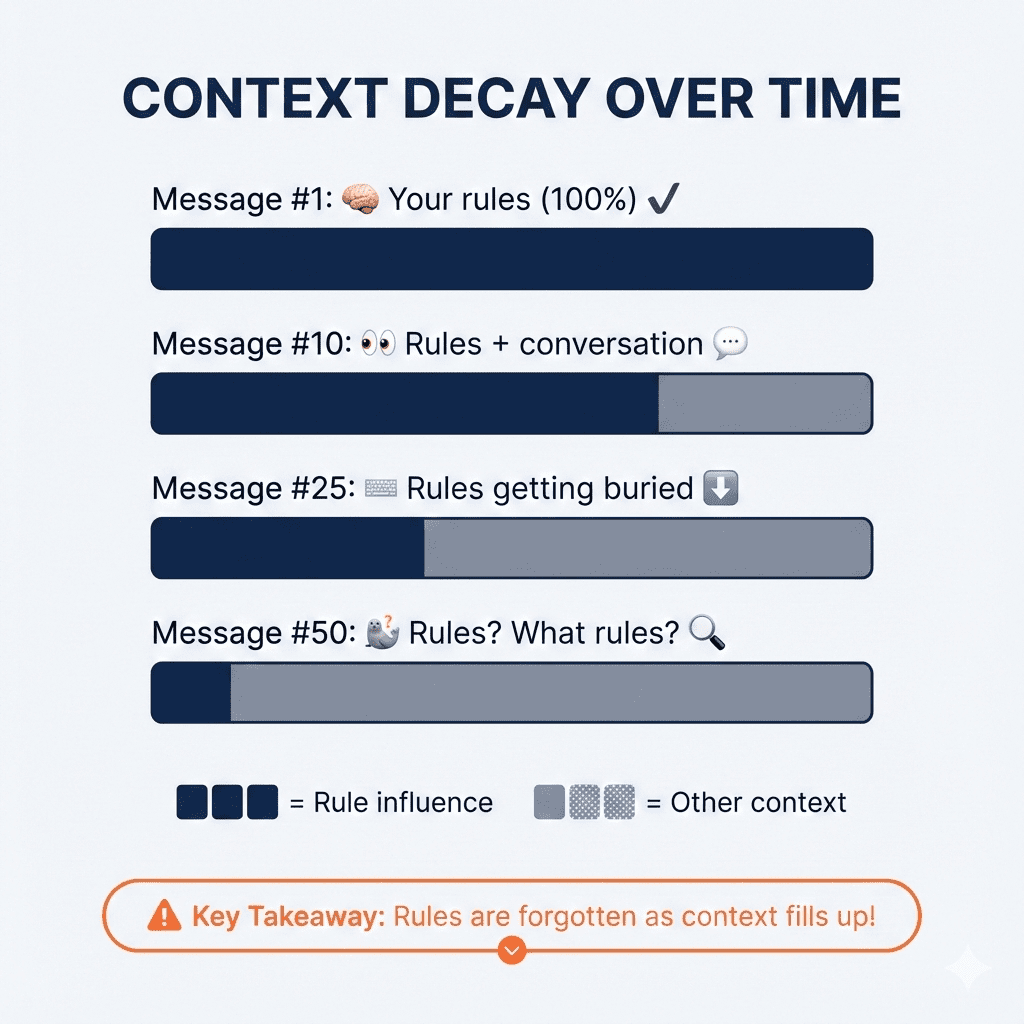
Even when you do include your rules, long sessions dilute them. By message #50, your carefully crafted “always use prepared statements” guideline has degraded into… whatever Claude feels like doing.
The rules are still technically in the context window. They’re just competing with 47 other messages for Claude’s attention. And losing.
Here’s what that looks like:
Problem #3: The Maintenance Black Hole
Rules should evolve. You know this. I know this. We all know this.
But who actually updates their rules file regularly?
(I’m raising my hand here too. We’re in this together.)
.
.
.
The CLAUDE.md Trap
Here’s what most developers do—and I get why it seems logical:
They cram everything into CLAUDE.md.
Security rules. Database patterns. API conventions. Coding standards. Error handling preferences. That one weird edge case from six months ago. All of it, stuffed into one giant file that gets loaded at the start of every session.
The thinking makes sense: “Claude will always have my rules!”
The reality?
A 2,000-line CLAUDE.md file burns through your token limits before you even start working.
You’re paying the context tax on every single message—whether you need those rules or not. Working on a simple UI tweak? Still loading all your database migration patterns. Fixing a typo? Still burning tokens on your entire security playbook.
![TOKEN CONSUMPTION: BEFORE vs AFTER". The top section, "THE CLAUDE.md TRAP (Before) ❌", shows a large, full dark bar labeled "2,000 lines = ~4k tokens". Below it are labels for code modules: [security][database][api][hooks][i18n][testing][deploy][...]. Text states "Every message loads EVERYTHING" and "Simple UI task? Still paying for ALL of it. ⚠️". The bottom section, "THE INDEXED SKILL (After) ✅", shows a small dark bar for "Index/descriptions = ~500 tokens (always loaded)". Below it, a separate, segmented gray bar represents "+ security.md = ~800 tokens (only if needed)". Text states "Load index first, references only when needed" and "Simple UI task? Pay only for the index. ✅". A legend indicates that dark bars mean "Tokens consumed" and gray bars mean "Loaded on-demand". A final callout box with a lightbulb icon states, "Key Takeaway: Indexing significantly reduces token costs by loading only what's necessary!](https://www.nathanonn.com/wp-content/uploads/2026/01/image-5.png)
It’s like packing your entire wardrobe for a weekend trip. Sure, you’ll have options. But you’ll also be exhausted before you get anywhere.
.
.
.
What If Your Rules Could Level Up?
Okay, here’s where the Pokémon thing comes in. (Told you I’d get there.)
Think about how evolution works in Pokémon. A Charmander doesn’t stay a Charmander forever. It battles. It gains experience. It evolves into Charmeleon, then Charizard. Each evolution makes it stronger, better suited for tougher challenges.
What if your Claude Code rules could work the same way?
Every correction you make.
Every “actually, do it this way instead” moment. Every hard-won insight from debugging at 2am. What if all of that could strengthen your rules automatically?
Not stuffed into a bloated CLAUDE.md. Not forgotten when sessions end. Actually captured and integrated into a system that gets smarter over time.
This is possible now. And it’s not even that complicated.
Enter Agent Skills (And Why They Change Everything)
If you haven’t explored Agent Skills yet, here’s the short version: Skills let Claude activate knowledge only when it needs it.
Instead of loading everything upfront—all 2,000 lines of your rules, whether relevant or not—Claude starts by reading just the skill descriptions. A few lines each. When a task triggers a specific skill, then it reads the full details.
Working on database queries? Claude loads the database skill. Building an API endpoint? It loads the API patterns. Simple UI change? It loads… just what it needs for that.
The token savings are significant. Instead of paying for your entire rulebook on every message, you pay for maybe 50 lines of descriptions, plus whatever specific reference you actually need.
But here’s where it gets interesting for our “evolving rules” problem…
The Card Catalog Architecture
Here’s the approach that solves all three problems we talked about earlier:
Structure your skill like a card catalog, not a library.
Your SKILL.md file becomes an index—brief descriptions pointing to reference files. The actual rules live in a references/ folder:
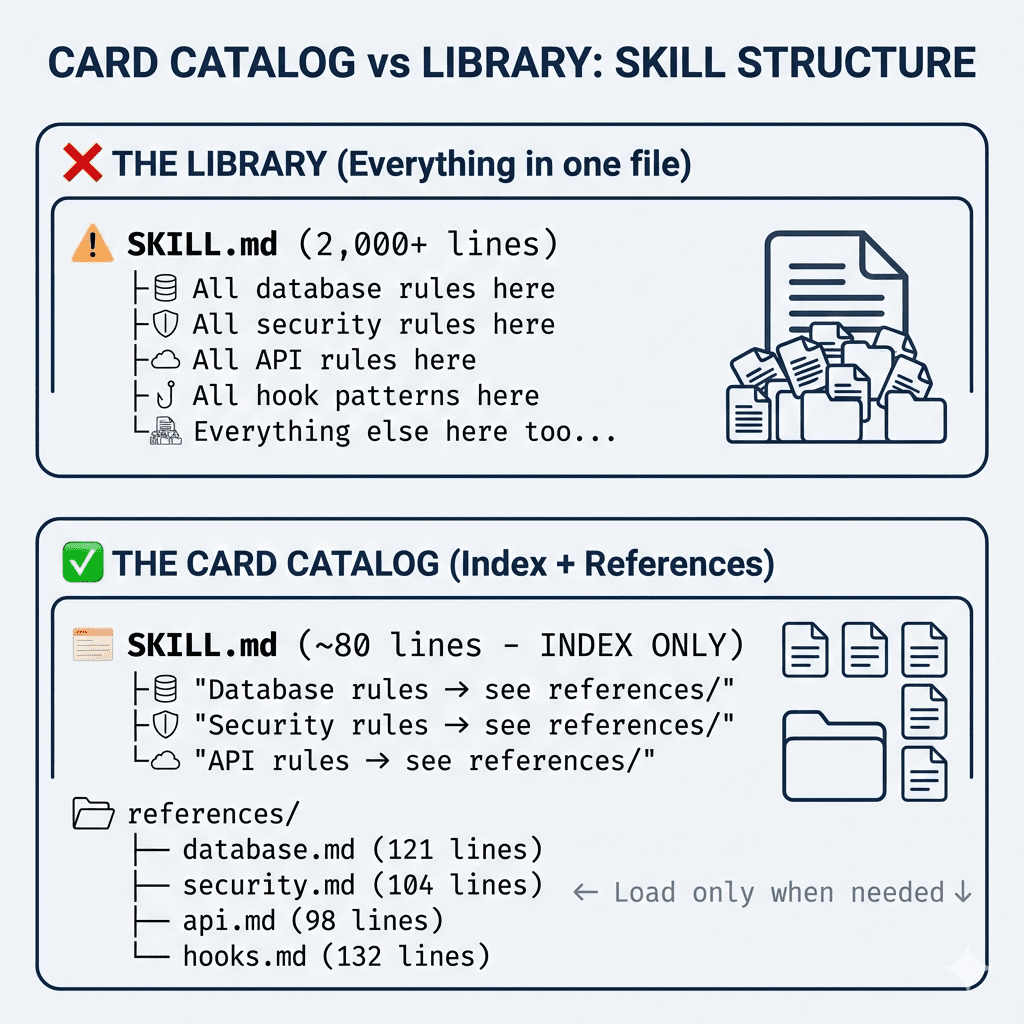
Instead of cramming everything into SKILL.md like this:
## Database Schema Rules
Always use snake_case for table names...
[50 more lines of database rules]

## Firebase Security Rules
Auth patterns must follow...
[40 more lines of Firebase rules]
Your SKILL.md becomes a simple directory:
## Database Schema Rules
See: references/database.md
Guidelines for table naming, migrations, and schema patterns.

## Firebase Security Rules
See: references/security.md
Authentication patterns and Firestore rules structure.
Why does this matter for evolution?
When you capture new insights, they go into the specific reference file—not bloating the main index. Your skill grows by expanding its reference library, not by inflating one massive file.
And when you pair this structure with the build-insights-logger skill? Your rules start updating themselves based on real learnings.
Your Charmander starts evolving.
.
.
.
Building Your Self-Evolving Skill: The Complete Walkthrough
Alright, let’s get practical. Here’s exactly how to set this up—step by step, with real screenshots from when I did this myself.
Step 1: Convert Your Existing Rules to an Indexed Skill
If you already have Claude Code rules somewhere (in CLAUDE.md, a rules file, or scattered notes), this is your starting point.
Here’s the prompt I used:
Convert the following project rules at @notes/rules.md into a live documentation skill using the "skill-creator" skill.

## Requirements

### 1. Skill Structure

Create a skill folder with this structure:

```
.claude/skills/[skill-name]/
    ├── SKILL.md           # Index file (card catalog, NOT the full library)
    ├── references/        # Detailed rule files
    │   ├── [category-1].md
    │   ├── [category-2].md
    │   └── ...
    └── [README.md](http://README.md)          # Optional: skill usage guide
```

### 2. SKILL.md Design (The Index)

The SKILL.md should act as a **card catalog**, not contain the full rules.

Example:

```
[...content of SKILL.md...]

## Quick Reference

Brief overview of what this skill covers (2-3 sentences max).

## Rule Categories

### [Category 1 Name]

Brief description (1 line). See: `references/[category-1].md`

### [Category 2 Name]

Brief description (1 line). See: `references/[category-2].md`

[Continue for all categories...]

## When to Load References

- Load `references/[category-1].md` when: [specific trigger]
- Load `references/[category-2].md` when: [specific trigger]
```

### 3. Reference File Design

Each reference file in `references/` should:
- Focus on ONE category/domain of rules
- Include code examples where helpful
- Be self-contained (can be understood without reading other files)
- End with a "Quick Checklist" for that category

### 4. Evolvability

Structure the skill so new learnings can be easily added:
- Each reference file should have a `## Lessons Learned` section at the end (initially empty)
- The SKILL.md index should be easy to extend with new categories
- Use consistent formatting so automated updates are possible

## Notes

- Prioritize token efficiency: Claude should only load what it needs
- Keep SKILL.md under 100 lines if possible
- Each reference file should be focused (ideally under 200 lines)
- Use the indexed structure so the build-insights-logger can update specific reference files later
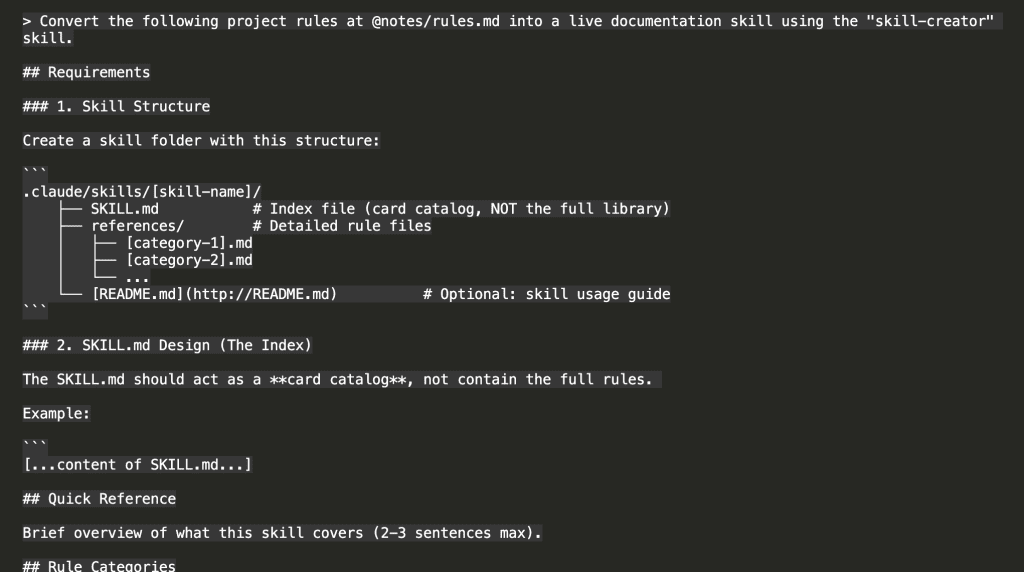
Two prerequisites before you run this:
- Install the “skill-creator” skill first
- Turn on Plan Mode (Shift+Tab)
Claude initiates the skill-creator and starts working:
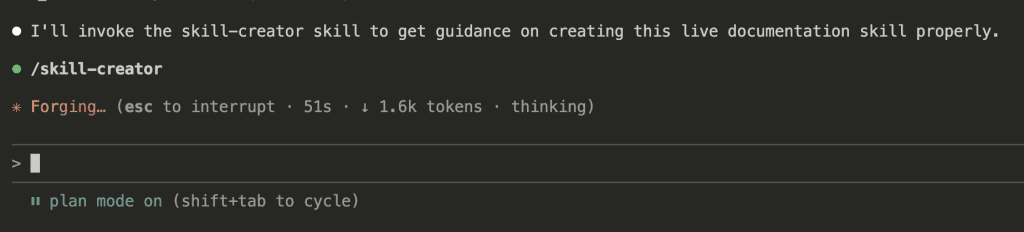
It explores your codebase for existing patterns to follow. (I love watching this part—it’s like Claude doing research before diving in.)

In my case, Claude asked clarifying questions before finalizing the plan. This is Plan Mode doing its job—thinking before coding:
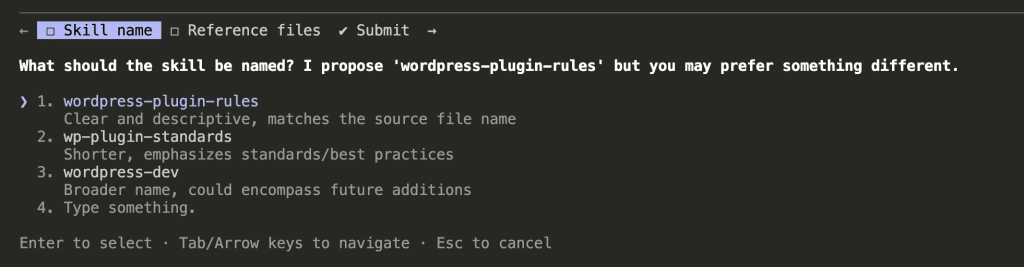
After answering, Claude proposed a complete plan:
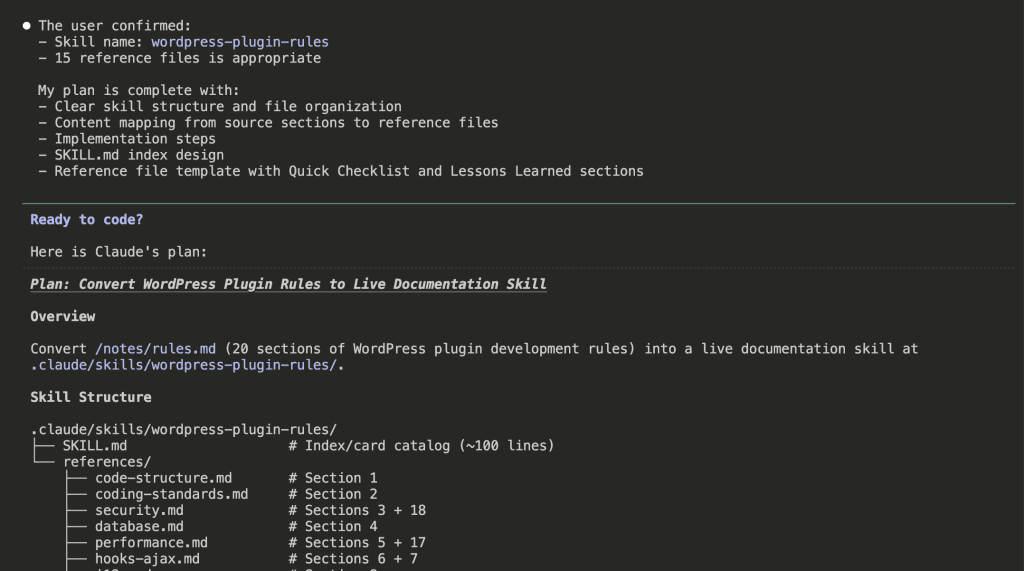
The plan includes the SKILL.md design—notice how it acts as an index, not a container for all the rules:

I agreed to proceed with auto-accept edits. And here’s what Claude created:
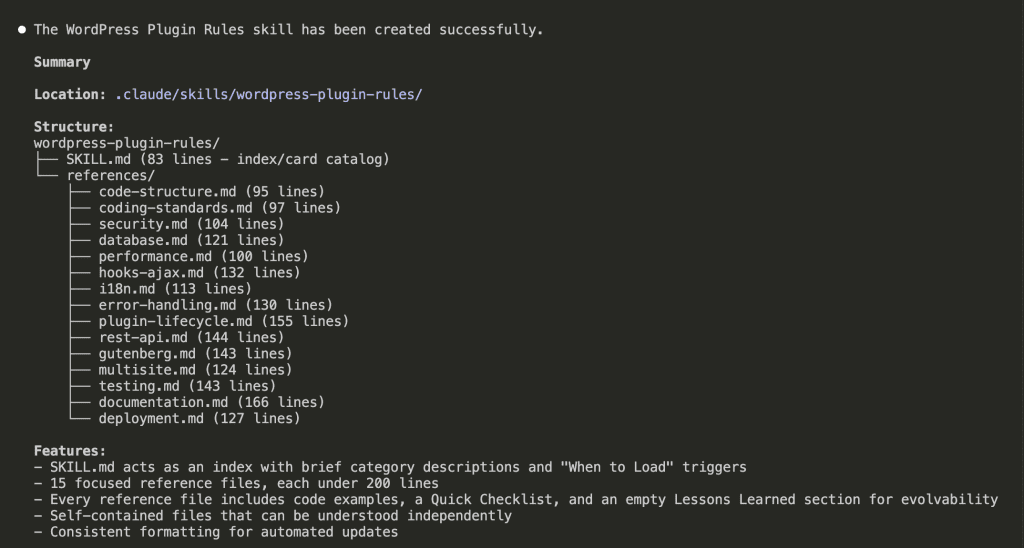
The result:
- SKILL.md: 83 lines (the index/card catalog)
- 15 reference files, each under 200 lines
- Every reference file includes code examples, a Quick Checklist, and an empty Lessons Learned section
Those empty Lessons Learned sections? They’re intentional. That’s where the evolution happens.
👉 Don’t have existing rules to convert? You can ask Claude to analyze your codebase and extract patterns into a skill. Or check out my previous post on how to compile your own project rules first.
Step 2: Install the Build-Insights-Logger
This is the skill that captures learnings during your sessions and routes them to the right place.
/plugin marketplace add nathanonn/claude-skill-build-insights-logger
GitHub repo: https://github.com/nathanonn/claude-skill-build-insights-logger
(Yes, I built this. Yes, I’m biased. But it solves a real problem.)
Step 3: Work Like You Normally Would
Here’s the beautiful part: you don’t need to change how you work.
With your skill installed and the insights logger ready, just… build. Code. Debug. Do your thing.
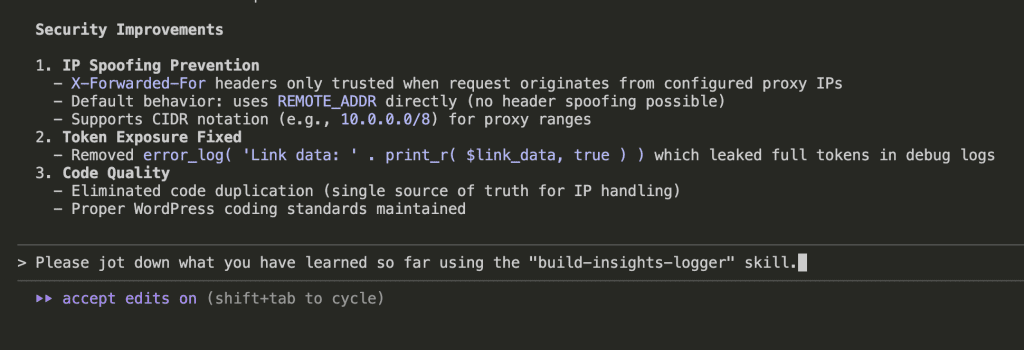
I’ll show you what this looks like. I asked Claude to audit my WordPress plugin for security vulnerabilities:
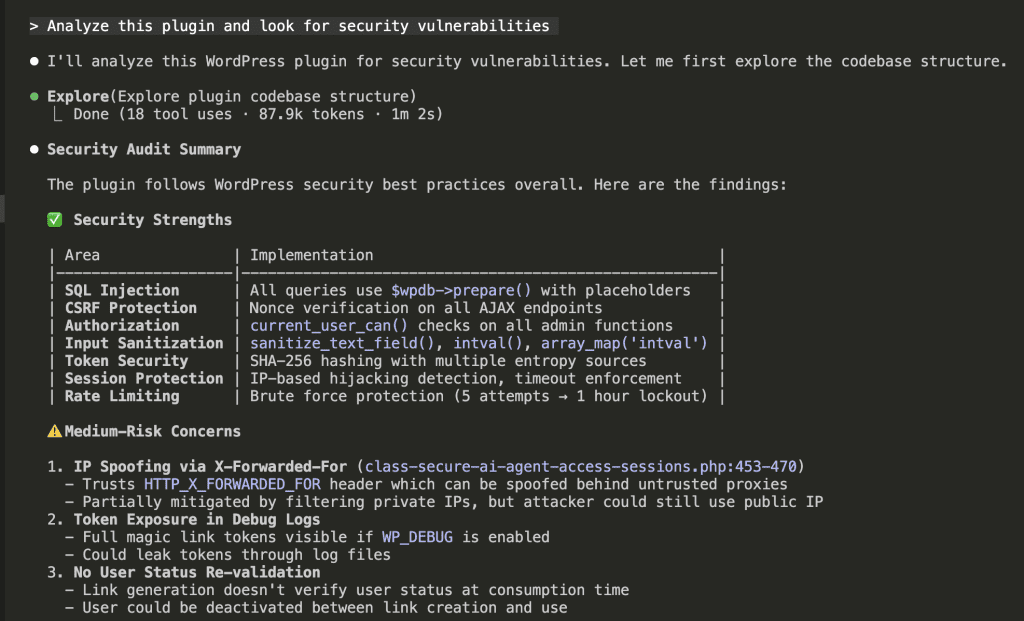
Claude found several issues, fixed them, and documented the changes. Standard stuff.
But here’s where it gets good.
After the implementation, I triggered the insights logger:
Please jot down what you have learned so far using the "build-insights-logger" skill.
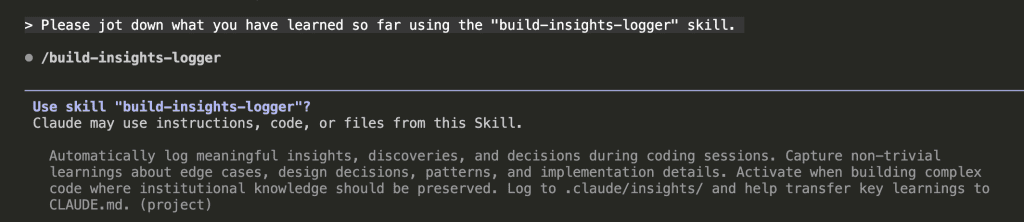
Claude activated the skill:
And logged 6 insights from the session:
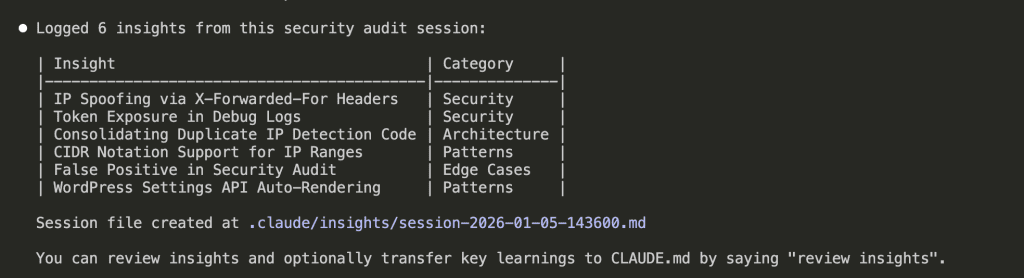
Six insights. Automatically categorized. Saved to .claude/insights/session-2026-01-05-143600.md.
No manual documentation. No “I should write this down” that never happens. Just… captured.
Step 4: Review and Integrate (The Curation Step)
You can review immediately after one session, or batch multiple sessions together. I usually wait until I have a few sessions worth of insights—but that’s personal preference.
Here’s how to review:
Please use the "build-insights-logger" skill to review the insights logged so far.

Claude reads all session files and presents a summary organized by category:
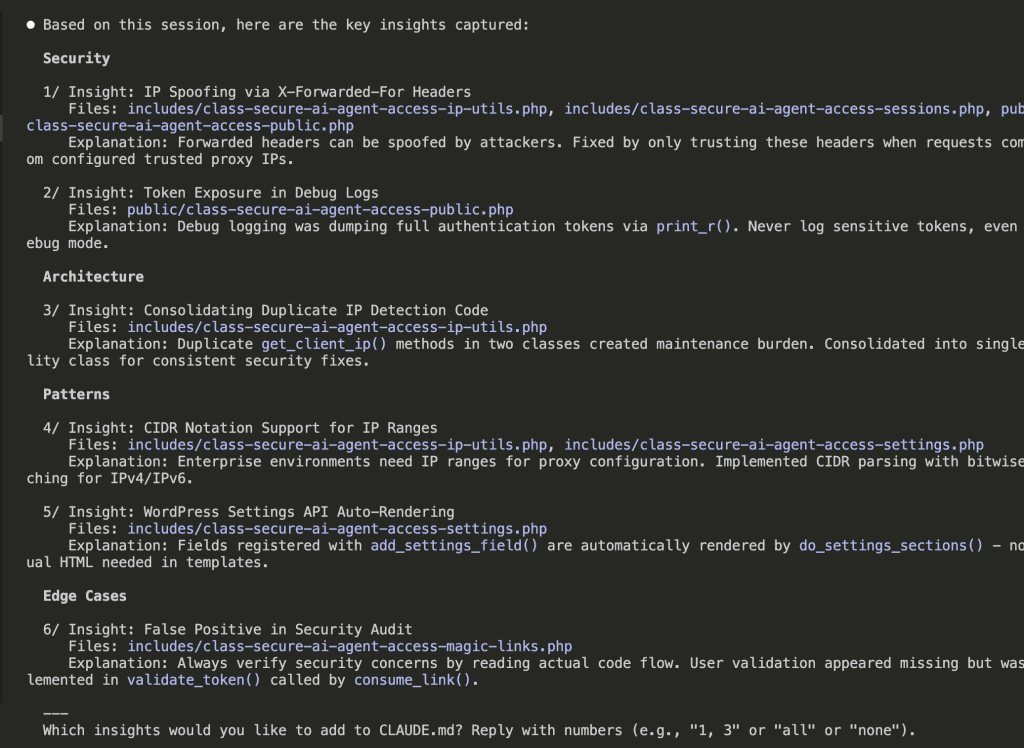
Now here’s the critical part: don’t add everything.
This is where human judgment matters. Review each insight and ask: “Will this apply to future projects, or is it specific to this one-off feature?”
Some insights are gold. Some are situational. You’re the curator here.
I selected insights 1, 2, 5, and 6—the ones that generalize across WordPress projects:

Important detail: Notice my instruction. By default, the build-insights-logger updates CLAUDE.md. I explicitly redirected it to update the skill instead, with a reminder to keep SKILL.md clean—insights should go to the relevant reference files, not the index.
Claude reads the relevant reference files and adds the insights where they belong:
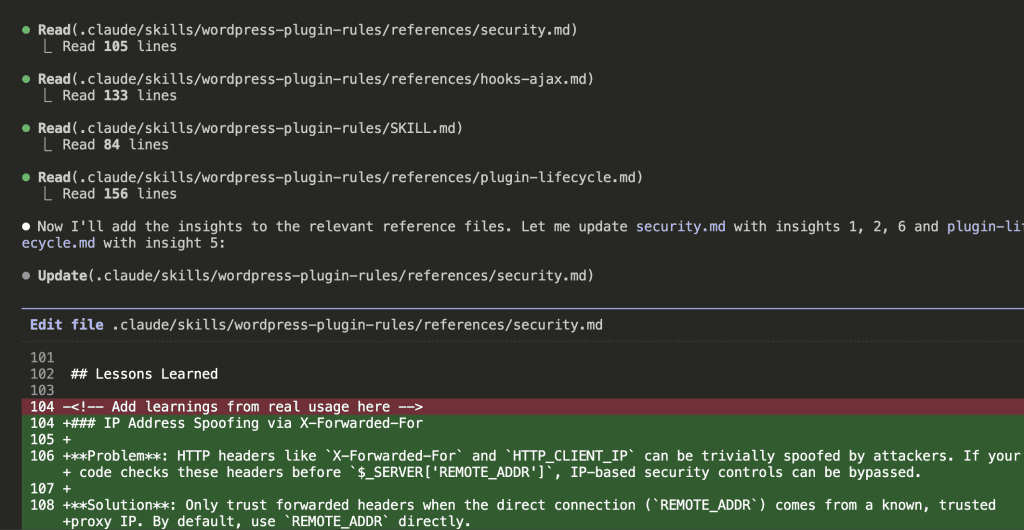
The result:
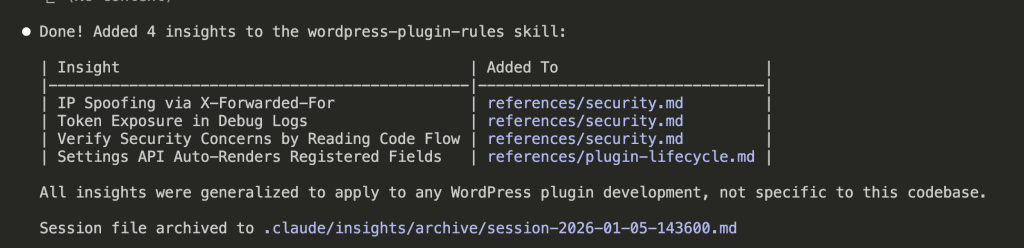
4 insights added to the skill:
- 3 security insights →
references/security.md - 1 lifecycle insight →
references/plugin-lifecycle.md
The session file gets archived. And your skill is now smarter than it was an hour ago.
.
.
.
What You Actually Built Here
Let’s step back for a second.
Four steps. That’s all it took:
- Convert rules to an indexed skill
- Install the insights logger
- Build like normal
- Review and integrate learnings
But what actually changed?
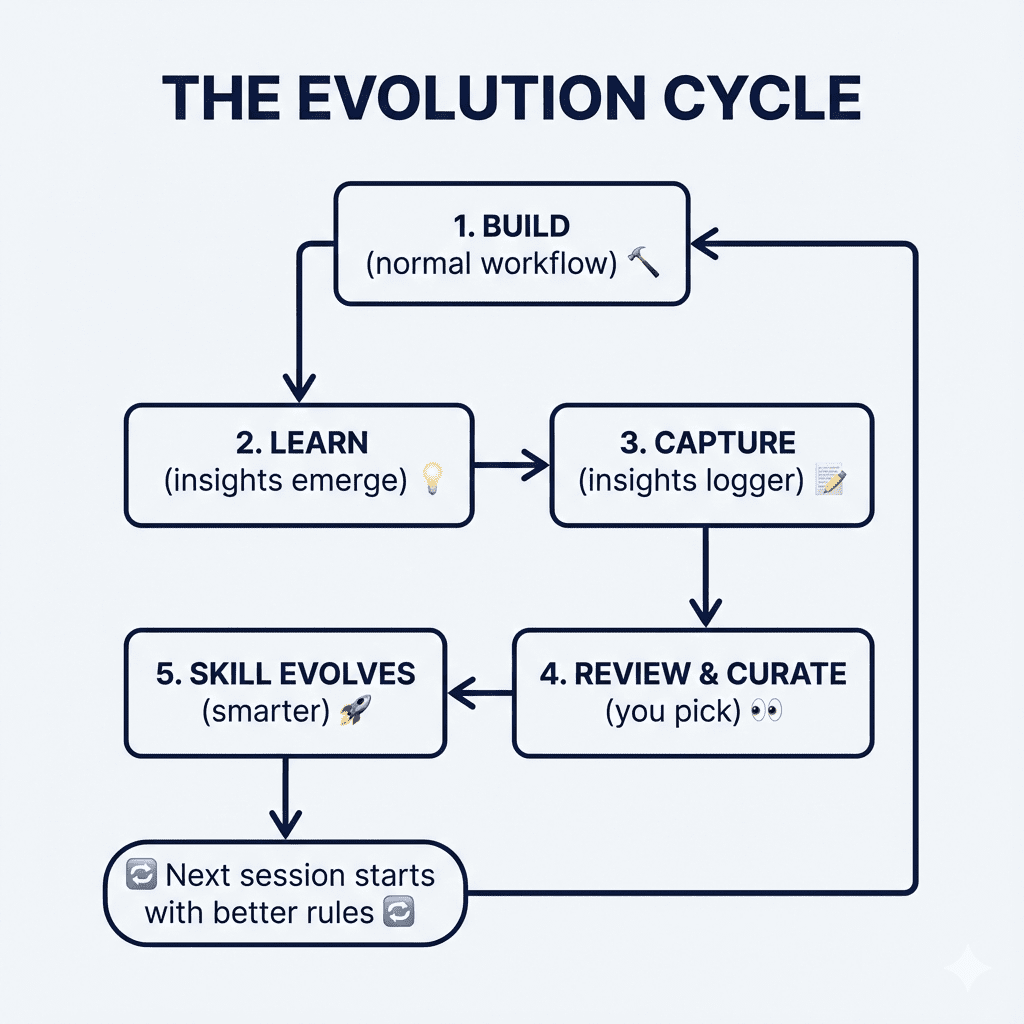
You’re no longer maintaining documentation. You’re growing a knowledge base.
Every correction you make—every “actually, do it this way instead” moment, every insight from debugging at 2am—the system captures it. You review it. The good stuff evolves your skill. Your next session starts with rules that reflect what you actually learned, not what you thought you knew when you started.
The gap between your experience and your documentation? It closes.
That mistake I mentioned at the beginning—Claude repeating an error I’d already corrected? It doesn’t happen anymore. Because the correction made it into my Claude Code rules. Automatically. As part of my normal workflow.
Your Charmander evolved into Charizard.
And it keeps evolving.
.
.
.
Your Turn
If you’ve been cramming rules into CLAUDE.md—or worse, keeping them in your head and hoping for the best—try this process on your next project.
Start with whatever rules you have. Even messy ones. (Especially messy ones, honestly.)
Convert them to an indexed skill. Install the insights logger. Build for a few sessions. Then review your insights folder.
You’ll be surprised at what Claude captured. And you’ll be amazed at how much smarter your rules become when they’re allowed to learn alongside you.
What project are you going to evolve first?
Go build it.
Now.

Leave a Comment