I Showed You the Wrong Way to Do Claude Code Testing. Let Me Fix That.
Last week, I walked you through browser testing with Claude Code using the Ralph loop plugin.
I was pretty proud of it, actually.
Here’s the thing: I was wrong.
Well, not entirely wrong. The tests ran. Things got verified. But what I showed you? That wasn’t a true Ralph loop—not the way Geoffrey Huntley originally designed it. And the difference matters more than I realized at the time.
(Stay with me here. This confession has a happy ending.)
.
.
.
The Problem I Didn’t See Coming
The real Ralph loop is supposed to wipe memory clean at the start of each iteration. No leftover context. No accumulated baggage. Just a fresh, focused agent tackling one task at a time.
The Ralph loop plugin from Claude Code’s official marketplace? It preserves context from the previous loop. The plugin relies on a stop hook to end and restart each iteration—but the conversation history tags along for the ride.
And that’s where everything quietly falls apart.
Here’s what this actually looks like in practice:
Imagine you’re setting out on a multi-day hiking trip. Every morning, you pack your backpack for that day’s trail.
Now imagine that instead of emptying your pack each night, you just… keep adding to it. Day one’s water bottles. Day two’s snacks. Day three’s rain gear (even though it’s sunny now). By day five, you’re hauling 40 pounds of stuff you don’t need, and you can barely focus on the trail in front of you.
That’s context rot.
It happens when an AI model’s performance degrades because its context window gets bloated with accumulated information from previous tasks. The more history your agent carries forward, the harder it becomes for the model to stay sharp on what actually matters right now.
👉 The takeaway: Fresh context isn’t a nice-to-have. It’s the whole point.
.
.
.
What Context Rot Actually Looks Like
Let me make this concrete with Claude Code testing:
Iteration 1: Claude runs test TC-001. Context is clean. Performance is sharp. The backpack is light.
Iteration 5: Claude runs test TC-005. But it’s also dragging along memories of TC-001 through TC-004. The pack is getting heavy.
Iteration 15: Claude runs test TC-015. The model is now swimming through accumulated history, trying to find what actually matters among all the gear from previous days.
Iteration 25: Claude runs test TC-025. Performance has degraded. The model makes weird mistakes. It forgets what it was supposed to verify—because it’s exhausted from carrying everyone else’s context.
Same trail. Same agent. Completely different performance.
And here’s the frustrating part: you might not even notice it happening. The tests still run. They just run… worse. Slower. Less reliably. With occasional bizarre failures that make you question your own test plan.
.
.
.
The Solution That Was Already There
So I went looking for a better approach to Claude Code testing—something that would give me the clean-slate benefits of a proper Ralph loop without the context accumulation problem.
And I found it in a tool I’d been using for something else entirely: Claude Code’s task management system.
Here’s where it gets interesting.
The task management system gives you the same effect as a properly implemented Ralph loop—but with something the Ralph loop never had: dependency management.
Think back to the hiking metaphor.
Each sub-agent is like a fresh hiker starting a new day with an empty pack. They get their assignment, they complete their section of trail, they report back. Then the next hiker takes over with their own empty pack.
- No accumulated gear.
- No context rot.
- No performance degradation over time.
But here’s the bonus: the task management system also handles situations where “Day 3’s trail can’t start until Day 2’s bridge gets built.” Dependencies get tracked automatically. Tests that need prerequisites don’t run until those prerequisites pass.
(Is that two features in one? Well, is a package of two Reese’s Peanut Butter Cups two candy bars? I say it counts as one delicious solution.)
.
.
.
How Claude Code Testing Actually Works With Task Management
Let me show you exactly how to set this up.
Fair warning: there are a lot of screenshots coming. But I promise each one shows something important about the workflow.
Step 1: Put the Prompt as a Command
First, store the entire testing prompt as a command file. This makes triggering your Claude Code testing workflow trivially easy—just a slash command away.
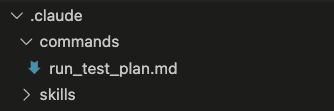
The full prompt (I’ll include it at the end—it’s long but worth having) tells Claude exactly how to read your test plan, create tasks, set dependencies, execute tests sequentially, and track results.
Step 2: Trigger the Command
With the command saved, execution is just:

That’s it. Type /run_test_plan and let the system take over.
Step 3: Claude Reads Your Specs
Since we’re starting fresh—no memory of previous execution—Claude first reads your original specs, test plan, and implementation plan to understand the context.

(Remember: empty backpack. The agent needs to load up on just what it needs for this journey.)
Step 4: Claude Creates the Tasks
After understanding the context, Claude creates one task per test case. Watch how it automatically detects dependencies:
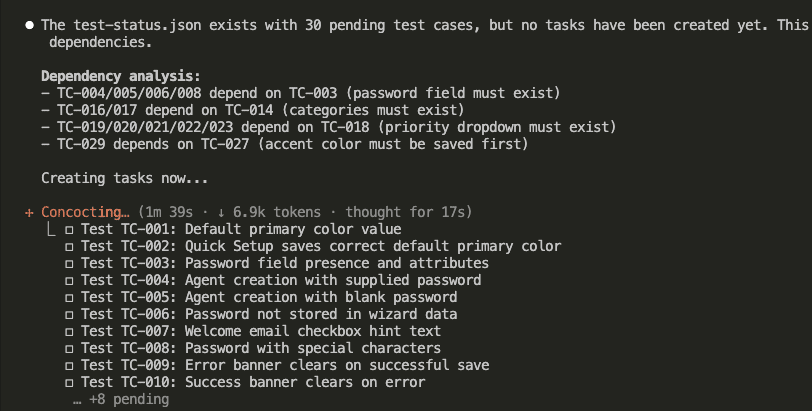
See that dependency analysis?
- TC-004, TC-005, TC-006, TC-008 depend on TC-003 (password field must exist first)
- TC-016, TC-017 depend on TC-014 (categories must exist first)
- TC-019 through TC-023 depend on TC-018 (priority dropdown must exist first)
- TC-029 depends on TC-027 (accent color must be saved first)
The system figured this out by reading the test plan. No manual configuration required.
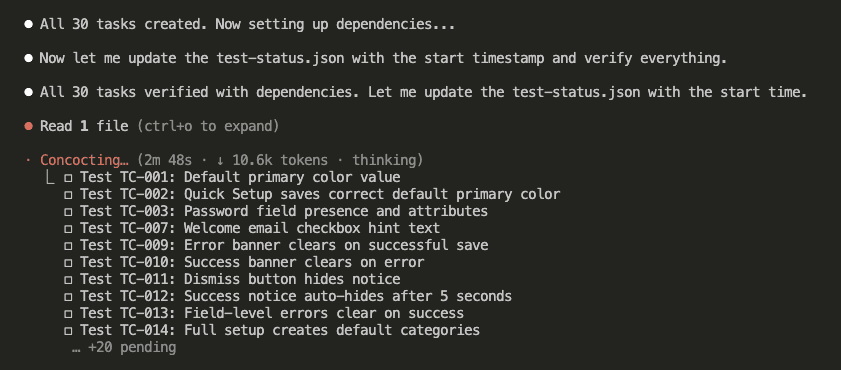
Step 5: Dependencies Get Locked In
All 30 tasks created.
Now Claude sets up the dependencies and verifies everything:
Step 6: Test Status File Created
Claude creates a test-status.json file to track everything—machine-readable, resumable, and audit-friendly:
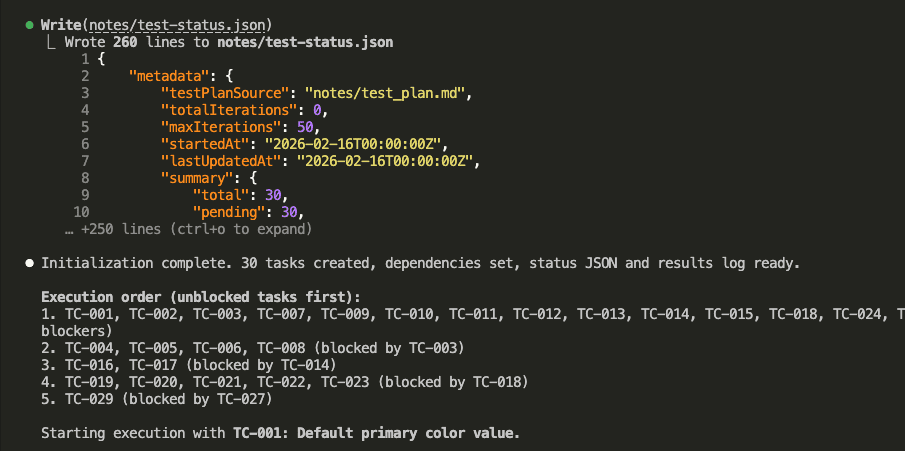
The execution order is now crystal clear:
- Unblocked tasks first: TC-001, TC-002, TC-003, TC-007, TC-009, TC-010, TC-011, TC-012, TC-013, TC-014, TC-015, TC-018, TC-024
- Tasks blocked by TC-003: TC-004, TC-005, TC-006, TC-008
- Tasks blocked by TC-014: TC-016, TC-017
- Tasks blocked by TC-018: TC-019, TC-020, TC-021, TC-022, TC-023
- Tasks blocked by TC-027: TC-029
Step 7: First Task Begins
Here’s where the magic happens.
Claude spawns a sub-agent—with fresh context—to execute TC-001:
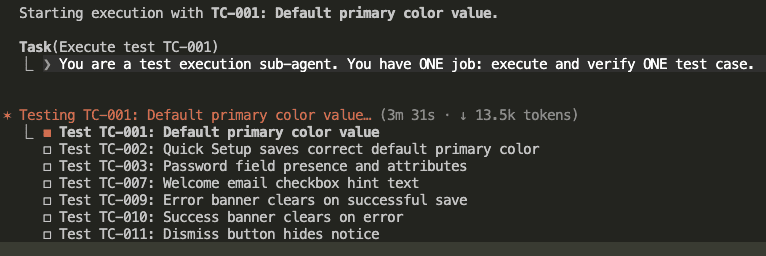
“You are a test execution sub-agent. You have ONE job: execute and verify ONE test case.”
That’s the key instruction. Fresh hiker. Empty backpack. Single trail.
Step 8: Browser Automation for Testing
The sub-agent uses Claude Code’s browser automation to test like a real user would:
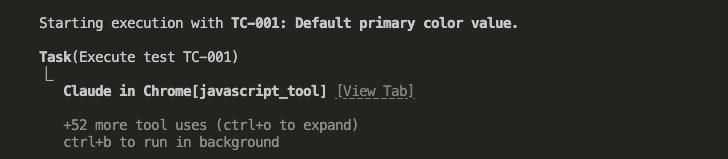
It navigates to URLs, clicks buttons, fills forms, takes screenshots at verification points, and checks the DOM state against expected outcomes.
Real browser. Real interactions. Real Claude Code testing.
Step 9: Test Status Gets Updated
After completing a test, the sub-agent updates the status file:
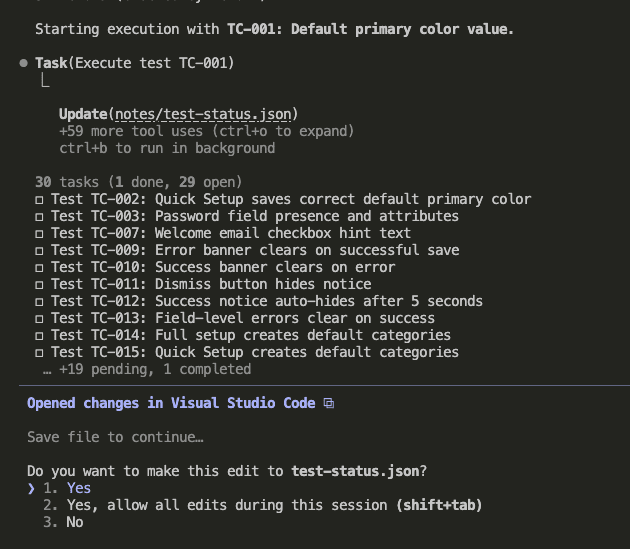
Step 10: Human-Readable Results Too
The results also get appended to a markdown log for human review:
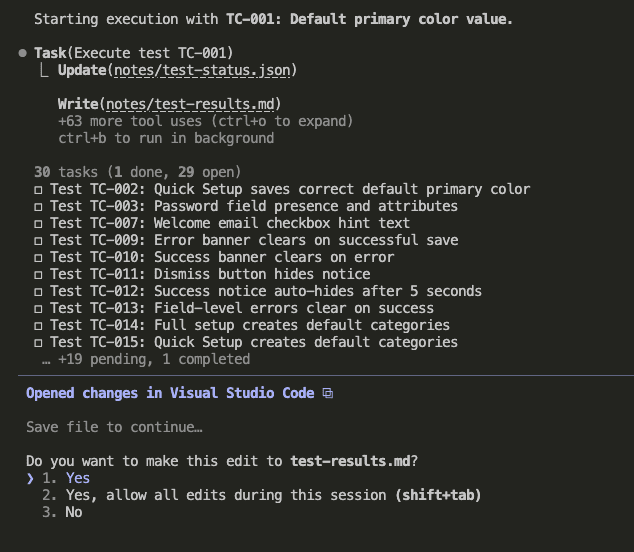
Every test gets logged in two places:
test-status.jsonfor machine parsingtest-results.mdfor human review
(Because sometimes you want to query the data programmatically, and sometimes you just want to read what happened over coffee. Both are valid.)
Step 11: Automatic Progression to Next Task
Once TC-001 completes, Claude automatically moves to TC-002:
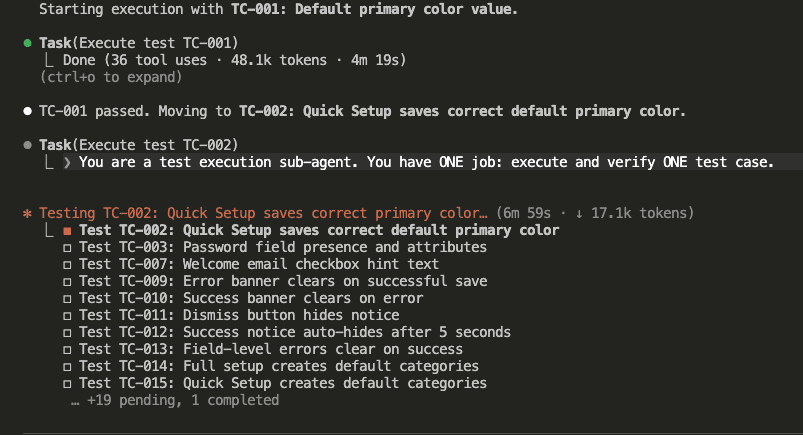
Look at those stats: 36 tool uses, 48.1k tokens, 4 minutes 19 seconds for TC-001.
Then a completely fresh sub-agent spawns for TC-002. New hiker. New backpack. No accumulated context from TC-001.
Step 12: Bugs Found? Claude Fixes Them.
TC-002 found a bug. Here’s what happened:
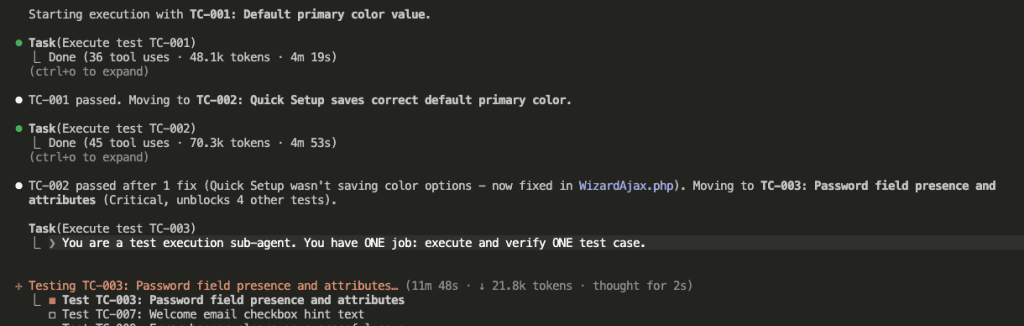
“TC-002 passed after 1 fix (Quick Setup wasn’t saving color options — now fixed in WizardAjax.php).”
The sub-agent detected the failure, analyzed the root cause, implemented a fix, and re-ran the test. All autonomously. All within the same fresh context.
Step 13: Dependencies Unlock Automatically
Now watch the dependency system in action.
Once TC-003 passes:
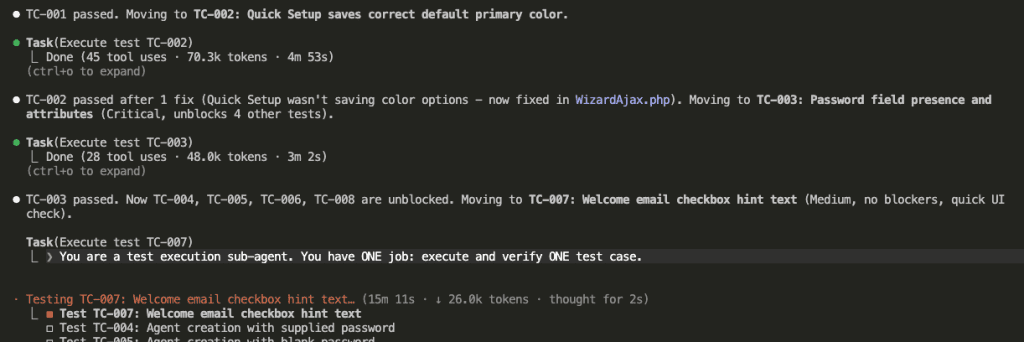
“TC-003 passed. Now TC-004, TC-005, TC-006, TC-008 are unblocked.”
The password field exists now. All the tests that depend on it can finally run.
👉 This is why dependencies matter: They prevent tests from running before their preconditions are met—avoiding the exact conflicts where one agent messes with something another agent needs.
Steps 14-15: The Marathon Continues
It keeps going. Test after test. Each sub-agent fresh and focused:
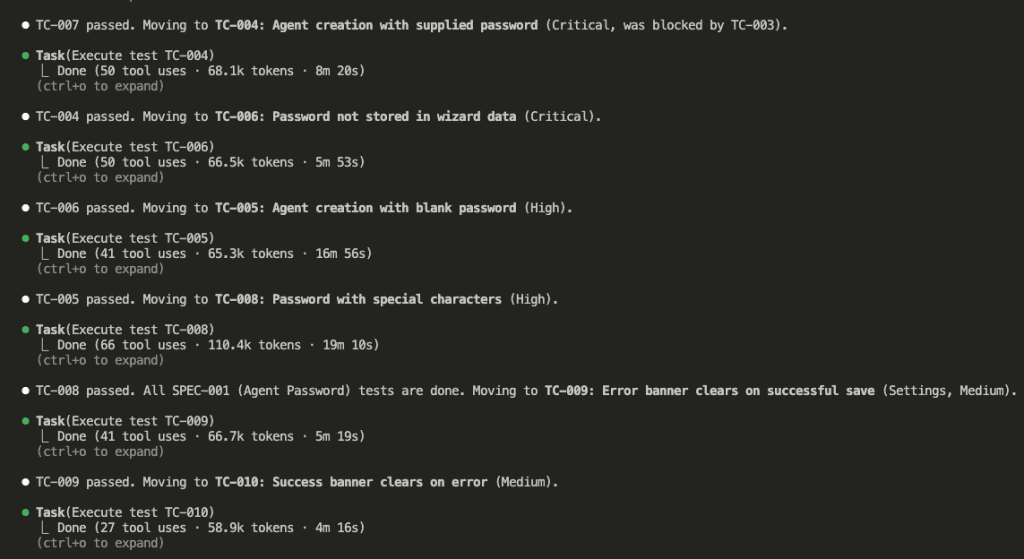
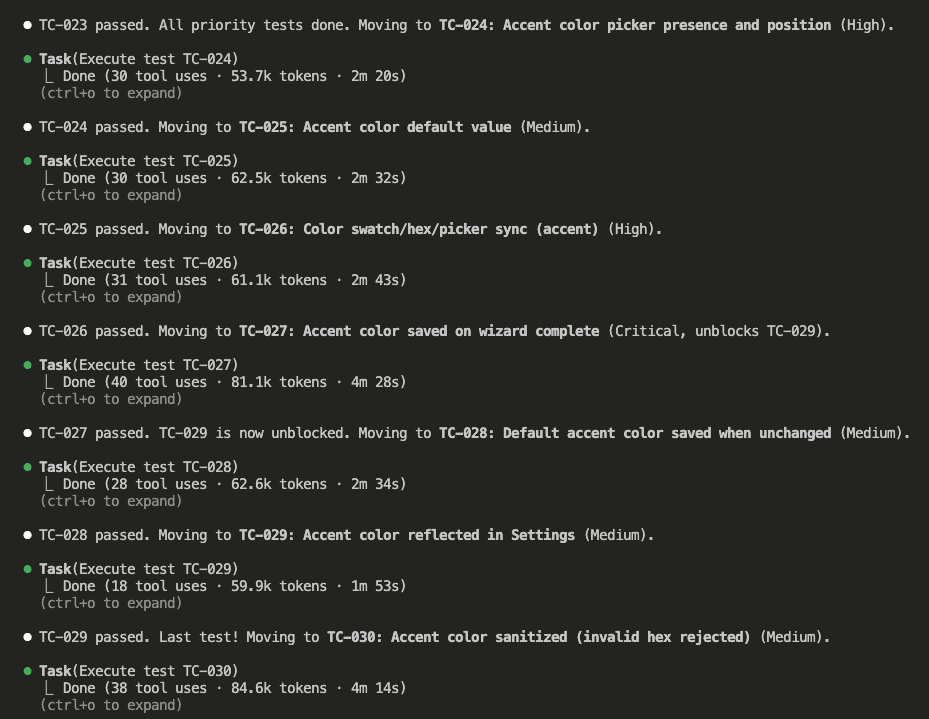
Every test runs sequentially. Every sub-agent gets clean context. Every dependency is respected. No context rot in sight.
Step 16: All Tests Complete
After 2 hours and 12 minutes:
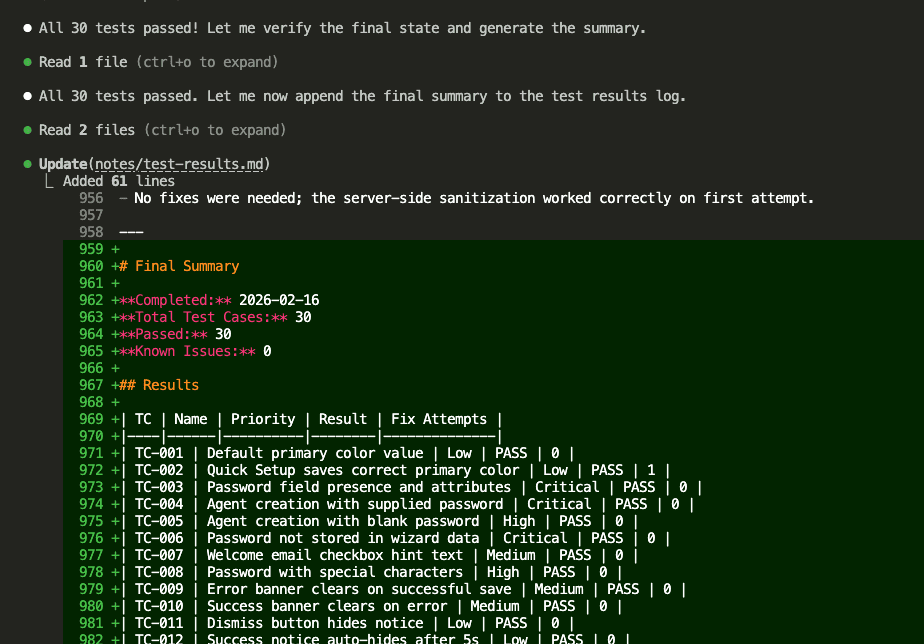
30 tests. All passed. Zero known issues.
Step 17: The Full Summary
The orchestrator writes a comprehensive summary:
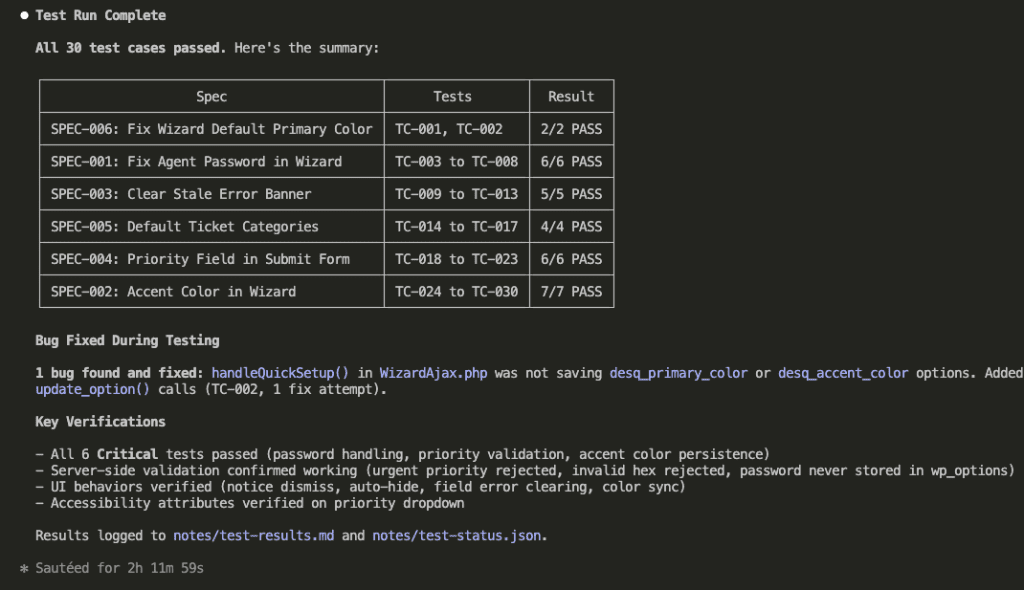
Here’s what got verified:
- All 6 Critical tests passed (password handling, priority validation, accent color persistence)
- Server-side validation confirmed working (urgent priority rejected, invalid hex rejected, password never stored in wp_options)
- UI behaviors verified (notice dismiss, auto-hide, field error clearing, color sync)
- Accessibility attributes verified on priority dropdown
And that bug that got fixed? handleQuickSetup() in WizardAjax.php wasn’t saving desq_primary_color or desq_accent_color options. Found during TC-002. Fixed autonomously.
.
.
.
Why This Actually Works Better
Let me be direct about the comparison:
| Aspect | Ralph Loop Plugin | Task Management System |
|---|---|---|
| Context | Preserves across iterations | Fresh per sub-agent |
| Dependencies | None | Built-in blocking |
| Parallel Safety | Risky | Sequential by default |
| State Tracking | Basic stop hook | JSON + Markdown logs |
| Bug Fixing | Manual | Automatic (up to 3 attempts) |
| Resumability | Limited | Full state recovery |
The Ralph loop was supposed to start each iteration with a clean slate. The task management system actually delivers on that promise—and adds dependency management that prevents tests from stepping on each other.
.
.
.
The Full Prompt (Copy This)
Here’s the complete command file to drop into .claude/commands/run_test_plan.md:
PROMPT: Execute Test Plan Using Claude Code Task Management System
We are executing the test plan. All implementation is complete. Now we verify it works.

## Reference Documents

- **Test Plan:** `notes/test_plan.md`
- **Implementation Plan:** `notes/impl_plan.md`
- **Specs:** `notes/specs.md`
- **Test Status JSON:** `notes/test-status.json`
- **Test Results Log:** `notes/test-results.md`

---

## Phase 1: Initialize

### Step 1: Check for Existing Run (Resumption)

Before creating anything, check if a previous test run exists:

1. Check if `notes/test-status.json` exists
2. Check if there are existing tasks via `TaskList`

**If both exist and tasks have results:**
- This is a **resumed run** — skip to Phase 2 (Step 7)
- Announce: "Resuming previous test run. Skipping already-passed tests."
- Only execute tasks that are still `pending` or `fail` (with fixAttempts < 3)

**If no previous run exists (or files are missing):**
- Continue with fresh initialization below

### Step 2: Read the Test Plan

Read `notes/test_plan.md` and extract ALL test cases. Auto-detect the TC-ID pattern used (e.g., `TC-001`, `TC-101`, `TC-5A`, etc.).

For each test case, note:

- TC ID
- Name
- Priority (Critical / High / Medium / Low — default to Medium if not stated)
- Preconditions
- Test steps and expected outcomes
- Test data (if any)
- Dependencies on other test cases (if any)

### Step 3: Analyze Test Dependencies

Determine which test cases depend on others. Common dependency patterns:

- A "saves data" test may depend on a "displays default" test
- A "form submission" test may depend on "form validation" tests
- An "end-to-end" test may depend on individual component tests

If no clear dependencies exist between test cases, treat them all as independent.

### Step 4: Create Tasks

Use `TaskCreate` to create one task per test case. Set `blocked_by` based on the dependency analysis.

**Task description format:**

```
Test [TC-ID]: [Test Name]
Priority: [Priority]

Preconditions:
- [Required state before test]

Steps:
| Step | Action | Expected Result |
|------|--------|-----------------|
| 1 | [Action] | [Result] |
| 2 | [Action] | [Result] |

Test Data:
- [Field]: [Value]

Expected Outcome: [Final verification]

Environment:
- Refer to CLAUDE.md for wp-env details, URLs, and credentials
- WordPress site: http://localhost:8105
- Admin: http://localhost:8105/wp-admin (admin/password)

---
fixAttempts: 0
result: pending
lastTestedAt: null
notes:
```

### Step 5: Generate Test Status JSON

Create `notes/test-status.json`:

```json
{
    "metadata": {
        "testPlanSource": "notes/test_plan.md",
        "totalIterations": 0,
        "maxIterations": 50,
        "startedAt": null,
        "lastUpdatedAt": null,
        "summary": {
            "total": "<count>",
            "pending": "<count>",
            "pass": 0,
            "fail": 0,
            "knownIssue": 0
        }
    },
    "testCases": {
        "<TC-ID>": {
            "name": "Test case name",
            "priority": "Critical|High|Medium|Low",
            "status": "pending",
            "fixAttempts": 0,
            "notes": "",
            "lastTestedAt": null
        }
    },
    "knownIssues": []
}
```

### Step 6: Initialize Test Results Log

Create `notes/test-results.md`:

```markdown
# Test Results

**Test Plan:** notes/test_plan.md
**Started:** [CURRENT_TIMESTAMP]

## Execution Log
```

### Verify Initialization

Use `TaskList` to confirm:
- All TC-IDs from the test plan have a corresponding task
- Dependencies are correctly set via `blocked_by`
- All tasks show `result: pending`

Cross-check task count matches `summary.total` in `notes/test-status.json`.

---

## Phase 2: Execute Tests

### Step 7: Determine Execution Order

Use `TaskList` to read all tasks and their `blocked_by` fields. Determine sequential execution order:

1. Tasks with no `blocked_by` (or all dependencies resolved) come first
2. Tasks whose dependencies are resolved come next
3. Continue until all tasks are ordered

**For resumed runs:** Skip tasks where `result` is already `pass` or `known_issue`.

### Step 8: Execute One Task at a Time

For the next eligible task, spawn ONE sub-agent with the instructions below.

**One sub-agent at a time. Do NOT spawn multiple sub-agents in parallel.**

---

#### Sub-Agent Instructions

**You are a test execution sub-agent. You have ONE job: execute and verify ONE test case.**

1. **Read your task** using `TaskGet` to get the full description
2. **Parse the test steps** from the description (everything above the `---` separator)
3. **Parse the metadata** from below the `---` separator
4. **Read CLAUDE.md** for environment details, URLs, and credentials

5. **Execute the test:**

    Using browser automation:
    - Navigate to URLs specified in the test steps
    - Click buttons/links as described
    - Fill form inputs with the test data provided
    - Take screenshots at key verification points
    - Read console logs for errors
    - Verify DOM state matches expected outcomes

    Follow the test plan steps EXACTLY. Do not skip steps.

6. **Determine the result:**

    **PASS** if:
    - All expected outcomes verified
    - No unexpected console errors
    - UI state matches test plan

    **FAIL** if:
    - Any expected outcome not met
    - Unexpected errors
    - UI state doesn't match

7. **If PASS:** Update the task description metadata via `TaskUpdate`:

    ```
    ---
    fixAttempts: 0
    result: pass
    lastTestedAt: [CURRENT_TIMESTAMP]
    notes: [Brief description of what was verified]
    ```

    Mark the task as `completed`.

8. **If FAIL and fixAttempts < 3:**

    a. Analyze the root cause
    b. Implement a fix in the codebase
    c. Increment fixAttempts and update via `TaskUpdate`:

    ```
    ---
    fixAttempts: [previous + 1]
    result: fail
    lastTestedAt: [CURRENT_TIMESTAMP]
    notes: [What failed, root cause, what fix was applied]
    ```

    d. Re-run the test steps to verify the fix
    e. If now passing, set `result: pass` and mark task as `completed`
    f. If still failing and fixAttempts < 3, repeat from (a)

9. **If FAIL and fixAttempts >= 3:** Mark as known issue via `TaskUpdate`:

    ```
    ---
    fixAttempts: 3
    result: known_issue
    lastTestedAt: [CURRENT_TIMESTAMP]
    notes: KI — [Description of the issue, steps to reproduce, severity, suggested fix]
    ```

    Mark the task as `completed`.

10. **Update Test Status JSON** — Read `notes/test-status.json`, update the test case entry and recalculate summary counts, then write back:

    - Set `status` to `pass`, `fail`, or `known_issue`
    - Update `fixAttempts`, `notes`, `lastTestedAt`
    - Increment `metadata.totalIterations`
    - Update `metadata.lastUpdatedAt`
    - Recalculate `metadata.summary` counts
    - If known_issue, add entry to `knownIssues` array

11. **Append to test results log** (`notes/test-results.md`):

    ```markdown
    ## [TC-ID] — [Test Name]

    **Result:** PASS | FAIL | KNOWN ISSUE
    **Tested At:** [TIMESTAMP]
    **Fix Attempts:** [N]

    **What happened:**
    [Brief description of test execution]

    **Notes:**
    [Observations, errors, or fixes attempted]

    ---
    ```

**CRITICAL: Before finishing, verify you have updated ALL THREE locations:**

1. Task description (metadata below `---` separator) via `TaskUpdate`
2. `notes/test-status.json` (test case entry + summary counts)
3. `notes/test-results.md` (appended human-readable entry)

Missing ANY of these = incomplete iteration.

---

### Step 9: Verify and Continue

After each sub-agent finishes, the orchestrator:

1. Uses `TaskGet` to verify the task description metadata was updated
2. Reads `notes/test-status.json` to confirm JSON was updated and summary counts are correct
3. Reads `notes/test-results.md` to confirm a new entry was appended
4. **If any location was NOT updated**, update it before proceeding
5. Determines the next eligible task (unresolved, dependencies met)
6. Spawns the next sub-agent (back to Step 8)

### Step 10: Repeat Until All Resolved

Continue until ALL tasks have `result: pass` or `result: known_issue`.

```
Completion check:
  - result: pass         → resolved
  - result: known_issue  → resolved
  - result: fail         → needs re-test (if fixAttempts < 3)
  - result: pending      → not yet tested

ALL resolved? → Phase 3 (Summary)
Otherwise?    → Next task
```

---

## Phase 3: Summary

### Step 11: Generate Final Summary

When all tasks are resolved, append a final summary to `notes/test-results.md`:

```markdown
# Final Summary

**Completed:** [TIMESTAMP]
**Total Test Cases:** [N]
**Passed:** [N]
**Known Issues:** [N]

## Results

| TC | Name | Priority | Result | Fix Attempts |
|----|------|----------|--------|--------------|
| TC-XXX | [Name] | High | PASS | 0 |
| TC-YYY | [Name] | Medium | KNOWN ISSUE | 3 |

## Known Issues Detail

### KI-001: [TC-ID] — [Issue Title]

**Severity:** [low|medium|high|critical]
**Steps to Reproduce:** [How to see the bug]
**Suggested Fix:** [Potential solution if known]

## Recommendations

[Any follow-up actions needed]
```

---

## Rules Summary

| Rule | Description |
|------|-------------|
| 1:1 Mapping | One task per test case — no grouping |
| Dependencies | Use `blocked_by` to enforce test execution order |
| Sequential | One sub-agent at a time — do NOT spawn multiple in parallel |
| Sub-Agents | One sub-agent per task — fresh context, focused execution |
| Max 3 Attempts | After 3 fix attempts → mark as `known_issue` |
| Metadata in Description | Track `fixAttempts`, `result`, `lastTestedAt`, `notes` below `---` separator |
| Test Status JSON | Always update `notes/test-status.json` after each test |
| Log Everything | Append results to `notes/test-results.md` for human review |
| Resumable | Detect existing run state and continue from where it left off |
| Completion | All tasks resolved = all results are `pass` or `known_issue` |

## Do NOT

- Spawn multiple sub-agents in parallel — execute ONE at a time
- Leave tasks in `fail` state without either retrying or escalating to `known_issue`
- Modify test plan steps — execute them exactly as written
- Forget to update `notes/test-status.json` after each test
- Forget to append to the test results log after each test
- Skip the dependency analysis
- Use `alert()` or `confirm()` in any fix (see CLAUDE.md)
We are executing the test plan. All implementation is complete. Now we verify it works.
## Reference Documents
- **Test Plan:** `notes/test_plan.md`
- **Implementation Plan:** `notes/impl_plan.md`
- **Specs:** `notes/specs.md`
- **Test Status JSON:** `notes/test-status.json`
- **Test Results Log:** `notes/test-results.md`
---
## Phase 1: Initialize
### Step 1: Check for Existing Run (Resumption)
Before creating anything, check if a previous test run exists:
1. Check if `notes/test-status.json` exists
2. Check if there are existing tasks via `TaskList`
**If both exist and tasks have results:**
- This is a **resumed run** — skip to Phase 2 (Step 7)
- Announce: "Resuming previous test run. Skipping already-passed tests."
- Only execute tasks that are still `pending` or `fail` (with fixAttempts < 3)
**If no previous run exists (or files are missing):**
- Continue with fresh initialization below
### Step 2: Read the Test Plan
Read `notes/test_plan.md` and extract ALL test cases. Auto-detect the TC-ID pattern used (e.g., `TC-001`, `TC-101`, `TC-5A`, etc.).
For each test case, note:
- TC ID
- Name
- Priority (Critical / High / Medium / Low — default to Medium if not stated)
- Preconditions
- Test steps and expected outcomes
- Test data (if any)
- Dependencies on other test cases (if any)
### Step 3: Analyze Test Dependencies
Determine which test cases depend on others. Common dependency patterns:
- A "saves data" test may depend on a "displays default" test
- A "form submission" test may depend on "form validation" tests
- An "end-to-end" test may depend on individual component tests
If no clear dependencies exist between test cases, treat them all as independent.
### Step 4: Create Tasks
Use `TaskCreate` to create one task per test case. Set `blocked_by` based on the dependency analysis.
**Task description format:**
```
Test [TC-ID]: [Test Name]
Priority: [Priority]
Preconditions:
- [Required state before test]
Steps:
| Step | Action | Expected Result |
|------|--------|-----------------|
| 1 | [Action] | [Result] |
| 2 | [Action] | [Result] |
Test Data:
- [Field]: [Value]
Expected Outcome: [Final verification]
Environment:
- Refer to CLAUDE.md for wp-env details, URLs, and credentials
- WordPress site: http://localhost:8105
- Admin: http://localhost:8105/wp-admin (admin/password)
---
fixAttempts: 0
result: pending
lastTestedAt: null
notes:
```
### Step 5: Generate Test Status JSON
Create `notes/test-status.json`:
```json
{
"metadata": {
"testPlanSource": "notes/test_plan.md",
"totalIterations": 0,
"maxIterations": 50,
"startedAt": null,
"lastUpdatedAt": null,
"summary": {
"total": "<count>",
"pending": "<count>",
"pass": 0,
"fail": 0,
"knownIssue": 0
}
},
"testCases": {
"<TC-ID>": {
"name": "Test case name",
"priority": "Critical|High|Medium|Low",
"status": "pending",
"fixAttempts": 0,
"notes": "",
"lastTestedAt": null
}
},
"knownIssues": []
}
```
### Step 6: Initialize Test Results Log
Create `notes/test-results.md`:
```markdown
# Test Results
**Test Plan:** notes/test_plan.md
**Started:** [CURRENT_TIMESTAMP]
## Execution Log
```
### Verify Initialization
Use `TaskList` to confirm:
- All TC-IDs from the test plan have a corresponding task
- Dependencies are correctly set via `blocked_by`
- All tasks show `result: pending`
Cross-check task count matches `summary.total` in `notes/test-status.json`.
---
## Phase 2: Execute Tests
### Step 7: Determine Execution Order
Use `TaskList` to read all tasks and their `blocked_by` fields. Determine sequential execution order:
1. Tasks with no `blocked_by` (or all dependencies resolved) come first
2. Tasks whose dependencies are resolved come next
3. Continue until all tasks are ordered
**For resumed runs:** Skip tasks where `result` is already `pass` or `known_issue`.
### Step 8: Execute One Task at a Time
For the next eligible task, spawn ONE sub-agent with the instructions below.
**One sub-agent at a time. Do NOT spawn multiple sub-agents in parallel.**
---
#### Sub-Agent Instructions
**You are a test execution sub-agent. You have ONE job: execute and verify ONE test case.**
1. **Read your task** using `TaskGet` to get the full description
2. **Parse the test steps** from the description (everything above the `---` separator)
3. **Parse the metadata** from below the `---` separator
4. **Read CLAUDE.md** for environment details, URLs, and credentials
5. **Execute the test:**
Using browser automation:
- Navigate to URLs specified in the test steps
- Click buttons/links as described
- Fill form inputs with the test data provided
- Take screenshots at key verification points
- Read console logs for errors
- Verify DOM state matches expected outcomes
Follow the test plan steps EXACTLY. Do not skip steps.
6. **Determine the result:**
**PASS** if:
- All expected outcomes verified
- No unexpected console errors
- UI state matches test plan
**FAIL** if:
- Any expected outcome not met
- Unexpected errors
- UI state doesn't match
7. **If PASS:** Update the task description metadata via `TaskUpdate`:
```
---
fixAttempts: 0
result: pass
lastTestedAt: [CURRENT_TIMESTAMP]
notes: [Brief description of what was verified]
```
Mark the task as `completed`.
8. **If FAIL and fixAttempts < 3:**
a. Analyze the root cause
b. Implement a fix in the codebase
c. Increment fixAttempts and update via `TaskUpdate`:
```
---
fixAttempts: [previous + 1]
result: fail
lastTestedAt: [CURRENT_TIMESTAMP]
notes: [What failed, root cause, what fix was applied]
```
d. Re-run the test steps to verify the fix
e. If now passing, set `result: pass` and mark task as `completed`
f. If still failing and fixAttempts < 3, repeat from (a)
9. **If FAIL and fixAttempts >= 3:** Mark as known issue via `TaskUpdate`:
```
---
fixAttempts: 3
result: known_issue
lastTestedAt: [CURRENT_TIMESTAMP]
notes: KI — [Description of the issue, steps to reproduce, severity, suggested fix]
```
Mark the task as `completed`.
10. **Update Test Status JSON** — Read `notes/test-status.json`, update the test case entry and recalculate summary counts, then write back:
- Set `status` to `pass`, `fail`, or `known_issue`
- Update `fixAttempts`, `notes`, `lastTestedAt`
- Increment `metadata.totalIterations`
- Update `metadata.lastUpdatedAt`
- Recalculate `metadata.summary` counts
- If known_issue, add entry to `knownIssues` array
11. **Append to test results log** (`notes/test-results.md`):
```markdown
## [TC-ID] — [Test Name]
**Result:** PASS | FAIL | KNOWN ISSUE
**Tested At:** [TIMESTAMP]
**Fix Attempts:** [N]
**What happened:**
[Brief description of test execution]
**Notes:**
[Observations, errors, or fixes attempted]
---
```
**CRITICAL: Before finishing, verify you have updated ALL THREE locations:**
1. Task description (metadata below `---` separator) via `TaskUpdate`
2. `notes/test-status.json` (test case entry + summary counts)
3. `notes/test-results.md` (appended human-readable entry)
Missing ANY of these = incomplete iteration.
---
### Step 9: Verify and Continue
After each sub-agent finishes, the orchestrator:
1. Uses `TaskGet` to verify the task description metadata was updated
2. Reads `notes/test-status.json` to confirm JSON was updated and summary counts are correct
3. Reads `notes/test-results.md` to confirm a new entry was appended
4. **If any location was NOT updated**, update it before proceeding
5. Determines the next eligible task (unresolved, dependencies met)
6. Spawns the next sub-agent (back to Step 8)
### Step 10: Repeat Until All Resolved
Continue until ALL tasks have `result: pass` or `result: known_issue`.
```
Completion check:
- result: pass → resolved
- result: known_issue → resolved
- result: fail → needs re-test (if fixAttempts < 3)
- result: pending → not yet tested
ALL resolved? → Phase 3 (Summary)
Otherwise? → Next task
```
---
## Phase 3: Summary
### Step 11: Generate Final Summary
When all tasks are resolved, append a final summary to `notes/test-results.md`:
```markdown
# Final Summary
**Completed:** [TIMESTAMP]
**Total Test Cases:** [N]
**Passed:** [N]
**Known Issues:** [N]
## Results
| TC | Name | Priority | Result | Fix Attempts |
|----|------|----------|--------|--------------|
| TC-XXX | [Name] | High | PASS | 0 |
| TC-YYY | [Name] | Medium | KNOWN ISSUE | 3 |
## Known Issues Detail
### KI-001: [TC-ID] — [Issue Title]
**Severity:** [low|medium|high|critical]
**Steps to Reproduce:** [How to see the bug]
**Suggested Fix:** [Potential solution if known]
## Recommendations
[Any follow-up actions needed]
```
---
## Rules Summary
| Rule | Description |
|------|-------------|
| 1:1 Mapping | One task per test case — no grouping |
| Dependencies | Use `blocked_by` to enforce test execution order |
| Sequential | One sub-agent at a time — do NOT spawn multiple in parallel |
| Sub-Agents | One sub-agent per task — fresh context, focused execution |
| Max 3 Attempts | After 3 fix attempts → mark as `known_issue` |
| Metadata in Description | Track `fixAttempts`, `result`, `lastTestedAt`, `notes` below `---` separator |
| Test Status JSON | Always update `notes/test-status.json` after each test |
| Log Everything | Append results to `notes/test-results.md` for human review |
| Resumable | Detect existing run state and continue from where it left off |
| Completion | All tasks resolved = all results are `pass` or `known_issue` |
## Do NOT
- Spawn multiple sub-agents in parallel — execute ONE at a time
- Leave tasks in `fail` state without either retrying or escalating to `known_issue`
- Modify test plan steps — execute them exactly as written
- Forget to update `notes/test-status.json` after each test
- Forget to append to the test results log after each test
- Skip the dependency analysis
- Use `alert()` or `confirm()` in any fix (see CLAUDE.md).
.
.
Your Turn
If you’ve been frustrated with AI-generated code that “works” but doesn’t actually work, give this a shot.
Define your success criteria upfront with a solid test plan. Let Claude Code testing handle the execution and verification through task management. Walk away while it iterates.
The test-fix-retest loop is boring. Tedious. The kind of thing every developer has always done manually.
Now you don’t have to.
What feature are you going to test with this workflow?
Set it up. Let it run. Come back to green checkmarks.
(And maybe grab a coffee while you wait. Your backpack is empty now—you’ve earned the rest.)

Leave a Comment