Talk Like a Caveman, Save > 75% on Claude Code Usage (I Tested It)
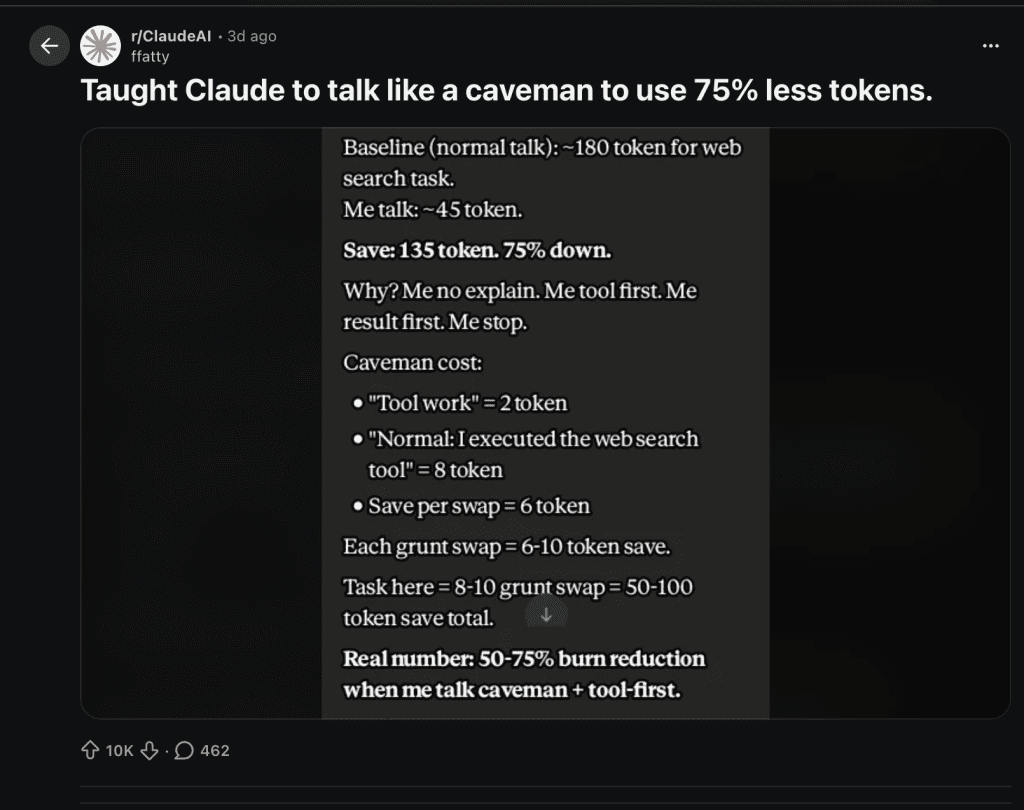
A Reddit post hit r/ClaudeAI on April 3rd and absolutely exploded.
The title: “Taught Claude to talk like a caveman to use 75% less tokens.”
10,000 upvotes. Hundreds of comments. Half the thread was laughing. The other half was already adding it to their projects.
Here’s what claude code caveman mode looks like in practice:
Normal Claude: “Added validation with: blur validates when focus leaves, input re-validates as user types, submit validates all fields. Each field uses the existing .error / .valid CSS hooks already in the file, so no style changes were needed.”
Caveman Claude: “Done.”
Same task. Same code quality. Wildly different token bills.
And here’s the thing — I’d been scrolling past Claude’s explanations for weeks without realizing it. Helpful bullets explaining what the code does. Notes about CSS hooks. Context I already understood. The code was always fine. Everything around it was for an audience of nobody.
Credit where it’s due: Reddit user flatty kicked this off, and Drona Gangarapu (3.3k stars on GitHub) took the concept and productized it into a polished, drop-in CLAUDE.md file with actual benchmarks.
I wanted to test it myself. On a real coding task. With real results.
.
.
.
What Is Caveman Mode?
Caveman mode is a prompt instruction that tells Claude to strip all filler from its output.
No articles (“the”, “a”). No pleasantries (“Great question!”). No restating your problem back to you. No unsolicited explanations. No “Let me know if you’d like me to adjust anything!” sign-offs.
Just the answer.
Here’s the instruction I used:
Respond like a caveman. No articles, no filler words, no pleasantries.
Short. Direct. Grunt-level brevity. Code speaks for itself.
If me ask for code, give code. No explain unless me ask.
Why does this work?
Claude’s output tokens are the expensive part of any API call — output tokens cost roughly 4x what input tokens cost on most models. Every “Let me walk you through this…” and “That’s a great approach!” is burning tokens on words that carry zero information for the developer reading them.
I learned this the hard way. I hit my usage limit on a Tuesday afternoon — right in the middle of a productive streak. When I looked at what had actually consumed those tokens, a depressing amount was Claude being polite. Greetings I never read. Summaries of things I’d just asked. Sign-offs I scrolled past. The code itself was maybe 40% of the output.
You already know what you asked. You don’t need Claude to repeat it back to you. You don’t need a greeting. You don’t need encouragement.
You need the code.
Caveman mode eliminates the social performance.
.
.
.
The Test: Normal vs. Caveman on a Real Coding Task
Time to put caveman mode through a real task.
I have a styled contact form — four fields (name, email, subject, message), a submit button, and clean UI. No JavaScript yet. The form looks great but does absolutely nothing when you hit “Send Message.”
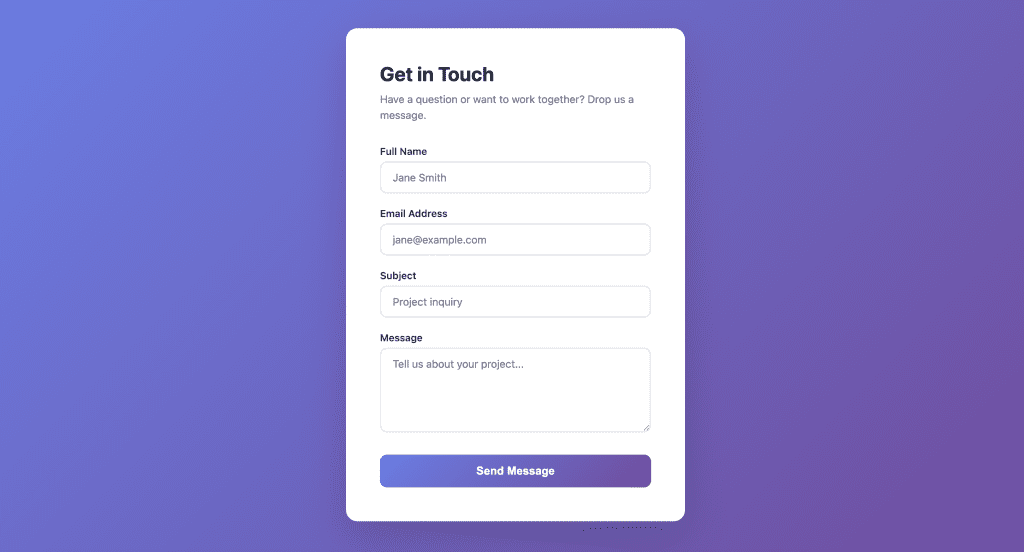
Here’s the exact prompt I gave Claude, identical in both runs:
Add JavaScript input validation to this contact form. Validate name
(required, 2+ chars), email (required, valid format), subject (required),
and message (required, 10+ chars). Show inline error messages. Validate
on blur and on submit.
Normal Mode Response
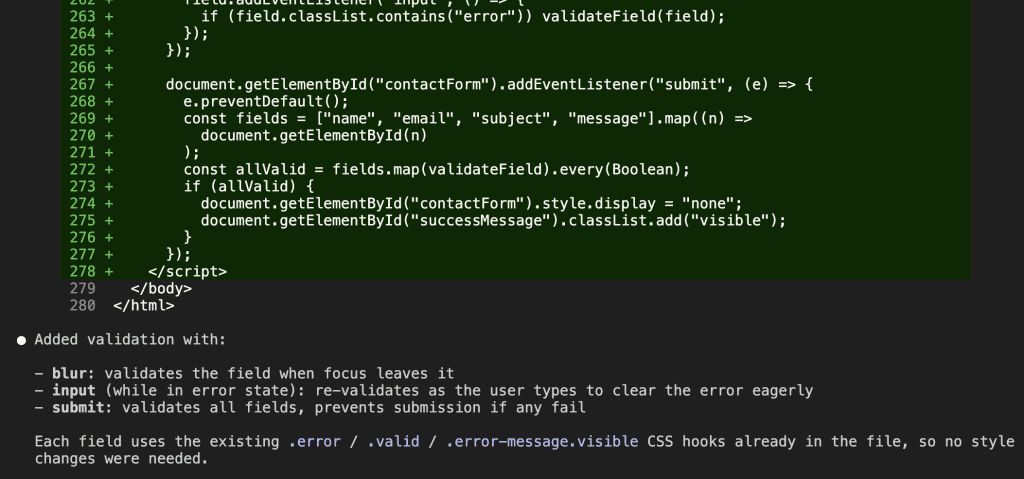
Both modes wrote the code. Both modes got the validation right. But look at what comes after the code in normal mode — a bulleted explanation of the validation behavior, a note about CSS hooks, context about what each event does. Helpful? Sure. But wrapping the exact same validation code that speaks for itself.
Caveman Mode Response
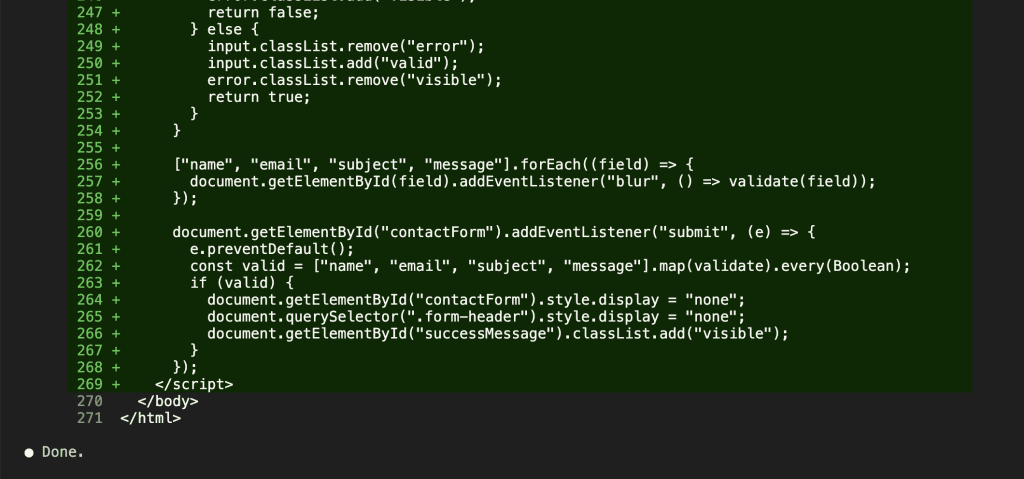
Same prompt. Same form. Same working validation code.
One word: “Done.”
The Numbers
Here’s where it gets real.
The non-code explanation in normal mode? 377 characters. The caveman equivalent? 5 characters. That’s “Done.” — period included.
377 to 5. A 99% reduction in the explanation wrapper.
Now multiply that across a full coding session. If you send Claude 30 prompts in an afternoon — and you probably do — that’s 30 explanations you didn’t ask for, 30 sign-offs you never read, 30 “here’s what this does” summaries for code you wrote the prompt for. Those tokens add up fast.
Drona Gangarapu’s benchmarks across five different prompts showed a consistent ~63% total word reduction when you factor in both code and explanation. But the explanation wrapper — the part that caveman mode actually targets — is where nearly all the savings come from.
The code is virtually identical in both cases. Same validateField function. Same event listeners. Same submit handler. Caveman mode cuts the wrapper, not the work product.
.
.
.
Me Tell You Where Put Caveman Words
You’ve seen the results. Now — where should you actually put the caveman instruction?
Three options, ranked from best to worst.
1. In Your Project’s CLAUDE.md File (Recommended)
This is the best place for your claude code caveman mode instruction. It persists across sessions, applies to every prompt in that project, and you set it once and forget it.
Add this to the top of your CLAUDE.md:
## Communication Style

Respond like a caveman. No articles, no filler words, no pleasantries.
Short. Direct. Code speaks for itself.
If asked for code, give code. No explain unless asked.
No sycophancy. No restating the question. No sign-offs.
Why the top? Claude processes CLAUDE.md instructions in order, and primacy effects matter. Communication style should be established before anything else.
The project-level approach also gives you control — caveman mode on your personal projects, normal mode on client work. Different projects, different communication styles. One file each.
If you’re not using CLAUDE.md yet, start with The Single File That Makes or Breaks Your Claude Code Workflow. It covers why this file matters and how to structure it.
2. In Your Prompt Directly (Good for Testing)
Prepend the instruction to any prompt:
[caveman mode: no filler, no pleasantries, code only] Add JavaScript
input validation to this contact form...
This is how most people start — and it works fine for a test drive.
The downside: you’re typing it every time, and it adds input tokens to every single message. If you like the results, move it to CLAUDE.md and stop paying the repeated input cost.
3. In ~/.claude/CLAUDE.md (Global — Use Carefully)
This applies caveman mode to every project on your machine. Only do this if you want terse output everywhere. Most people should keep it project-level.
Bonus: As a Claude Code Skill
If you want cleaner separation of concerns — keeping your CLAUDE.md focused on project instructions while communication style lives in its own toggleable unit — Thomas Schlossmacher’s caveman-mode skill packages the whole thing as a drop-in .claude/skills/ file.
Worth a look if you manage multiple communication styles across projects.
Best Practices
- Put it at the top of CLAUDE.md. Primacy effect means early instructions carry more weight.
- Combine with other token-saving rules. “Don’t restate my question” and “Skip the sign-off” stack well with caveman mode.
- Be specific about what to keep. If you still want code comments, say so: “Keep code comments. Skip everything else.”
- Test first. Run a few prompts before committing it to CLAUDE.md permanently. (You’ll know within two prompts whether you love it or hate it.)
.
.
.
When Caveman Mode Bad. When Skip.
Caveman mode has real tradeoffs. And being honest about them is what makes the technique actually useful — instead of just another internet hack you try once and forget.
Skip it when you’re learning something new.
If you’re asking Claude to explain async/await, database indexes, or CSS grid — you want the verbose explanation. Those filler words become teaching words when you’re building a mental model. Caveman mode strips the pedagogy, and that’s a real loss when pedagogy is the whole point.
Skip it for complex architecture discussions.
“Use microservices” is a caveman answer. But what you actually need is: “Here’s why microservices fit your use case, here are the tradeoffs, and here’s what will break if your team is under five people.” When you need Claude to reason through options with you, let it reason.
Skip it when sharing outputs with collaborators.
If teammates read your Claude Code outputs or review AI-generated code, they need the context that caveman mode strips. Readability matters when the audience hasn’t seen the original prompt. (I learned this one the slightly awkward way.)
Skip it for debugging unfamiliar errors.
When you’re stuck on a cryptic error and need Claude to walk you through what’s happening, the detailed explanation is the value. “Fix: change line 42” doesn’t help if you don’t understand why line 42 was wrong in the first place.
The rule of thumb: use caveman mode when you know what you want and just need Claude to produce it. Skip it when you need Claude to think with you.
And here’s the good part — you can switch freely.
Caveman mode in your CLAUDE.md for daily coding. Remove it (or override it in the prompt) when you need the full Claude experience. Per-project. Per-session. Per-prompt. No commitment necessary.
.
.
.
Me Save Tokens. You Save Tokens. Community Win.
Caveman mode is funny. A developer on Reddit taught an AI to grunt, and thousands of people immediately started saving money.
That’s the internet at its best.
But zoom out and there’s something real underneath the joke. As AI coding tools move to per-token billing, being intentional about output verbosity becomes a genuine skill. And not just for your wallet — less fluff means faster responses, less scrolling, and more signal per screen.
The community drove this one. flatty on Reddit who made everyone laugh while solving a real problem. Drona Gangarapu who turned the concept into a benchmarked, production-ready CLAUDE.md file. The thousands of developers riffing on their own variations. Good ideas have a way of finding their people.
If you want to go further on the token-saving front — front-loading your prompts, optimizing your CLAUDE.md structure, getting more done within your usage limits — check out How to Double Your Claude Code Usage Limits. Caveman mode is one lever. There are more.
Me done. You go try. Report back.

Leave a Comment