The Three Files That Made Codex /goal Reliable Enough to Walk Away From
The Hard Part Was Walking Away
The first time I ran a codex goal command on something that mattered, I sat there for twenty-eight minutes pretending to check email while the terminal scrolled.
I wasn’t doing other work. I was watching.
Making Codex write code has never been the hard part.
The hard part is walking away — stepping out of the room while an autonomous agent builds something you actually care about, with no way to know if it’s going sideways until it’s done.
Over five weeks and five builds, the same question kept surfacing: How do I know it did the right thing while I was gone?
Here’s what I learned.
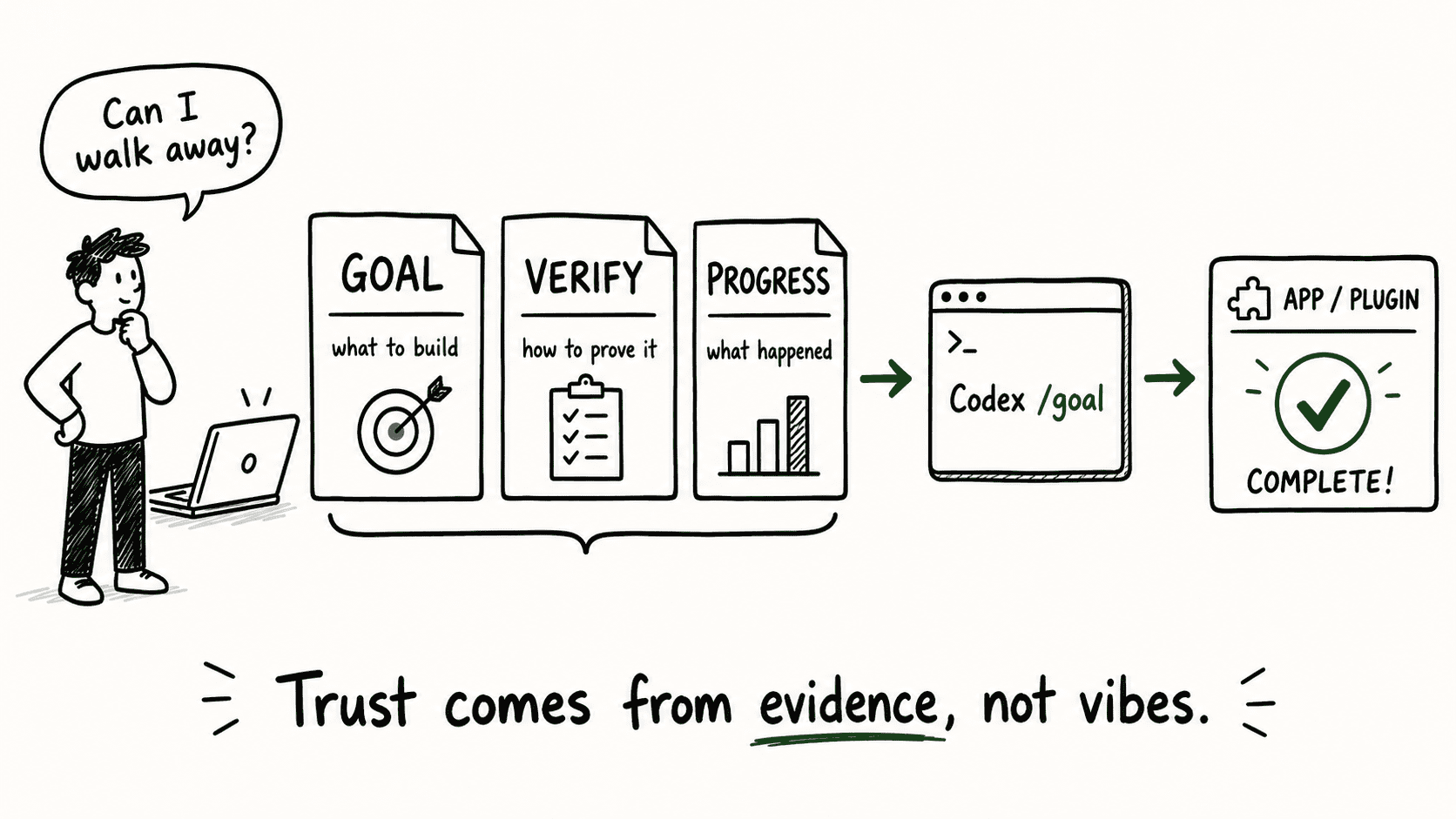
A good /goal skill gives Codex a clear system to follow — and gives you something concrete to audit after the run ends. That system comes down to three files: GOAL, VERIFY, and PROGRESS.
- GOAL defines what “done” means.
- VERIFY maps each requirement to an actual check.
- PROGRESS records what happened during the run so you can review the evidence instead of guessing.
Together, they turn a hands-off Codex run from “hope it works” into “review the receipts.”
.
.
.
Five Builds, One Pattern
This pattern came from building things — running the codex goal command across five projects and watching what actually made the difference between a run I could trust and one I couldn’t.
| Build | Scale | Trust Lesson |
|---|---|---|
| WordPress plugin | 1 goal | Codex needs a clear finish line |
| CLI tool | 2 goals | Connected goals need clear verification |
| Browser game | 8 goals | Sequencing matters |
| Expanded game | 7 goals | Seam checks catch hidden bugs |
| WooCommerce plugin | 10 goals | Long runs need receipts |
Each build gave Codex a bigger slice of autonomous work. Different stacks, different scales, anywhere from 28 minutes to nearly five hours of runtime. The trust structure underneath stayed the same.
Here’s the thing. The first build — one goal, 28 minutes — was small enough to verify by hand. By the fifth — ten goals, nearly five hours — manual verification would have taken longer than the build itself. (Stay with me on that: a five-hour autonomous run where you come back and check the receipts instead of babysitting. That’s the payoff these three files unlock.)
The full walkthrough for each build is linked at the end of this post.
.
.
.
Does Codex Know What Done Means?
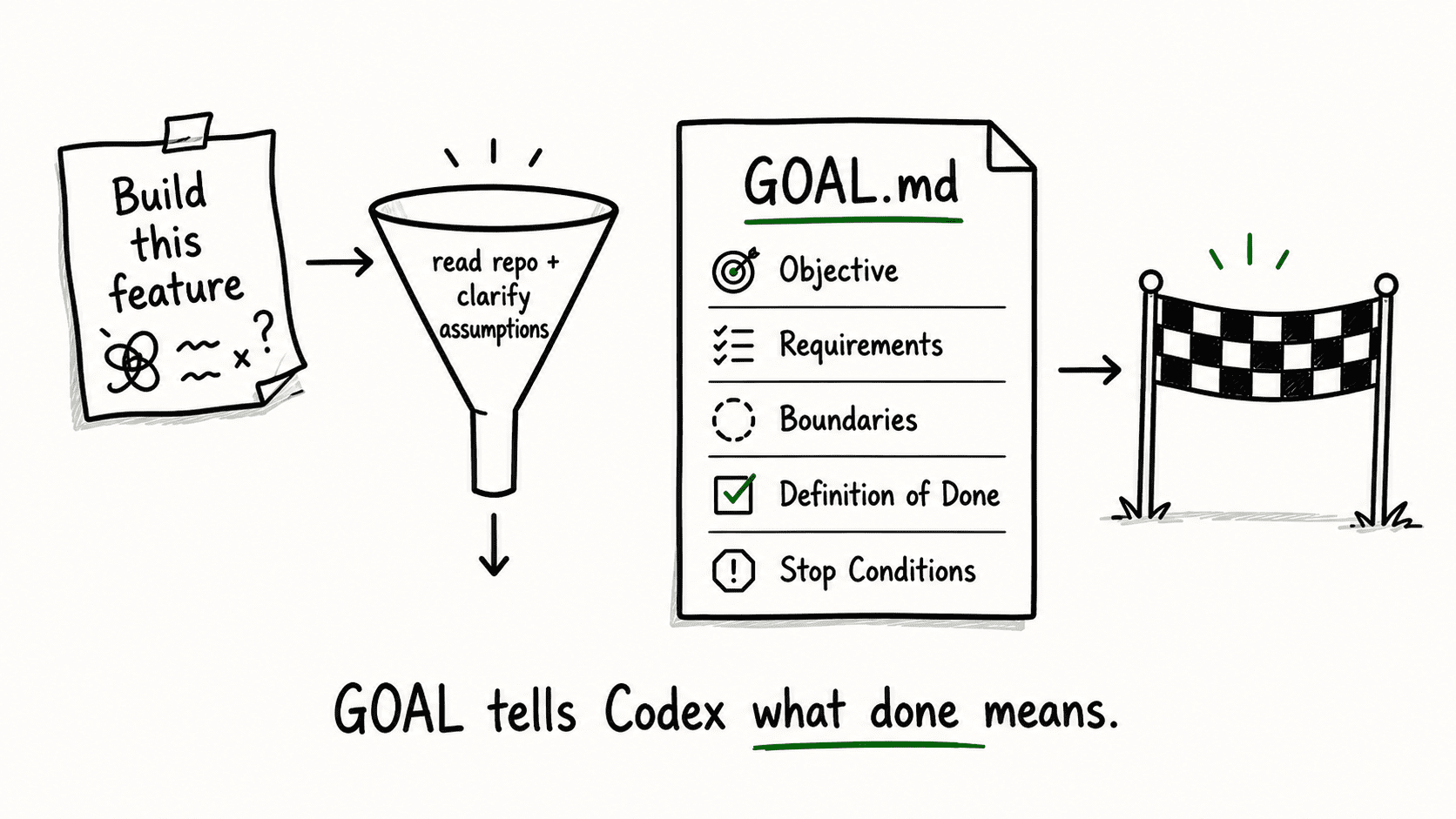
GOAL answers the first trust question: What exactly are we building?
Without a clear definition of done, Codex invents its own finish line. It wanders, second-guesses scope, and eventually gives up having shipped half the requirements. Every long run that went sideways in my five weeks traced back to one thing: the spec was too vague for Codex to grade its own work.
And Codex re-reads the goal text constantly. It uses that same document as both the to-do list and the test for “done.” A vague spec gives it nothing to grade against — so it either keeps going in circles or declares victory on a hunch.
A good /goal skill solves this by writing GOAL from evidence. It reads your project first — the language, the framework, the folder layout, the naming patterns already in place. Then it asks targeted questions, each carrying a recommended answer and a one-line reason. By the time it generates GOAL.md, the document is grounded in your actual codebase.
GOAL.md should include:
- Objective — one sentence describing what this goal produces
- Repo context — what the skill learned by reading the project
- Requirements — the specific features or behaviors to build
- Assumptions — what the skill inferred and confirmed with you
- Boundaries — what Codex should not touch
- Definition of done — the outcomes that constitute “finished”
- Stop conditions — when Codex should stop and ask instead of guessing
That last one matters more than it looks.
Stop conditions are the guardrail that prevents Codex from filling in gaps with assumptions. When the spec runs out of detail, a good skill tells Codex to pause rather than improvise.
In practice, the skill handles most of this for you. It shows up with a draft of what “done” looks like and asks you to confirm or edit — which is always faster than writing it from scratch. (The whole exchange feels like confirming a restaurant reservation. “Table for one? Near the window? 7 PM?” Yes, yes, yes.) Most of the time, the recommended answers are right. When they’re wrong, editing one line is cheaper than discovering the gap mid-run.
.
.
.
Proof, or Just a Green Terminal?
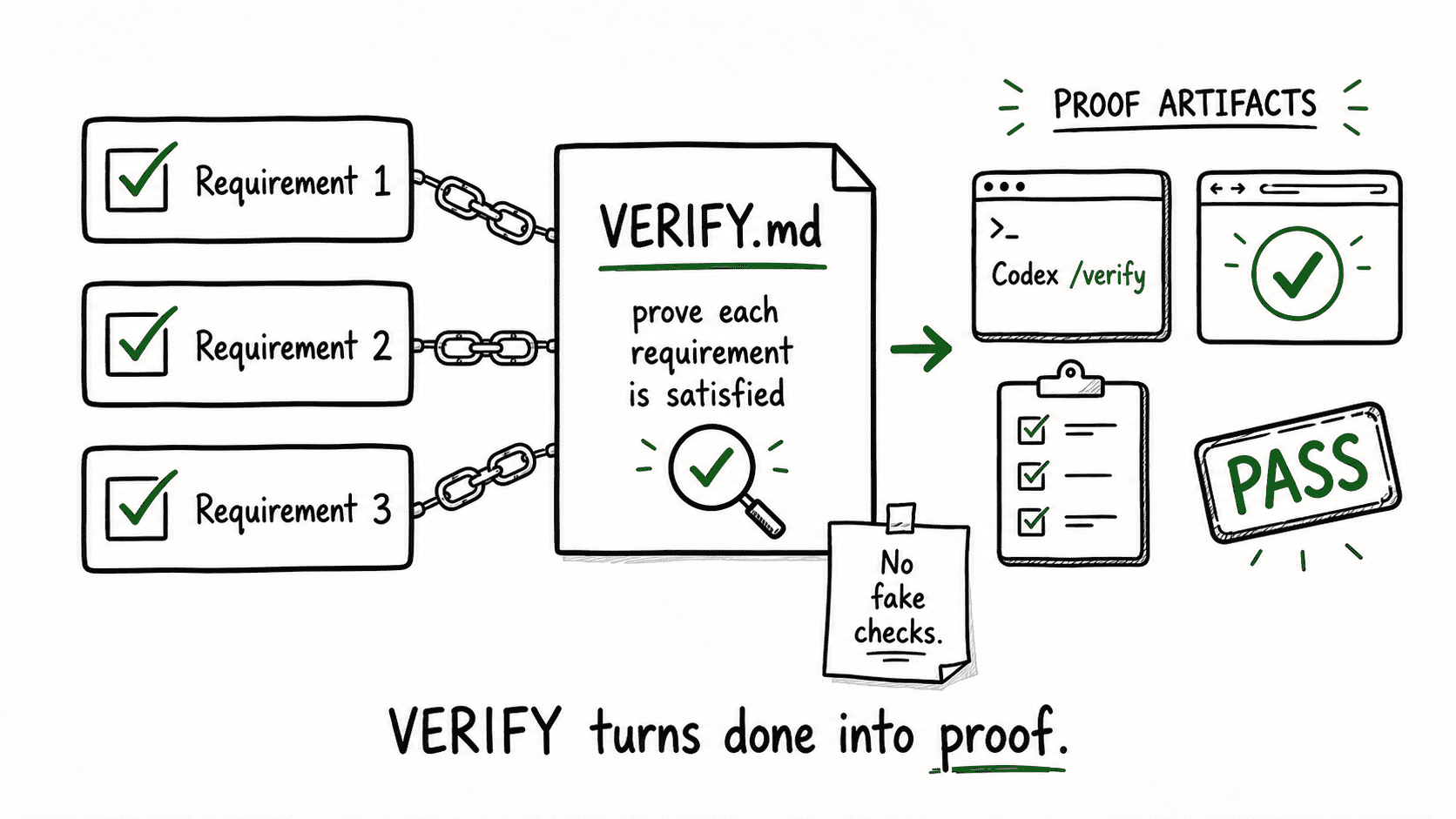
VERIFY answers the second trust question: How do we know the work is correct?
GOAL defines what done looks like. VERIFY maps each requirement to an actual check that proves it was built correctly. Those checks have to use real commands from your project — real test runners, real build steps, real linters. Invented checks are worse than no checks, because they hand you false confidence.
A green terminal is comforting.
But if the check doesn’t trace back to a specific requirement in GOAL, it proves nothing useful. The WooCommerce build had ten goals running across nearly five hours. Without explicit traceability from each requirement to its proof, a clean summary could easily mask three missing features — and you’d only discover them after deploying.
VERIFY.md should include:
- Requirement-to-check mapping — each GOAL requirement paired with its verification method
- Real commands — test, build, lint commands that exist in the project
- Manual checks — for anything that can’t be automated (UI polish, UX flow), explicitly listed as manual
- Expected results — what a passing check looks like
- Environment notes — anything the checks depend on (ports, services, seed data)
- Seam checks — for multi-goal runs, checks that test the boundaries between goals
Seam checks earn a highlight.
I almost skipped the full-loop check in the Ion Viper build — every individual goal had passed its own tests. Why bother? Four hidden bugs at the transitions between goals is why. Stale state on restart, timing conflicts between systems, projectiles accumulating silently across scene boundaries. Each goal looked fine in isolation.
The full loop revealed the assumptions that no single goal’s tests could catch.
👉 A green terminal is not proof if the check doesn’t map back to the requirement.
.
.
.
What Happened While You Were Gone
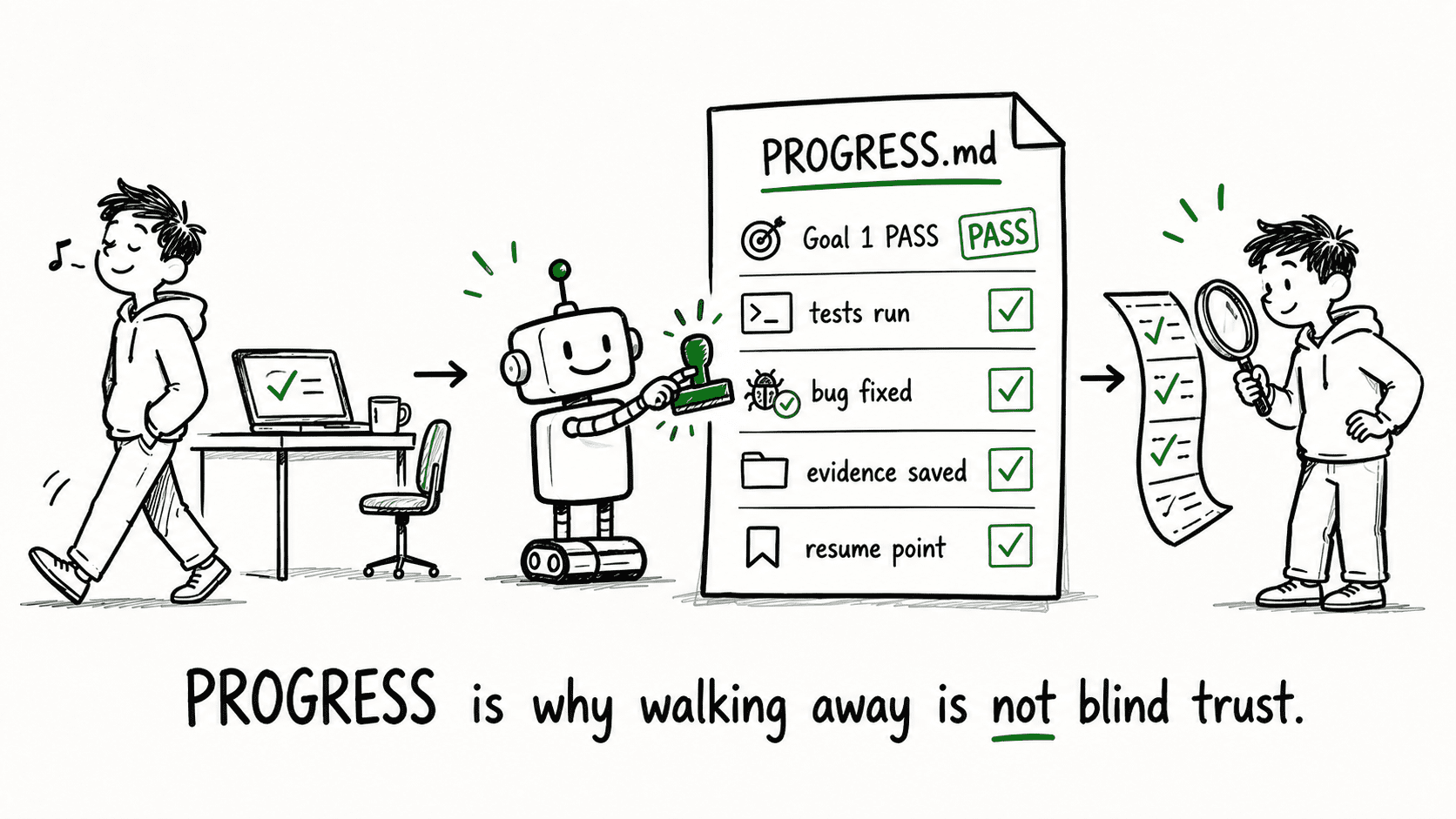
PROGRESS answers the third trust question: What happened while I was gone?
GOAL gives the standard. VERIFY gives the proof plan. PROGRESS is the running record of what Codex actually did — what it changed, what it checked, what passed, what broke, and how it responded.
For a quick, single-goal run, you might glance at the terminal and move on. For a ten-goal build that ran for nearly five hours, terminal output is useless as an audit tool. PROGRESS.md is the structured receipt that lets you review the entire run without scrolling through hundreds of lines of terminal history.
PROGRESS.md should include:
- Goals started and completed — with timestamps
- Files changed — what Codex touched in each goal
- Checks run — which verification steps executed
- Results — pass/fail for each check
- Errors found and fixes made — what broke and how Codex handled it
- Evidence paths — where to find the artifacts (test output, screenshots, logs)
- Remaining issues — anything Codex flagged but couldn’t resolve
- Resume point — where to pick up if the run is interrupted
- Final summary — the overall status in one paragraph
Resume points matter for long runs.
If a build fails at goal 7 of 10, you don’t want to re-run goals 1 through 6. PROGRESS records exactly where the work stopped and what state it was in, so the next run picks up cleanly.
The WooCommerce build was the first time I actually left the desk. Nearly five hours. I came back, opened PROGRESS.md, and had the full story in under three minutes — what passed, what broke, what Codex fixed on its own, and what it flagged for me to look at. A few minutes of structured review instead of hours of babysitting. That’s the trade these files offer.
.
.
.
The Chain That Holds It Together
The three files work because they connect.
- GOAL defines what done means.
- VERIFY maps those requirements to proof.
- PROGRESS records whether the proof held up during the actual run.
Any important requirement should be traceable across all three.
Here’s the traceability test: pick any requirement from GOAL. You should be able to find its matching check in VERIFY, the expected result, the recorded outcome in PROGRESS, and the evidence a human can review. If the chain breaks at any link — and I’ve had it break — you catch it during review, before anything ships.
Let me show you what that looks like.
A GOAL requirement says “admin users can generate auto-login links.” VERIFY maps that to a specific test command plus a manual browser check. PROGRESS records that both passed, with the test output saved to a file path you can open. From that single thread, you or anyone reviewing the build can verify the claim without re-running anything.
Each file fills a role the others can’t cover. GOAL without verification is a wish list — requirements with no accountability. A proof plan with no execution record can’t confirm the tests actually ran. And an execution log with no standard to measure against is a diary that tells you what happened but can’t tell you whether it was right.
The traceability between them is what turns three documents into a system you can rely on. Hand a reviewer the three files from any goal, and they can reconstruct the full story: what was supposed to happen, how it was supposed to be tested, and what actually happened. The evidence sits on disk.
.
.
.
Where Trust Still Breaks
The biggest risk is an unclear spec.
I wrote “build a wishlist plugin” once — three words, no detail. The result had wishlist functionality, technically. Just not the ones I needed. (If you’ve ever gotten back exactly what you asked for and realized the problem was what you asked for, you know the feeling.)
That costs real time and money.
The WooCommerce plugin build used roughly $131 worth of subscription usage across ten goals and nearly five hours. A vague spec that forces a second attempt doubles that cost. The three files pay for themselves by making the first run more likely to be the only run.
Codex also doesn’t do design polish. It builds things that work, but the look and feel comes out plain. Admin interfaces are functional and ugly. That’s fine — the hours the three files freed up from implementation are hours you can spend on refinement instead.
And I still review everything.
The three files don’t replace human judgment. They move it to better places: before the run, you define the right goal. After the run, you audit the receipts and polish what needs a human eye.
The codex goal command handles the middle part.
Your job is the beginning and the end.
.
.
.
Trust Is Engineered
The goal was always the same: give Codex a system that leaves evidence you can audit.
GOAL sets the finish line, VERIFY maps the proof plan, and PROGRESS keeps the receipts.
Together, they turn a hands-off run from “hope it works” into “review the evidence.” That’s what made walking away possible — across five builds, five different stacks, and run times stretching from 28 minutes to nearly five hours.
The skills keep getting better, too. Every gotcha you teach one is a gotcha it handles next time. The second project on a given stack goes smoother than the first, and the fifth smoother still. The investment compounds.
The specific stack doesn’t matter, either. Whether you’re building WordPress plugins, CLI tools, browser games, or something else entirely, the three-file structure translates. Build the skill once for your domain, teach it your stack’s hard-won rules, and future projects start ahead.
Build the system once. Document the evidence. Review the receipts.
All four skills from this series are open source:
npx skills add nathanonn/agent-skills --agent codexThe repo is at github.com/nathanonn/agent-skills.
The series, if you’re catching up:
- How to Use Codex /goal to Build WordPress Plugins (My Spec-to-Ship Workflow)
- How I Chained Two Codex /goal Runs to Build a Complete CLI Tool
- How I Used 8 Codex /goal Runs to Build a Browser Game From Scratch
- Your Codex Skills Should Evolve With Your Project (Ion Viper Part 2)
- I Gave Codex a Requirements Doc and Got a CodeCanyon-Grade Plugin Back
More workflows like this — AI-assisted development with Claude Code, Codex, and the tools between them — land in The Art of Vibe Coding newsletter every week. If this one was useful, the next one probably will be too.

Leave a Comment