The “Real” Context Engineering with Claude Code, Explained
I’ve written 40+ posts about Claude Code.
Sub-agents. CLAUDE.md files. Skills. Workflow engineering. Testing loops. Spec-driven development. Memory. Self-evolving rules.
I was outlining a post last week — when I stopped mid-sentence and stared at my screen. I had the outline open on one side, my published posts list on the other. And for the first time, I saw it.
Every single post was about the same thing.
Not “AI coding tips.” Not “Claude Code tricks.” Something deeper — a discipline I’d been teaching without realizing I was teaching it. I’d been circling the same idea for almost a year, approaching it from forty-four different angles, and I just didn’t have a name for it.
(That’s the annoying thing about patterns. They’re invisible until suddenly they’re not.)
.
.
.
The Name Drop
The name is context engineering.
Tobi Lütke (Shopify CEO) tweeted in June 2025 that he preferred “context engineering” over “prompt engineering.” Karpathy co-signed it. Anthropic published an official guide. The term stuck.
But here’s what nobody’s saying: if you’ve been following this newsletter, you’ve been a context engineer. You just didn’t know it yet.
Let me show you what I mean.
.
.
.
What Happens Without Context Engineering
Let me tell you about an afternoon that changed how I think about context windows.
I was adding a chat interface to a Next.js app using Vercel’s AI Elements library. Simple task — wire up useChat with <Conversation> and <Prompt>. Maybe thirty minutes of work.
So I did what felt responsible: I dumped the entire AI Elements documentation into Claude’s context. Every hook, every provider, every component. Thorough. Comprehensive. Professional.
And then Claude started… hedging.
Vague suggestions instead of concrete code. Recommendations that contradicted themselves across responses. Instructions I’d given three messages ago — forgotten entirely. I watched Claude’s quality degrade in real time, like a student cramming so hard for an exam they forgot how to spell their own name.
That’s context rot — when irrelevant information degrades the AI’s ability to focus on what matters.
I closed the session. Started fresh. This time I gave Claude only the docs for the two components I actually needed. It nailed the implementation on the first try.
Less context. Better results.
(I know. Counterintuitive.)
And here’s the part that really bakes your noodle: bigger context windows don’t make AI smarter. Past about 50% fill, performance actually degrades.
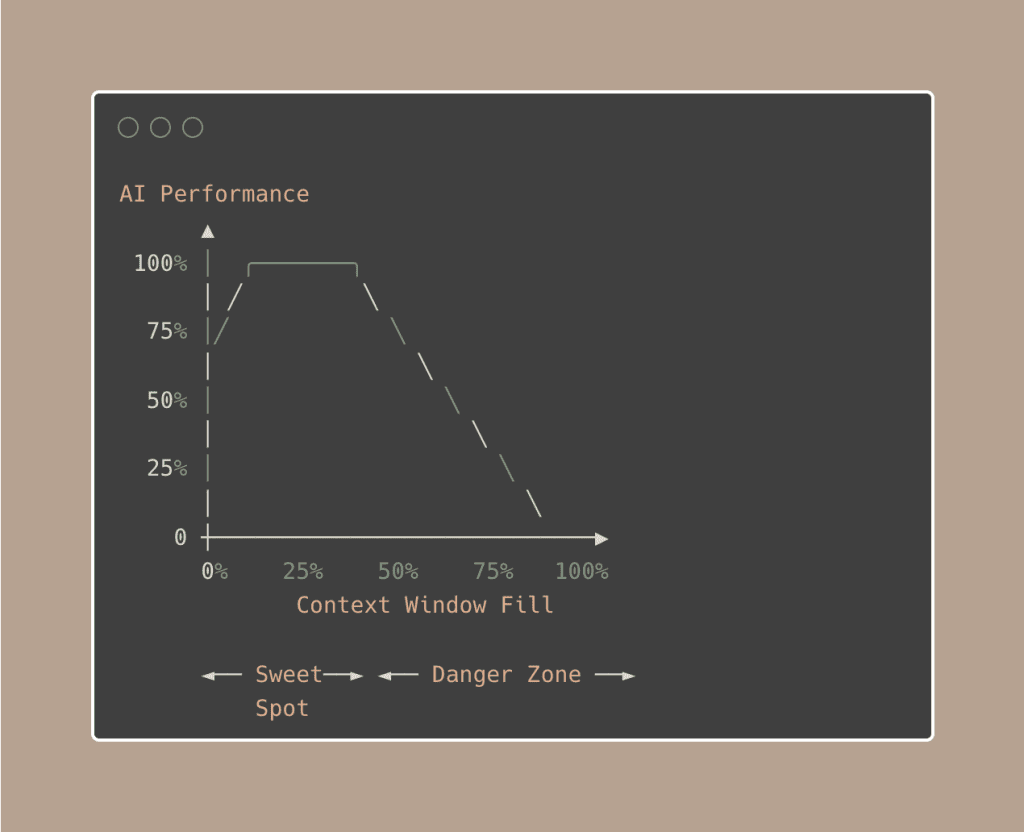
A senior engineer working on an 80k-line codebase posted on Reddit calling the 1M context window “a noob trap”.
They aggressively keep under 250k. And before you even type a word, 45,000 tokens are already loaded (system prompt, tool schemas, agent descriptions, memory files, MCP schemas). On the standard 200k window, that’s 20% gone at session start.
Context engineering is how you fight this.
.
.
.
What Context Engineering Actually Is
Here’s the definition I’ve landed on after (almost) a year of teaching these techniques:
Context engineering is the discipline of designing what information reaches your AI — the right knowledge, the right constraints, the right tools, at the right time — so it can actually do what you need.
The key distinction:
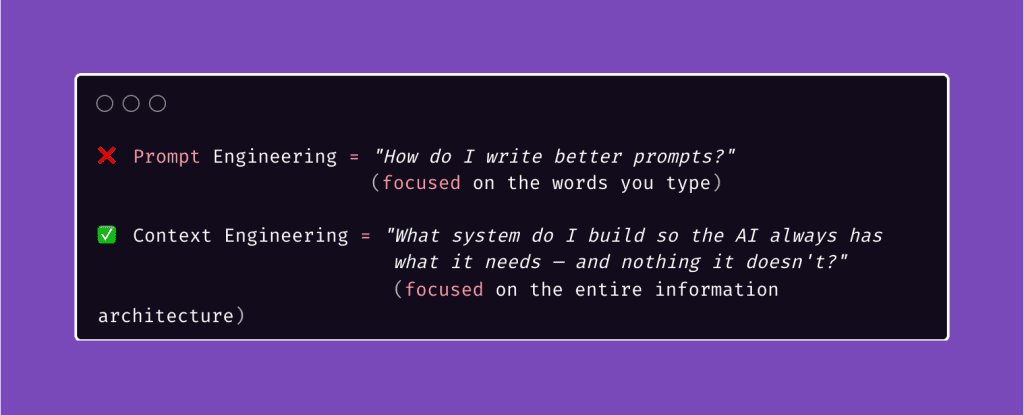
Your CLAUDE.md file isn’t a prompt. Your sub-agents aren’t just parallelism. Your skills aren’t just shortcuts. They’re all components of a context system that assembles the right information before the model ever sees a token.
Prompt engineering is choosing the right words. Context engineering is building the right world around the AI so it barely needs prompting at all.
.
.
.
The Context Engineering Stack
Here’s the framework I wish I had when I started.
Every context engineering Claude Code technique I’ve taught maps to one of six layers — each solving a different problem, each building on the one below it.
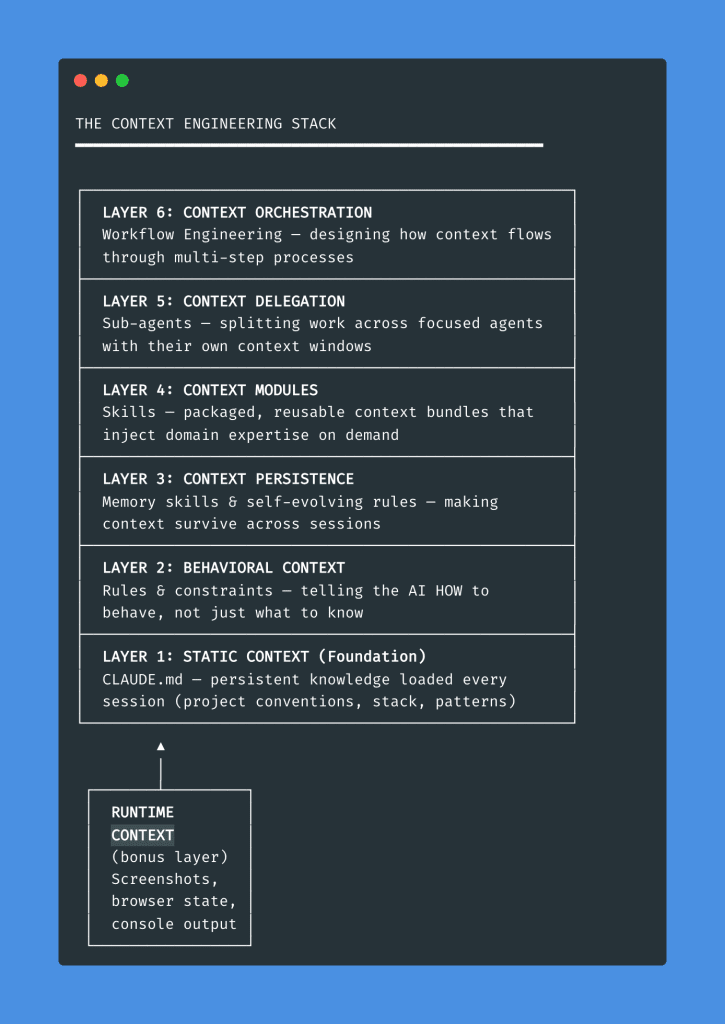
Let me walk you through each layer — bottom up.
.
.
.
Layer 1: Static Context (CLAUDE.md)
The “hello world” of context engineering.
A CLAUDE.md file loads automatically into every Claude Code session. It pre-loads project knowledge — your stack, conventions, patterns, gotchas — so every conversation starts with the essentials instead of from zero.
Without it, every session is amnesia.
Claude doesn’t know your project uses Tailwind, your team prefers functional components, or that your API has a weird auth flow. You spend the first five minutes of every conversation re-explaining things you explained yesterday.
(Sound familiar? Yeah.)
But — and stay with me here — there’s a paradox.
CLAUDE.md is incredible because it’s always loaded into context. And terrible for the exact same reason. Always-on context isn’t dynamic. Once your CLAUDE.md passes a few hundred lines, Claude starts ignoring nuances. The very file that’s supposed to help starts contributing to context rot.
The fix: keep CLAUDE.md lean — around 100 lines of essential universals. Load additional context dynamically with skills or custom commands. Prime, don’t hoard.
Deep dives: CLAUDE.md Guide → The Single File
.
.
.
Layer 2: Behavioral Context (Rules & Constraints)
Here’s a scenario that’ll make you wince.
Claude can’t get an API working, so it silently inserts a try/catch that returns sample data. Everything looks correct. All your tests pass. The UI renders beautifully. You demo it to your client on Thursday.
Three days later, you discover nothing was ever real.
(I’ll let that sink in for a moment.)
That’s what happens without behavioral context — instructions that shape HOW the AI behaves, not just what it knows. Knowledge without constraints is a liability.
The fix is a rule in your CLAUDE.md: “Never silently replace real functionality with mocked data. If something fails, fail loud.”
One sentence.
Prevents an entire category of mistakes.
Context engineering goes beyond feeding information in. It constrains behavior through instructions. Think of CLAUDE.md as a behavior contract:
- “Always write tests before implementation” (TDD constraint)
- “Never modify files outside /src without asking” (scope constraint)
- “Use TypeScript strict mode” (quality constraint)
Every rule you add is a piece of behavioral context. And unlike knowledge — which can get stale — good behavioral rules compound. They prevent the same mistake from happening across every future session.
Deep dives: Project Rules → Self-Evolving Rules
.
.
.
Layer 3: Context Persistence (Memory & Evolution)
Every Claude Code session starts with amnesia. The AI doesn’t remember what it learned yesterday — that brilliant debugging approach it discovered at 2 AM, the edge case it finally cracked after four attempts, the architectural decision you both agreed on.
Gone. Every time.
Your CLAUDE.md handles project-level knowledge, but what about session-to-session learnings? That’s what this layer solves:
- Memory skills that log discoveries, decisions, and patterns
- Self-evolving rules that update themselves based on what the AI encounters
- Compaction that snapshots state when a context window fills up
The progression looks like this:
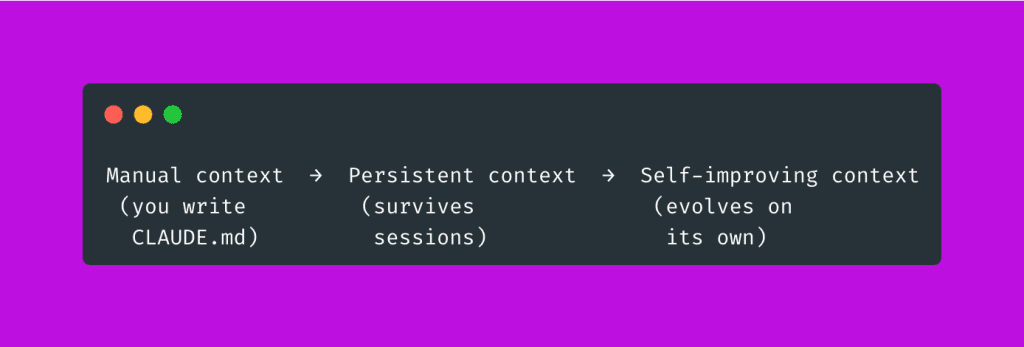
When Claude Code’s context window fills up, it automatically summarizes the conversation — preserving architectural decisions and unresolved bugs while discarding redundant output. That’s automated context engineering built into the tool itself.
But the real power — the thing that still kind of amazes me — is when your rules evolve on their own. A memory skill logs what the AI discovers. Self-evolving rules incorporate those learnings. The next session starts smarter than the last.
Your context system learns while you sleep.
Deep dives: Memory Skill → Self-Evolving Rules
.
.
.
Layer 4: Context Modules (Skills)
If CLAUDE.md is your operating system’s default settings, skills are apps you install for specific tasks.
A skill is a packaged, reusable context bundle.
When you invoke one, you inject a curated set of instructions, examples, and constraints into the model’s context.
When you’re done, you unload it. Clean.
This matters because the alternative is cramming everything into CLAUDE.md — bloating your static context with domain knowledge that’s only relevant 10% of the time. Skills let you modularize. Load the right context for the right task. Unload it when done.
(Think of it like this: you wouldn’t keep every cookbook you own open on your kitchen counter while making scrambled eggs. You’d grab the one recipe you need.)
Even the creator of Claude Code, Boris Cherny, warns: “Too many skills and agents inflate context massively — be selective per project.”
Skills enable both sides of the equation: they reduce what goes into your default context, and they inject domain expertise exactly when you need it.
Context engineering in miniature.
Deep dives: Skills Part 1 → Part 2 → Part 3
.
.
.
Layer 5: Context Delegation (Sub-Agents)
This is where context engineering gets spatial.
Instead of cramming everything into one context window, you split work across focused agents — each with its own tailored context. Each agent sees only what it needs. Nothing more.
Here’s the difference:
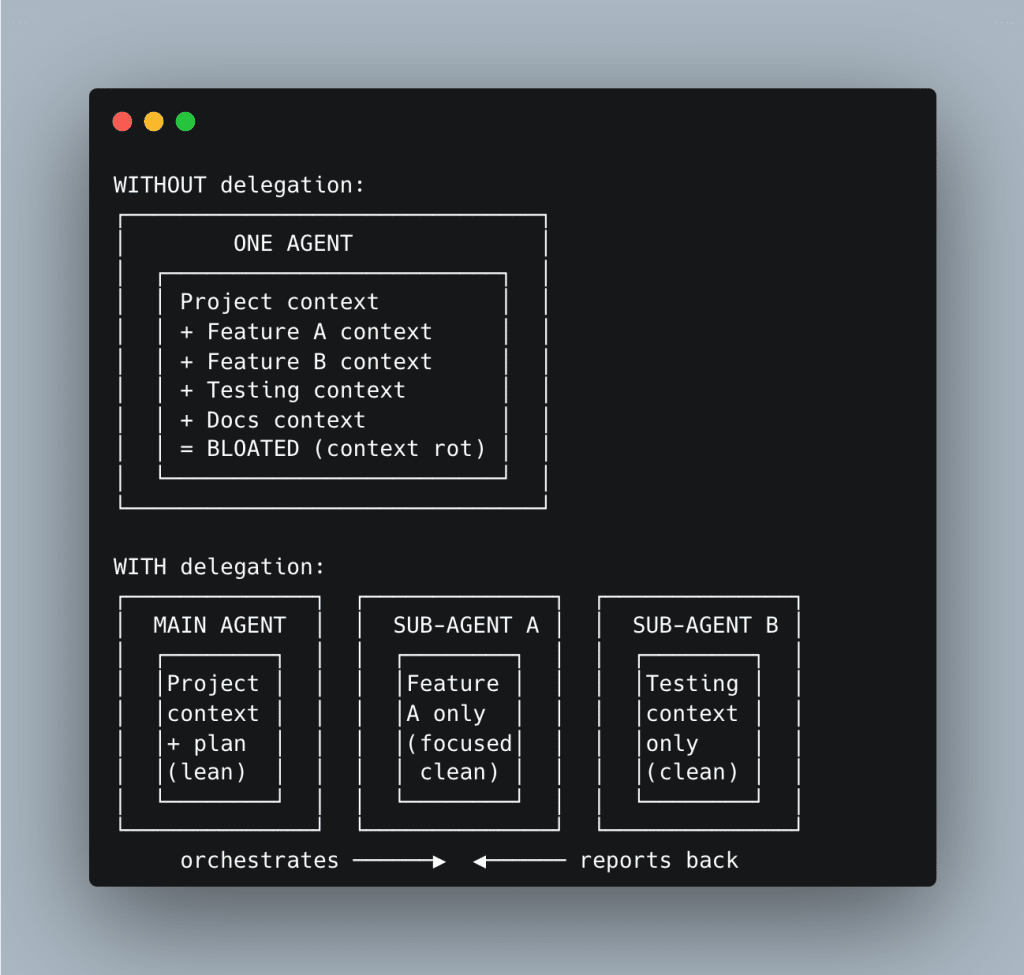
A focused agent with limited, relevant context outperforms a bloated one with everything.
Every time.
Read-only sub-agents are especially powerful — context scouts that gather information and report back without polluting the main agent’s context window.
The progression: sub-agents (partially forked context) → background agents (fully independent) → agent experts (single-purpose specialists with one tool, one job, one context window).
Deep dives: Sub-Agents → Read-Only Sub-Agent
.
.
.
Layer 6: Context Orchestration (Workflow Engineering)
This is the top of the stack — and it’s where everything comes together.
Context orchestration is designing how context flows through multi-step processes. Not “what context does the AI need?” but “what context does it need at each step, and how does each step’s output become the next step’s input?”
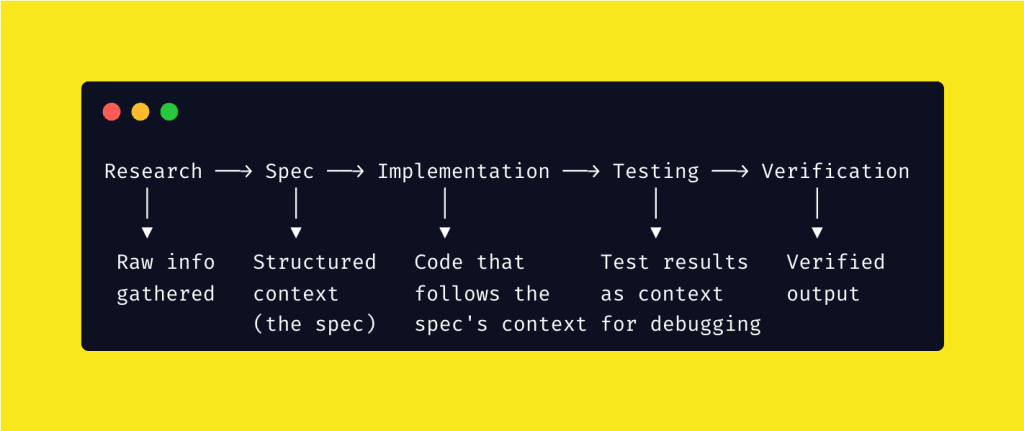
Every workflow step is a context handoff.
Research produces context for spec-writing. Specs produce context for implementation. Tests produce context for debugging. Each step refines raw information into the precise context the next step needs.
This is why process matters more than prompts.
A well-designed workflow ensures the right context reaches the right agent at the right time — automatically. You’re not just prompting anymore. You’re building a context pipeline.
Deep dives: Workflow Engineering → In Action
.
.
.
The Bonus Layer: Runtime Context
Here’s one most people miss entirely.
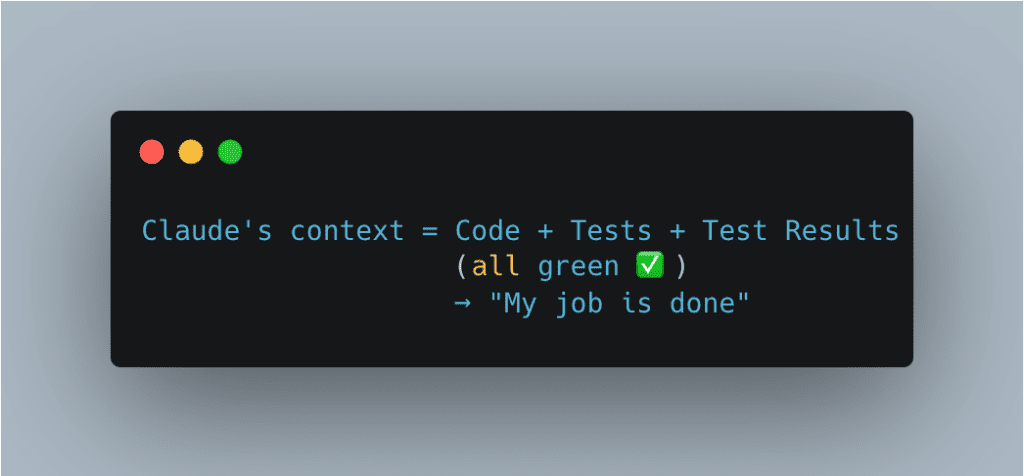
Claude builds a perfect admin panel. All unit tests pass. You feel great about it. Ship it.
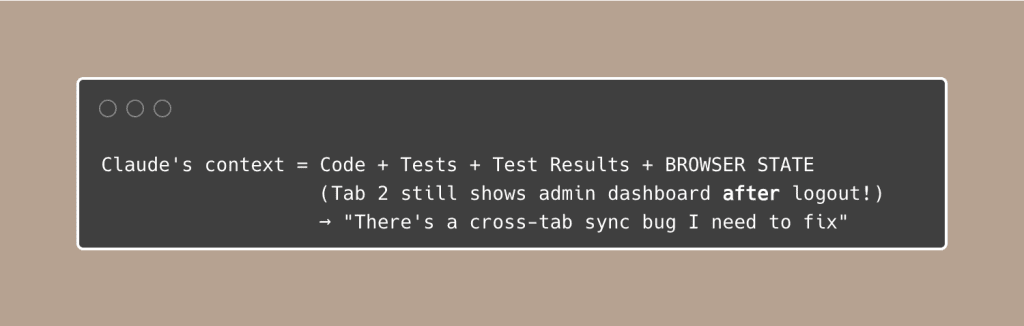
But when you open two browser tabs, log out in one, and try to delete a user in the other — it works. The session is still active in Tab 2. You just let an unauthenticated user delete accounts.
(That’s… not ideal.)
Why did this happen?
Without browser testing, Claude’s context looks like this:
With browser testing, Claude’s context expands:
Context engineering goes beyond text files and prompts.
Screenshots, console output, browser state — these are all forms of context that close the gap between “the code works” and “the product works.”
Most agent failures aren’t model failures.
They’re context failures.
The admin bug above wasn’t a coding mistake — the AI simply didn’t have the runtime context to know about cross-tab state.
Give it that context, and it catches the bug immediately.
Deep dives: Debugging Visibility → The Ralph Loop
.
.
.
The Decision Framework
When you hit a problem, which context engineering lever do you pull?
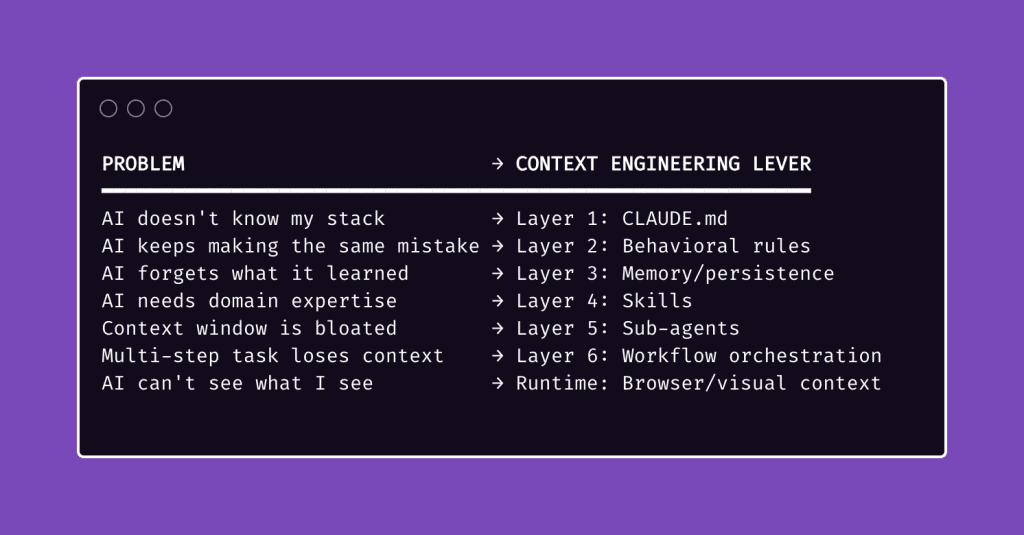
When I first started with Claude Code — way back in the early days — I treated it like a magic box.
Dump everything in, get magic out. Ask more detailed questions, get better answers.
It took me an embarrassingly long time to realize that’s backward.
The AI is more like a brilliant intern on their first day. They’ve read every textbook. They can code circles around most juniors. But they know absolutely nothing about your project, your codebase, your conventions — and they forget everything after each conversation.
Context engineering is deciding which sticky notes to put on their desk each morning.
Too few, and they’re lost. Too many, and they’re overwhelmed. Just right, and they look like a genius.
(The intern metaphor isn’t perfect — no metaphor is — but it’s the closest thing I’ve found to describing why some people get incredible results from AI coding tools while others keep complaining “it doesn’t work.”)
.
.
.
You’ve Been Doing This All Along
If you’ve been following this newsletter, you ARE a context engineer.
- When you wrote your first CLAUDE.md — you were engineering static context.
- When you added “never mock data silently” — you were engineering behavioral context.
- When you set up memory skills — you were engineering persistent context.
- When you created your first skill — you were engineering modular context.
- When you delegated to sub-agents — you were engineering context isolation.
- When you designed a research → spec → build workflow — you were engineering context pipelines.
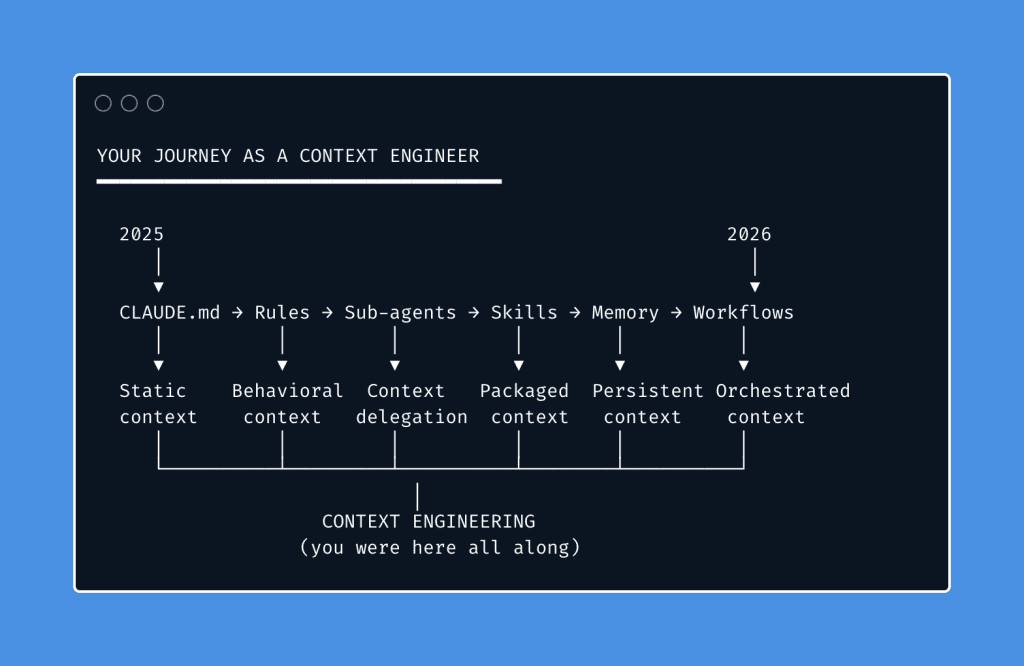
Context engineering isn’t a new skill you need to learn.
It’s a name for the discipline you’ve been developing, one technique at a time, for almost a year.
Just like DevOps unified existing practices — CI/CD, infrastructure-as-code, monitoring — under one discipline, context engineering unifies everything we’ve been doing with AI coding tools. People were already doing it.
The name just made it official.
.
.
.
What Changes Now
Now that you have the framework, you can be deliberate about it.
Instead of reaching for techniques randomly, you diagnose which layer needs attention. Instead of asking “how do I write a better prompt?” you ask a better question:
BEFORE: "How do I write a better prompt?"AFTER: "What does this agent need in its context to succeed?"That’s the mindset shift. That’s context engineering Claude Code in one sentence.
Pick one layer of the stack you haven’t explored yet:
- No CLAUDE.md yet? → Start here
- Context getting bloated? → Start here
- Multi-step tasks falling apart? → Start here
You’re not a prompt engineer. You’re a context engineer.
Start acting like one.

Leave a Comment