The 4 Golden Rules of Vibe Coding (A Year-End Manifesto)
You remember early 2025, right?
I was bouncing between ChatGPT Pro, Claude web, and Cursor like a pinball with a deadline. Copy from o1 pro. Paste into my editor. Fix the bug it introduced. Pray it works. Try Cursor for a second opinion. Watch it rewrite my entire file when I asked for one measly line.
Rinse. Repeat. Question your life choices.
(We’ve all been there. And if you say you haven’t, well, I’m not sure I believe you.)
Then May hit. Anthropic added Claude Code to their Max plan—same $200/month I was already burning on ChatGPT Pro, but now I could stop copy-pasting and start orchestrating.
That shift changed everything.
Here’s the thing: I wrote 30+ articles this year documenting every breakthrough, every spectacular failure, every “wait, that’s how it’s supposed to work?” moment. If you only read one piece from me in 2025—make it this one.
What follows are the 4 immutable laws of Vibe Coding I discovered this year. They turned chaotic AI sessions into systematic, predictable wins. Once you see them, you can’t unsee them.
Ready? Let’s go.
.
.
.
Rule #1: The Blueprint Is More Important Than The Code
Let me tell you about the single biggest mistake I see developers make.
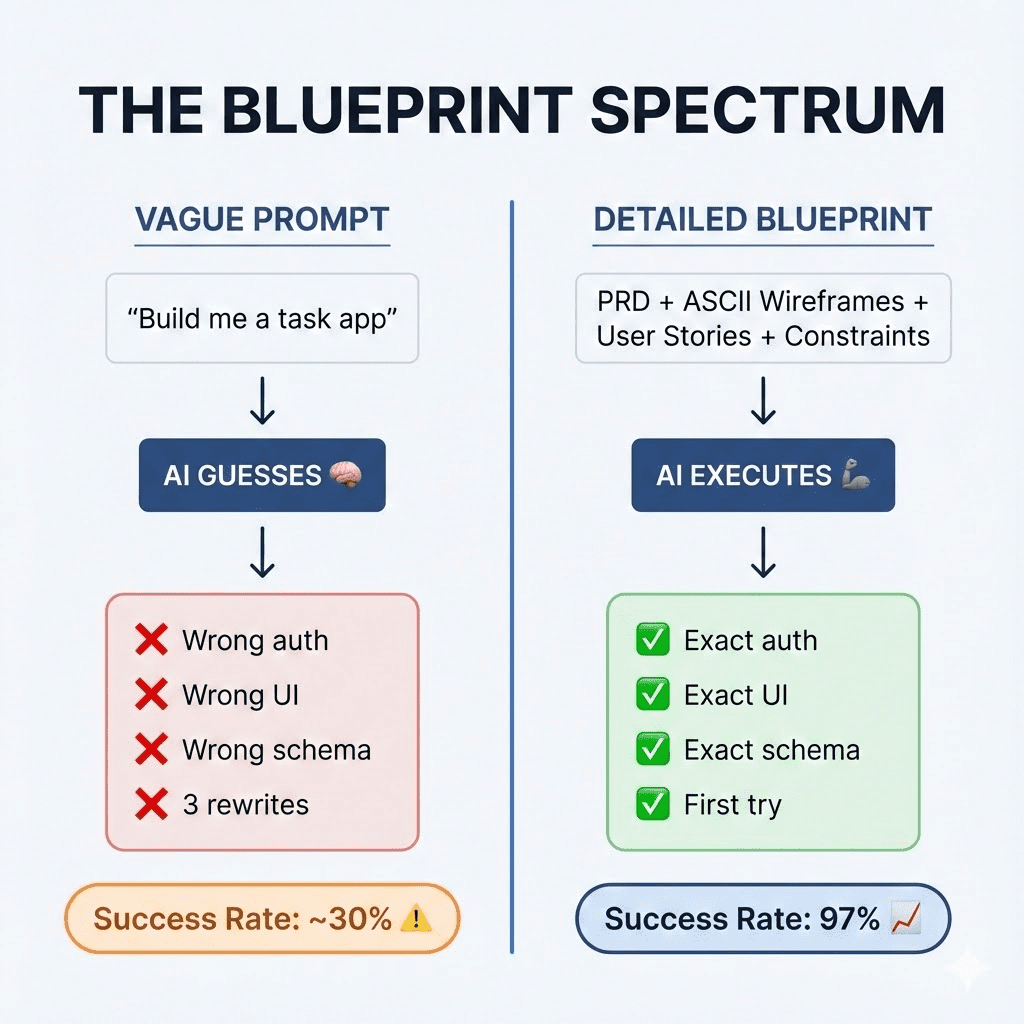
They type “build me a task management app” and hit Enter. Claude generates code. Components. Database schemas. Authentication logic.
And then… it’s nothing like what they imagined.
They blame the AI. “It hallucinated again.”
But here’s what I’ve learned after shipping dozens of projects with Claude Code: hallucinations are usually just ambiguity in your prompt. That’s it. That’s the secret nobody wants to admit.
AI is a terrible architect. Give it vague instructions, and it fills in the blanks with whatever patterns it’s seen most often. (Which, spoiler alert, aren’t YOUR patterns.)
But AI is an amazing contractor.
Give it clear blueprints—specific requirements, explicit constraints, visual references—and it executes with surgical precision. Like a really talented carpenter who just needs you to stop saying “make it nice” and start handing over actual measurements.
The technique: Interview yourself first
Instead of asking Claude to “build me an app,” I use a brainstorming prompt (inspired by McKay Wrigley and Sabrina Ramonov) that flips the entire script.
The AI interviews me.
- “What’s the core problem this solves?”
- “Who uses it?”
- “What does the main screen look like?”
- “What happens when the user clicks X?”
By the time I’ve answered those questions, I’ve got a Product Requirements Document. Not AI-generated slop—my vision, clarified.
Claude becomes the junior dev who asks great questions before writing a single line of code. I stay the architect who actually understands what we’re building.
(This is the way it should be.)
The secret weapon: ASCII wireframes
Text descriptions get misinterpreted. Every. Single. Time.
You say “a sidebar with navigation.” Claude hears “full-width hamburger menu.”
So I started including ASCII art wireframes in my prompts:
+------------------+---------------------------+
|   SIDEBAR        |      MAIN CONTENT         |
|  [Dashboard]     |                           |
|  [Projects]      |   +-------------------+   |
|  [Settings]      |   |   Project Card    |   |
|                  |   +-------------------+   |
|                  |   +-------------------+   |
|                  |   |   Project Card    |   |
+------------------+---------------------------+
Sounds primitive, right? Almost embarrassingly low-tech.
The results say otherwise.
When I started including visual plans, my first-try success rate hit 97%. Claude understood layout and hierarchy immediately. No more “that’s not what I meant” rewrites. No more three rounds of “closer, but still wrong.”
👉 The takeaway: Stop typing code and start drawing maps. The blueprint is where the real work happens.
Want the full workflow?
- Stop Asking Claude Code to “Build Me an App” walks you through the complete PRD brainstorming prompt.
- And Codex Plans with ASCII Wireframes shows you the visual planning system that hits 97% first-try success.
.
.
.
Rule #2: Separate The “Thinker” From The “Builder”
At the beginning, I was using Claude Code for everything.
Planning. Building. Reviewing. Debugging.
One model to rule them all.
And it almost worked.
Almost.
But I kept running into the same problems. Claude would rewrite perfectly good code. Add complex abstractions I never asked for. Solve a simple bug by restructuring half my app.
I asked for email OTP login. I got a 12-file authentication framework.
I asked to fix a type error. Claude decided my entire architecture was wrong.
(It wasn’t. I promise you, it wasn’t.)
The discovery: Specialized roles
Then I stumbled onto a workflow that changed everything—and honestly, I felt a little silly for not seeing it sooner.
Use one model to think. Use another to build.
For me, that’s GPT-5/Codex (The Thinker) and Claude Code (The Builder).
Codex asks clarifying questions. It creates comprehensive plans. It reviews code like a senior engineer who’s seen every possible edge case and still remembers them all.
Claude Code executes. Fast. Reliably. It handles files, terminal commands, and edits without wandering off into philosophical debates about code architecture.
Together? Magic.
The review loop
The workflow looks like this:
- Plan (Codex): Describe what I want to build. Codex asks questions, creates a detailed implementation plan.
- Build (Claude Code): Feed the plan to Claude. Let it execute.
- Review (Codex): Paste the implementation back to Codex. It checks against the original plan, catches bugs, finds edge cases.
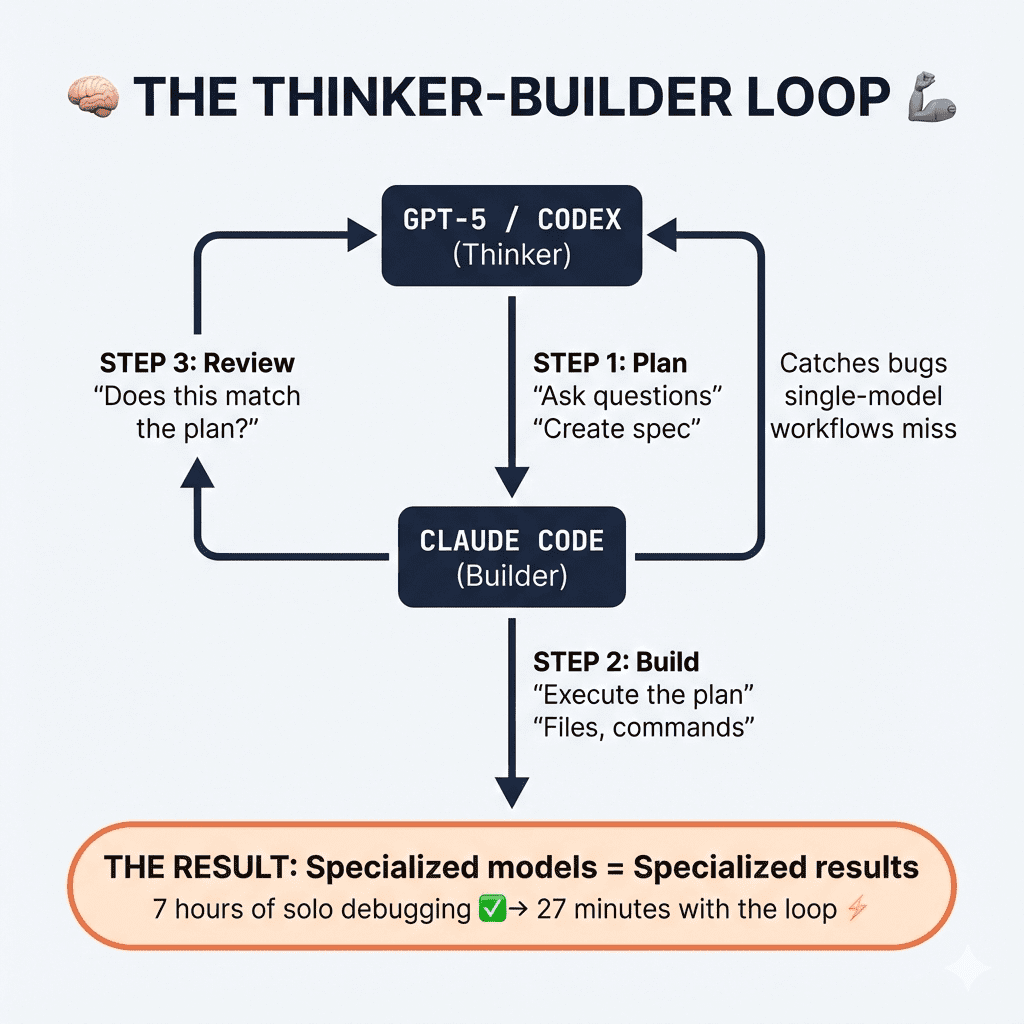
That third step—the review loop—catches issues that single-model workflows miss every time. EVERY time.
Taming the overengineering monster
Claude has a tendency to overcomplicate. It’s well-documented at this point. (If you’ve used it for more than a week, you know exactly what I’m talking about.)
My fix? The Surgical Coding Prompt.
Instead of “add this feature,” I tell Claude:
“Analyze the existing patterns in this codebase. Implement this change using the minimal number of edits. Do not refactor unless explicitly asked. Show me the surgical changes—nothing more.”
From 15 files to 3 files. From 1000+ lines to 120 lines.
Same functionality. 90% less complexity.
👉 The takeaway: Treat your AI models like a team, not a swiss-army knife. Specialized roles produce specialized results.
Ready to go deeper?
- The Codex-Claude Code Workflow breaks down the full Plan-Build-Review loop in detail.
- Claude Code vs Codex: Why I Use Both shows a real-world example where the review step caught security gaps I would have missed.
- And How To Stop Claude Code From Overengineering Everything gives you the exact surgical coding prompt.
.
.
.
Rule #3: Don’t Just Prompt—Teach “Skills”
Here’s a question that haunted me for months:
“Why do I keep explaining the same patterns over and over?”
Every new project, I’d spell out my authentication approach. My database schema conventions. My error handling patterns. Every. Single. Time.
Claude would forget by the next session. Sometimes by the next prompt.
I was treating AI like a goldfish with a keyboard.
(No offense to goldfish. They’re trying their best.)
The “I know kung fu” moment
Then Claude launched Skills—and everything clicked.
Skills let you package your coding patterns into reusable modules. Instead of explaining “here’s how I do authentication” for the 47th time, you create an auth-skill. Enable it, and Claude instantly knows your entire implementation.
The exact patterns. The exact folder structure. The exact error messages.
Every project uses the same battle-tested approach. Zero drift. Zero “well, last time I used a different library.”
It’s like downloading knowledge directly into Claude’s brain.
Matrix-style. (Hence the name.)
Building your first skill
The process is stupidly simple:
- Take code that already works in production
- Document the patterns using GPT-5 (it’s better at documentation than execution)
- Transform that documentation into a Claude Skill using the
skill-creatortool - Deploy to any future project
The documentation step matters. GPT-5 creates clean, structured explanations of your existing implementations. Claude Skills uses those explanations to replicate them perfectly.
The compound learning effect
Here’s where it gets really interesting.
I built an Insights Logger skill that captures lessons while Claude “code”. Every architectural decision, every weird bug fix, every “oh that’s why it works that way” moment—automatically logged.
At the end of each session, I review those insights. The good ones get promoted to my CLAUDE.md file—the permanent knowledge base Claude reads at the start of every project.
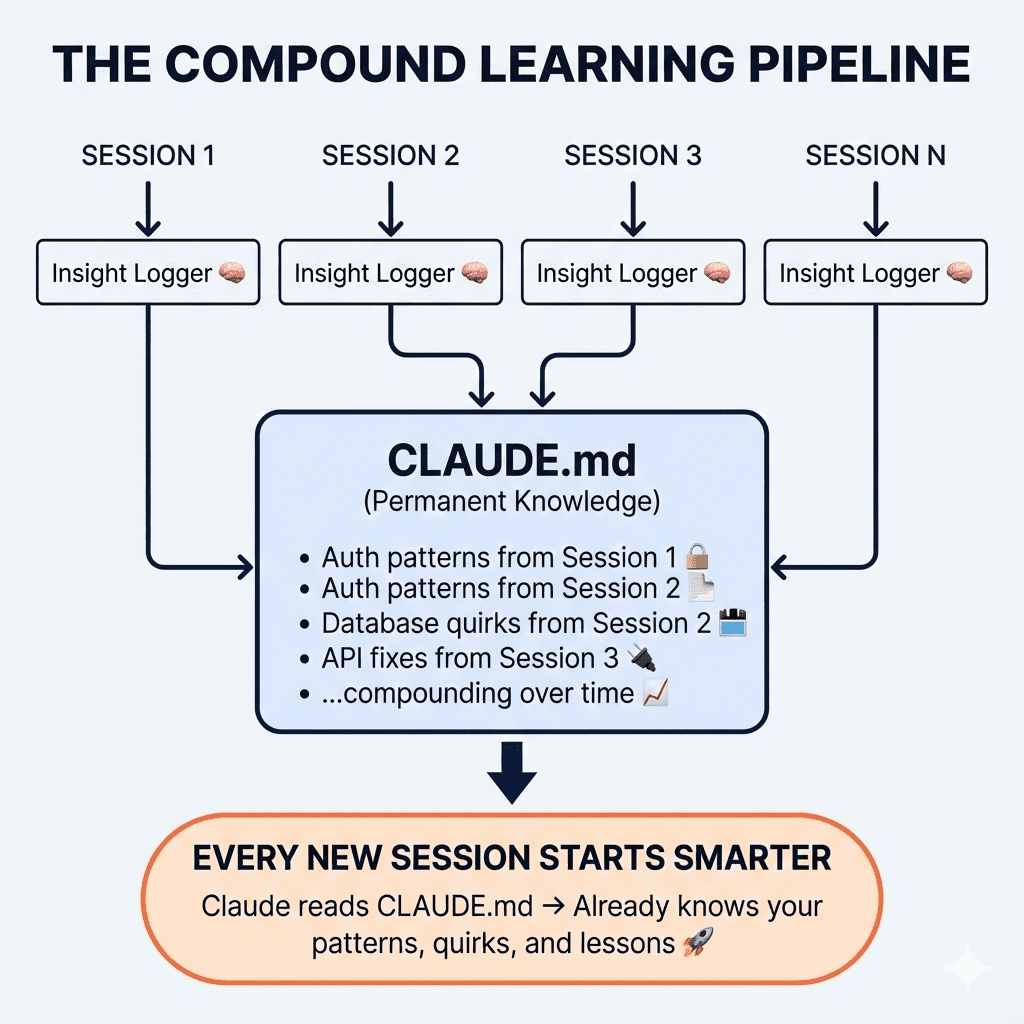
Each coding session builds on the last. Compound learning, automated.
👉 The takeaway: Prompting is temporary. Skills are permanent. If you’re explaining something twice, you’re doing it wrong.
For the complete Skills series,
- Start with Claude Skills Part 1: Your “I Know Kung Fu” Moment to understand the core concept.
- Then move to Part 2: Turn Your Battle-Tested Code Into a Reusable Superpower for the documentation-to-skill workflow.
- Finally, Make Claude Code Never Forget What It Learns shows you how to build the Insights Logger that creates compound learning.
.
.
.
Rule #4: Friction Is The Enemy (So Automate It Away)
Let me describe a scene you’ll recognize.
You’re deep in flow state. Claude Code is humming along. Building components, wiring up APIs, making real progress.
And then:
Allow Claude to run `npm install`? [y/n]You press Enter.
Allow Claude to run `git status`? [y/n]Enter.
Allow Claude to run `ls src/`? [y/n]Enter. Enter. Enter. Enter. Enter.
By prompt #47, you’re not reading anymore. You’re a very tired seal at a circus act nobody asked for.
(Stay with me on this metaphor—it’s going somewhere.)
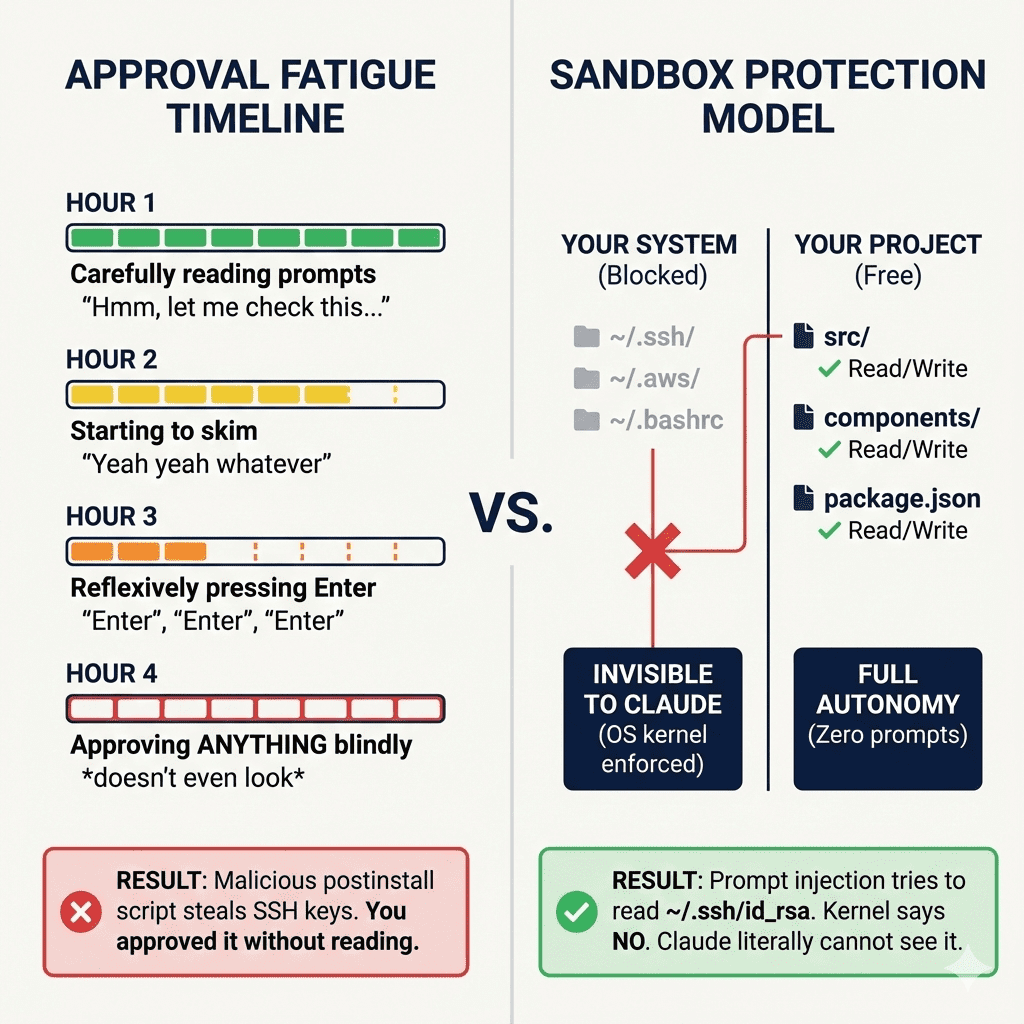
Anthropic calls this approval fatigue. Their testing showed developers hit it within the first hour of use.
And here’s the terrifying part: the safety mechanism designed to protect you actually makes you less safe. You start approving everything blindly. Including the stuff you should actually read.
The sandbox solution
Claude Code’s sandbox flips the entire model.
Instead of asking permission for every tiny action, the sandbox draws clear boundaries upfront. Work freely inside them. Get blocked immediately outside them.
On Linux, it uses Bubblewrap—the same tech powering Flatpak. On macOS, it’s Seatbelt—the same tech restricting iOS apps.
These boundaries are OS-enforced. Prompt injection can’t bypass them.
Claude can only read/write inside your project directory. Your SSH keys, AWS credentials, shell config? Invisible. Network traffic routes through a proxy allowing only approved domains.
You run /sandbox, enable auto-allow mode, and suddenly every sandboxed command executes automatically. No prompts. No friction. No approval fatigue.
The 84% reduction in permission prompts? Nice. The kernel-level protection that actually works? Essential.
Parallel experimentation with Git Worktrees
Here’s another friction point that kills vibe coding: fear of breaking the main branch.
My fix: Git Worktrees with full isolation.
Standard worktrees share your database. They share your ports. Three AI agents working on three features leads to chaos. (Ask me how I know.)
I built a tool that gives each worktree its own universe. Own working directory. Own PostgreSQL database clone. Own port assignment. Own .env configuration. Now I run three experimental branches simultaneously. Let three Claude instances explore three different approaches. Pick the winner. Delete the losers.
No conflicts. No fear. No “let me save my work before trying this crazy idea.”
👉 The takeaway: Safe environments allow for dangerous speed. Eliminate friction, and experimentation becomes free.
Ready to set it up?
- Claude Code Sandbox Explained walks through the complete configuration—including battle-tested configs for Next.js, WordPress, and maximum paranoia mode.
- And How I Vibe Code With 3 AI Agents Using Git Worktrees shows the parallel experimentation setup with database isolation.
.
.
.
The Synthesis: What Separates Hobbyists From Shippers
These 4 rules are what separate “people who play with AI” from “people who ship software with AI.”
- Rule #1: The blueprint is more important than the code.
- Rule #2: Separate the thinker from the builder.
- Rule #3: Don’t just prompt—teach skills.
- Rule #4: Friction is the enemy.
Each rule builds on the last.
Clear blueprints feed into specialized models. Specialized models benefit from reusable skills. Reusable skills only matter if friction doesn’t kill your flow.
It’s a system. Not a collection of random tips.
Where to start
Don’t try to implement all four at once.
That’s a recipe for burnout.
- Start with Rule #4. Enable the sandbox. Regain your sanity. Stop being a tired circus seal.
- Then move to Rule #1. Before your next feature, write the PRD first. Interview yourself. Draw the ASCII wireframe.
- Rule #2 and Rule #3 come naturally after that. You’ll feel the pain of overengineering (and want specialized roles). You’ll get tired of repeating yourself (and want skills).
The system reveals itself when you need it.
Your challenge for 2026
Pick one project you’ve been putting off. Something that felt too complex for AI assistance.
- Apply Rule #1: Write the blueprint first. ASCII wireframes and all.
- Apply Rule #4: Set up the sandbox before you start.
Then let Claude execute.
Watch what happens when AI has clear boundaries and clear instructions. Watch how different it feels when you’re orchestrating instead of babysitting.
What will you build first?
Here’s to an even faster 2026.
Now go ship something.
This post synthesizes a year’s worth of vibe coding experimentation. Browse the full archive to dive deeper into any technique—from CLAUDE.md setup to sub-agent patterns to WordPress automation.

Leave a Comment